The 2026 guide to enterprise video content management
Enterprise video content management for your business: Read about key benefits, how to choose a system, and the top solutions available.

Video content has been a staple of enterprise marketing for years, and for good reason. 96% of users have watched a video preferto learn more about a product or service. Beyond marketing, video is used across the enterprise, from training to communication to customer support, With so much content, it can get difficult to effectively manage your team’s videos without a strategy. Let’s take a look at the processes and tools that can support you on your journey with video content.
What is enterprise video content management?
Enterprise video content management (EVCM) is a system for managing, organizing, and delivering video content at an enterprise scale, offering benefits like centralized storage, robust security, and streamlined workflows.
These systems handle tasks such as uploading, transcoding, and streaming video across devices, using features like metadata tagging, access control, and analytics to ensure secure and efficient content distribution. EVCM is crucial for companies to manage video assets for internal training, external marketing, and live streaming, while ensuring content is accessible, secure, and scalable.
The key features and benefits of enterprise video content management include:
- Video hosting – Securely storing and managing video files in a centralized location
- Video editing – Tools for editing and enhancing videos before publishing
- Video distribution – Ability to share videos across multiple platforms and devices
- Content management – Organizing and categorizing videos for easy search and retrieval.
- User access controls – Managing permissions and access levels for different users within the organization
- Analytics – Tracking metrics such as views, engagement, and completion rates to measure the effectiveness of videos
- Live streaming – Integration with live streaming platforms for real-time video delivery
- Security – Ensuring the privacy and security of videos through encryption, access controls, and secure authentication methods
- Integration – Seamless integration with other enterprise systems such as learning management systems, content management systems, and customer relationship management systems
- Mobile support – Ensuring that videos can be accessed and viewed on mobile devices for remote employees and on-the-go access
How extensively you incorporate these elements depends on your team’s goals. Whether you’re using video for internal training, customer support, or digital marketing, EVCM sets you up for success.
Key features and benefits of an enterprise video content management system
Video hosting
Video hosting in an enterprise context requires more than just storing files—it demands scalable, secure, and high-performance infrastructure. A strong EVCM system provides centralized video storage with support for high-resolution formats, adaptive bitrate streaming, and CDN delivery for consistent playback across geographies.
Hosting solutions should also support multiple upload methods (manual, batch, API-based) and automate tasks like transcoding and thumbnail generation. This reduces the manual burden on teams while ensuring optimal video quality on all devices.
Video editing
Built-in video editing tools allow teams to quickly trim, cut, or enhance content without leaving the CMS environment. This reduces turnaround time and eliminates the need to toggle between separate software for minor adjustments.
More advanced editing capabilities, like adding intros/outros, subtitles, or branded overlays, ensure that all published content maintains consistency and professionalism. Role-based permissions can also restrict editing access to authorized users.
Video distribution
Enterprise video distribution tools allow content to be shared across websites, internal portals, email campaigns, and social media channels. Modern EVCM platforms automate distribution and ensure proper format delivery to each destination.
Support for embed codes, private links, and third-party integrations ensures videos reach the right audience while preserving control over access, usage, and branding. Distribution can also be scheduled or triggered by workflow events.
Content management
Organizing hundreds or thousands of videos becomes manageable with tagging, categorization, and folder-based hierarchies. A strong EVCM includes robust search functions using metadata, transcripts, or AI-generated summaries.
Custom taxonomies and smart filters make it easier for teams to find and reuse content. This saves time and prevents duplication while supporting content lifecycle management across departments.
User access controls
Granular access controls ensure that different users—such as trainers, marketers, or external contractors—see only what they’re authorized to access. Most systems support integration with SSO, LDAP, or Active Directory for identity management.
Permissions can be set at the video, folder, or platform level, with roles such as viewer, editor, or admin. This not only secures content but also helps maintain workflow discipline.
Analytics
Detailed video analytics provide insight into how viewers interact with content. Metrics like play rate, average watch time, drop-off points, and completion rate help teams assess effectiveness and identify content that needs improvement.
Advanced systems break this data down by user, device, or location, and may support integration with external analytics platforms or BI tools. This enables continuous optimization of video strategies.
Live streaming
EVCM systems with live streaming capabilities support internal events, product launches, and webinars directly from the platform. Features often include registration gating, audience Q&A, and automatic archiving for on-demand viewing.
Support for low-latency delivery and adaptive streaming ensures high-quality experiences even for large or globally distributed audiences. Live streams can also be secured with access controls and recorded for compliance.
Security
Security features include encryption (both in transit and at rest), watermarking, and digital rights management (DRM) to prevent unauthorized sharing or leaks. Enterprises should also expect compliance with standards like SOC 2, GDPR, or HIPAA if applicable.
In addition, activity logging and audit trails help track who accessed or changed content. This is crucial for regulatory environments or sensitive corporate communications.
Integration
A capable EVCM system integrates with existing tools such as learning management systems (LMS), content management systems (CMS), CRMs, and marketing automation platforms. This helps streamline content publishing and tracking within established workflows.
APIs, webhooks, and pre-built connectors allow easy synchronization of video assets, metadata, and analytics across tools. This reduces duplication and supports more cohesive operations across departments.
Mobile support
A distributed workforce demands mobile-ready access. A robust EVCM system ensures content is optimized for playback on phones and tablets, regardless of platform or network quality.
Many systems provide native mobile apps or responsive web interfaces, allowing users to view, upload, and even record content from mobile devices. Offline access and push notifications are often included for added flexibility.
Notable video content management solutions for enterprises
1. Kaltura

Kaltura’s comprehensive enterprise video content management system is designed to manage the full video lifecycle at scale, from ingestion and organization to secure distribution, analytics, and AI-driven enrichment. Unlike point solutions that focus on a single use case, Kaltura’s VCMS is built as a flexible, modular platform that supports internal communications, learning, marketing, customer support, and live events within one unified system.
Kaltura’s VCMS centralizes video and media assets of any size or format, enabling teams to upload, store, edit, secure, and distribute content without reworking existing workflows or tech stacks. Robust APIs and native integrations allow Kaltura to “play well with others,” embedding seamlessly into CMSs, LMSs, CRMs, portals, and mobile applications.
General features include:
- Upload & store at scale: Ingest and package media from any source with support for large files and diverse formats.
- Search & enrich: Advanced metadata, transcripts, and enrichment tools make large video libraries easy to navigate and reuse.
- Built-in editing & reworking: Trim, clip, and repurpose content directly within the platform to reduce production bottlenecks.
- Adaptive delivery: On-the-fly video packaging ensures optimal bitrate and playback quality across devices and network conditions.
- Syndication & distribution: One-click publishing to internal portals, websites, apps, and external distribution partners.
Enterprise features include:
- Granular security & access controls: Role-based permissions, admin governance, and secure delivery protect sensitive enterprise content.
- Enterprise-grade scalability: Designed to support global audiences, high-volume libraries, and mission-critical communications.
- Deep analytics & insights: Measure engagement, performance, and usage across departments and audiences.
- AI-powered capabilities: Kaltura’s VCMS for enterprises uses advanced AI tools such as Content Lab for automated clipping, summarization, and content optimization, and Genie, an AI assistant that helps surface relevant video knowledge, answer questions, and improve content discoverability across large libraries.
- Future-ready flexibility: Modular architecture allows organizations to expand capabilities over time without migrating platforms.
By combining media management from A to Z with enterprise-grade security, scalability, and AI-driven intelligence, Kaltura’s VCMS enables organizations to turn growing video libraries into structured, searchable, and actionable assets, rather than unmanaged repositories.
2. Panopto Video CMS

Panopto is an enterprise-grade video content management system built to address the challenges of storing, organizing, and delivering video at scale. Unlike traditional CMS or LMS platforms that struggle with large file sizes and limited format support, Panopto is purpose-built for video. It enables organizations to centralize their video assets in the cloud while maintaining control over access and security.
General features include:
- Automatic transcoding: Upload videos in nearly any format and have them automatically converted for playback across all devices.
- Drag-and-drop uploads: Upload one or hundreds of videos with a simple drag-and-drop interface.
- Adaptive video delivery: Use HLS and adaptive bitrate streaming to ensure smooth, high-quality playback across bandwidth conditions.
- Mobile compatibility: Access your full video library and stream content from mobile devices with native app support.
- Interactive video players: Enhance viewer engagement with interactive players that support navigation, chapters, and in-video elements.
Enterprise features include:
- Secure access controls: Enforce permissions with SSO integrations (SAML, OAuth, Active Directory, etc.) and granular sharing settings.
- Cloud hosting & access management: Host videos in a secure cloud environment and control access at the portal or individual video level.
- AI-powered video search: Search across video libraries using AI-generated transcripts, table of contents, and visual thumbnails.
- Tagging & subscriptions: Use video tags for improved organization and enable users to follow content by topic or author.
- Analytics & engagement reports: Gain detailed insights into viewer behavior, engagement, and drop-off rates to evaluate content performance.

Source: Panopto Video CMS
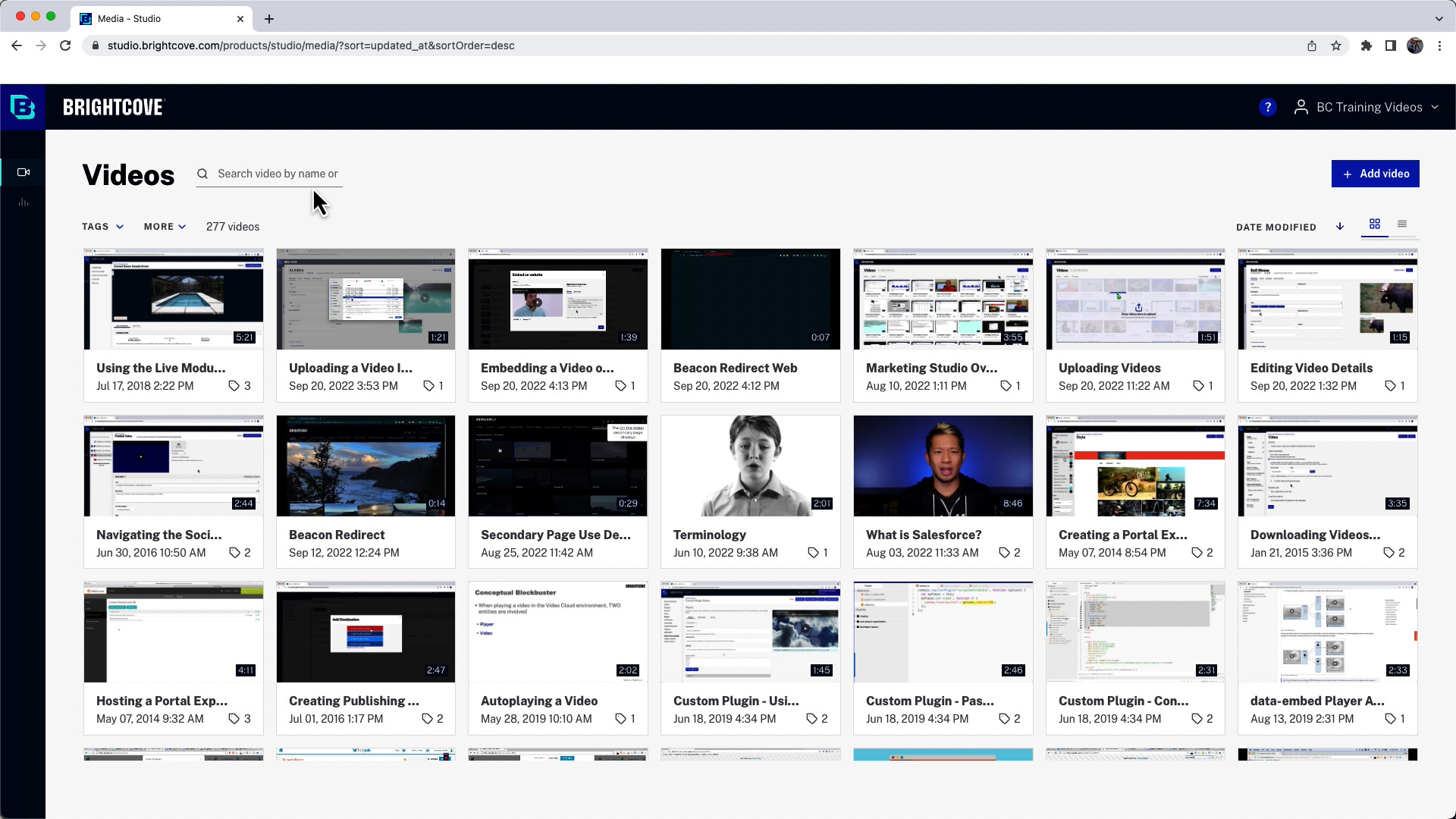
3. Brightcove Marketing Studio

Brightcove Marketing Studio is a video content management and distribution solution built for marketers who need to deliver impactful video across the entire customer journey. It centralizes video content, simplifies deployment across digital channels, and provides insights into audience behavior and campaign performance.
General features include:
- Live and on-demand video hosting: Share videos in real-time or through curated libraries and playlists to support continuous engagement.
- Interactive video elements: Increase viewer interaction with clickable features that personalize experiences and drive action.
- Customizable templates: Build branded video destinations using flexible layouts and pre-designed templates tailored to your business needs.
- Audience segmentation: Use engagement data to define audience groups and deliver more targeted marketing messages.
- Cross-platform integration: Seamlessly integrate with CMS, CRM, MAP, e-commerce platforms, and social media to embed video into existing workflows.
Enterprise features include:
- Marketing insights analytics: Access in-depth metrics on viewer behavior, content performance, and campaign outcomes to guide strategic decisions.
- Security from upload to delivery: Protect your content with enterprise-grade security features that safeguard video assets throughout the entire workflow.
- Centralized video library management: Manage and control all marketing video assets from a single platform, with customizable permissions and metadata.
- Scalable infrastructure: Rely on a platform trusted by top brands for its performance, reliability, and ability to support growing video libraries and traffic.
- 24/7 global support: Get around-the-clock assistance to ensure operational continuity and support for high-impact campaigns.

Source: BrightCove Marketing
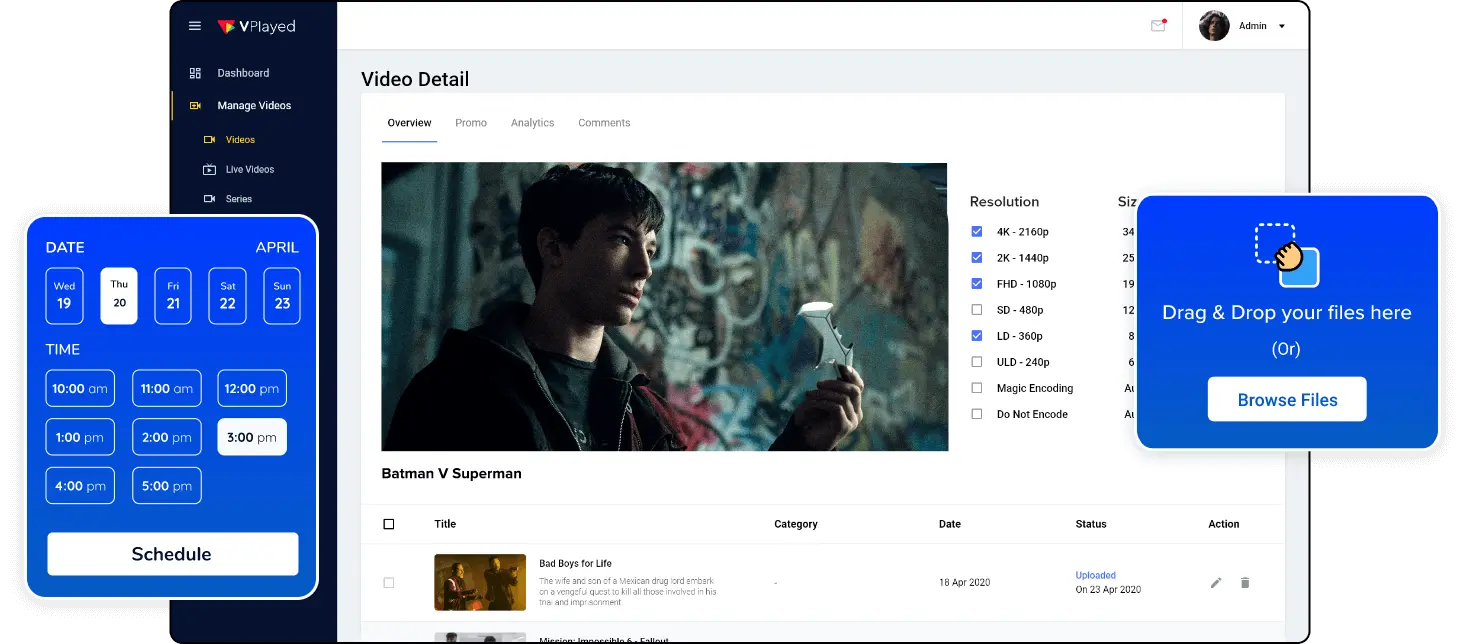
4. VPlayed Video CMS

VPlayed Video CMS is a customizable and secure platform designed to manage, store, and distribute both live and on-demand video content. Built for enterprises, broadcasters, and content-driven businesses, VPlayed offers branding control, flexible hosting options, and total data ownership.
General features include:
- Live & on-demand streaming: Stream content in real time or on demand to serve a wide range of audience needs from a single platform.
- Video library management: Organize and manage VOD content with categories, playlists, and metadata for better navigation and control.
- Bulk upload & drag-and-drop: Add multiple videos at once with ease using batch import and intuitive drag-and-drop tools.
- Integrated video editing: Edit videos directly within the CMS, eliminating the need for external editing software.
- Multi-lingual support: Translate and localize your content to reach global audiences across different languages and cultures.
Enterprise features include:
- Flexible deployment: Choose between on-premise or cloud hosting based on your infrastructure, compliance, and security requirements.
- White-label customization: Fully brand the platform to reflect your organization’s identity, including UI elements, logos, and themes.
- Content partner portal: Manage content contributions from multiple partners through a dedicated portal that streamlines collaboration and asset control.
- Custom integrations: Seamlessly connect with CRMs, analytics tools, marketing platforms, and other enterprise systems.
- Video storage & DRM protection: Store content securely with encryption and DRM to ensure smooth playback while preventing unauthorized access.

Source: Vplayed Video CMS
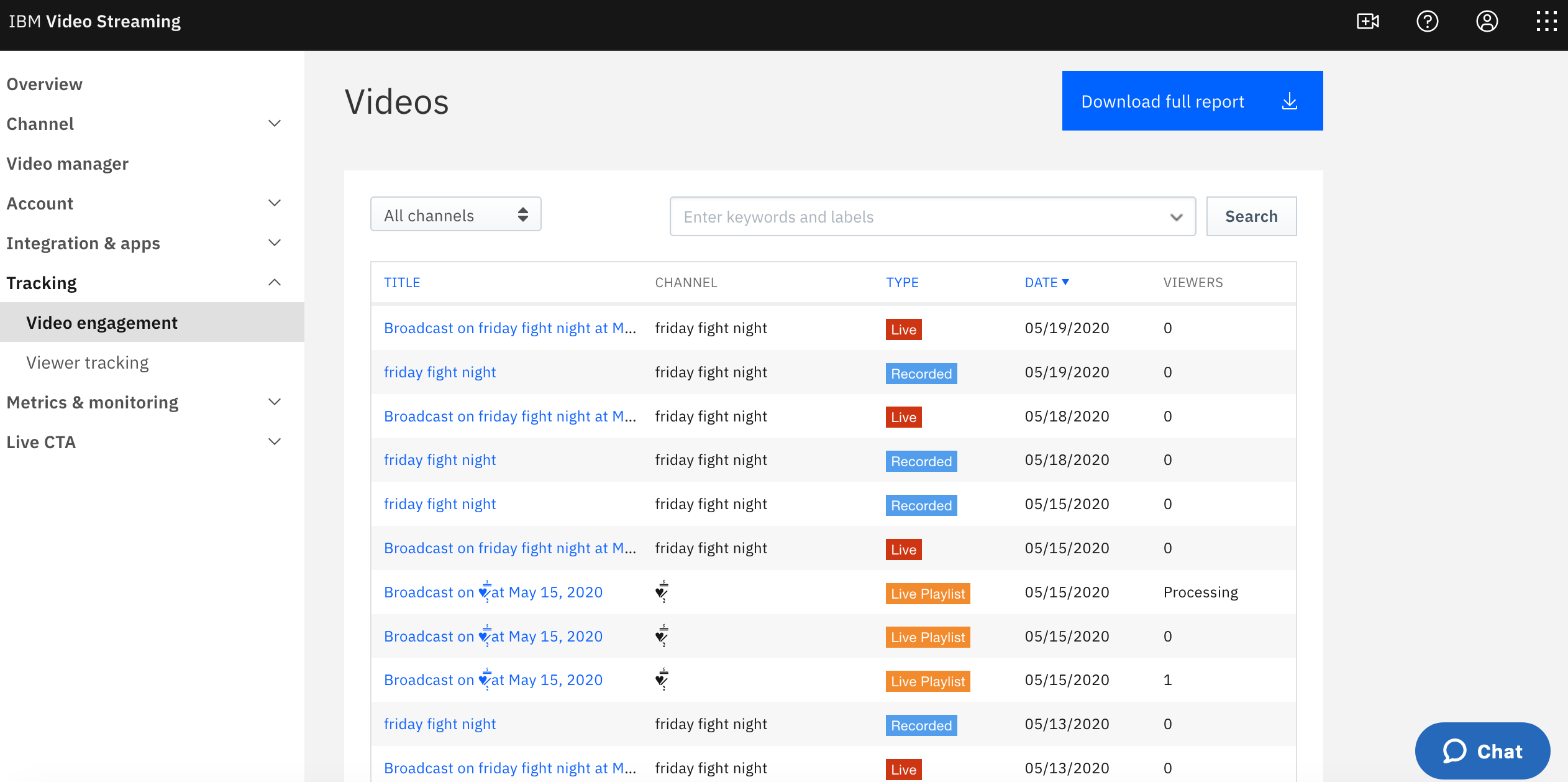
5. IBM Video Streaming

IBM Video Streaming is a scalable, secure, and AI-powered video content management and delivery platform designed for both public-facing and private enterprise use cases. It enables organizations to stream live events, host on-demand video libraries, and manage recurring virtual experiences with high reliability and strong data protection.
General features include:
- Live and on-demand streaming: Host live broadcasts, simulated live sessions, and video-on-demand content with auto-archiving.
- Mobile-compatible playback: Adaptive bitrate streaming ensures high-quality viewing across devices and bandwidths.
- Custom channel pages: Showcase past and upcoming broadcasts with branded layouts and featured content.
- AI-driven video search: Use Watson-powered transcription to enable keyword search and jump-to-time navigation within videos.
- Automated closed captioning: Add live captions automatically using AI-based speech recognition.
Enterprise features include:
- Security-rich access controls: Enforce protection through encryption, user authentication, and integration with corporate directory systems (e.g., SSO).
- Private video streaming: Host internal events and content with password protection, user-level access, and tracking.
- Granular user management: Control who can access, view, or interact with content at an individual or group level.
- Email authentication: Enable secure individual access without requiring full SSO integration.
- Scalable global delivery: Multi-CDN infrastructure ensures consistent delivery for large-scale enterprise audiences.

Source: IBM Video Streaming
How to choose an enterprise video content management system
The system you use to empower your enterprise video content management strategy will be the biggest factor contributing to your success or failure. You must take the time to understand what you need and find the perfect tool for your team.
Start by creating a list of requirements. How many videos will you need to manage? What type of content are you creating? What’s your target audience? Will the videos be used internally, externally, or both? Once you understand the role your management system will fill, you can start researching your options.
There are several elements to consider when choosing an enterprise video content management system (CMS). Let’s take an in-depth look at each.
Variety of features
Ideally, your CMS will be the only tool you need for dealing with video content. This means it needs to support several features, including video hosting, encoding, editing, security, and analytics.
The perfect system will allow you to customize the tools you need, and change with your company over time. Decide on your non-negotiables ahead of time, and don’t settle for anything that doesn’t check your boxes.
User experience
Ease of use is crucial when it comes to a video CMS. The more polished and comprehensive the UX is, the easier it will be for your team to adopt and master.
This is vital on both ends, for your team and the customers interacting with your videos. The system should be intuitive, with easy access to all the features you need. Make sure to demo each system you are considering, to get a feel for them.
Branding
The last thing you want is for your company’s videos to be marred by a CMS watermark, or have your streams wreathed by colors that don’t match your branding. White-label options are a great way to keep your branding intact across your video content.
Your viewers should only see your company’s logo and name when they interact with your videos – not the name of your CMS.
Security measures
This should be one of your top priorities when evaluating a video CMS. You want to ensure that your valuable video content is secure and protected from unauthorized access. Not only does this protect your intellectual property, but it ensures that private company information is not compromised.
Make sure the CMS offers robust security measures, such as encryption, access controls, and user permissions. They should also have a reliable disaster recovery plan in place.
Pricing and scalability
Budget will undoubtedly play a role in your decision-making process. It’s important to consider the pricing structure of any CMS you’re interested in, along with how easily it will grow with your business.
Look for pricing plans that fit your current budget, but also allow for potential future growth. As your catalog and needs grow, you will be able to invest more in the system instead of needing to migrate to a new tool.
Integration capabilities
Your CMS doesn’t exist in a vacuum. It will need to integrate with other systems in your tech stack, such as your website, social media, and marketing automation platforms. Make sure the CMS you choose is compatible with your existing tools and can seamlessly integrate with them.
Customer support and training
As with any new technology, there will be challenges and a learning curve when implementing an enterprise video CMS. Look for a system that comes with comprehensive customer support and training resources.
This can include online tutorials, in-person training sessions, or a designated account manager. Having reliable support can save you time and frustration in the long run.
FAQ
How much does an enterprise video CMS cost?
The cost of an enterprise video CMS can vary depending on its specific features and capabilities. Generally, prices can range from a few hundred dollars per month to several thousand dollars per month. Where your CMS lands on this scale depends on the size and scale you’re working with.
The best systems have a sliding scale that can grow along with your company. If you’re looking to use an enterprise video CMS, you should speak with the platforms directly to see the range of pricing for your specific needs.
What are common use cases for an enterprise video CMS?
Anywhere that an organization could use video, an enterprise video CMS will be helpful. Some of the most common use cases include:
Training and development – Create and manage training material for employees that can be accessed from anywhere at any time.
- Marketing and promotion – Craft the perfect marketing videos, product demos, and promotional content to engage with customers
- Internal communication – Share important announcements, updates, and information with stakeholders, and conduct simple, engaging video conference calls
- Event streaming – Livestream conferences, meetings, webinars, and more to reach a wider audience
- Knowledge sharing – Keep a library of instructional videos, tutorials, and best practices
- Customer support – Create troubleshooting videos and FAQs to help customers resolve issues in an engaging way
With the ability to edit and share vast amounts of video content, there’s little a CMS can’t help you accomplish.
Discover Kaltura Media Management – video content management from A to Z
The CMS you work with can make or break your video content strategy. That’s why you must get the best system available, Kaltura Media Management, a comprehensive platform covering the entire lifecycle of your video content, from creation and publishing to permissions, repurposing, and analytics.
One of Kaltura’s core values is flexibility, meaning that the CMS can grow and change with your company. It is built specifically to fit into your process, rather than requiring you to rework your workflow to fit your platform’s mold.
With easy integration, high-quality streaming, and one-click syndication, Kaltura makes it easy to create and share ultra-high-quality videos. When you add that to their streamlined search system, easy editing tools, and high-level security, it’s easy to see why Kaltura is the number one option for enterprise video content management.
Was this post useful?
Thank you for your feedback!