Best AI Video Platforms: Top 12 Solutions in 2026

AI video platforms are reshaping how video content is created, edited, and managed. By combining generative models, automation, and media intelligence, they enable rapid production of personalized, scalable, and accessible video content across industries.
What is an AI video platform?
AI video platforms are tools that use artificial intelligence to generate or edit video content, with options for creating videos from text prompts, animating images, and using AI-generated avatars.
Platforms for business and marketing:
- Kaltura: Offers an AI-powered video platform for enterprises to create, manage, and distribute branded communications, training, and marketing videos at scale.
- Synthesia: Specializes in creating videos with realistic AI avatars and can translate and dub videos in over 140 languages.
- HeyGen: Generates engaging marketing videos with AI motion and voice, useful for professionals who want a simple-to-use tool.
Platforms for editing and content repurposing:
- Kaltura Content Lab: Provides automated editing, summarization, and content clipping tools to simplify post-production and adapt long-form videos for various formats.
- Descript: Allows you to edit video simply by editing the text transcript, making it suitable for podcasts and interviews.
- CapCut: Provides flexible and fuss-free editing on desktop and mobile, with a range of AI features.
Platforms for video knowledge management:
- Kaltura AI Genie: Uses AI to generate searchable transcripts, summaries, and metadata from video content, enabling fast retrieval and smarter knowledge management across enterprise video libraries.
- Moments Lab: Helps organize media archives and monetize video libraries.
- VIDIZMO: Lets you manage enterprise video workflows and ensure security when delivering content.
Platforms for video creation and generation:
- Sora (OpenAI): Known for generating long, coherent, and realistic video clips from text prompts.
- Veo (Google): Creates cinematic realism and can generate videos with synchronized audio, though access may require an AI plan.
- Luma Dream Machine: Creates fast, cinematic, and lifelike video from descriptions, suitable for complex scenes.
Benefits of AI video platforms
AI video platforms offer a range of benefits that improve efficiency, reduce manual work, and unlock new capabilities for organizations working with video content:
- Faster video production: Automated editing, scene detection, and transcription reduce the time and effort needed to produce high-quality videos.
- Improved accessibility: Auto-generated captions, translations, and voiceovers make video content accessible to a wider audience, including those with hearing impairments or language barriers.
- Scalability: AI enables bulk processing of videos, such as tagging, summarizing, and formatting, making it feasible to manage large video libraries with minimal manual effort.
- Enhanced search and discovery: Metadata extraction and scene recognition help users find relevant content quickly by indexing visual and audio elements.
- Content personalization: AI can tailor video content to individual viewers based on behavior, preferences, or demographic data, improving engagement and relevance.
- Cost reduction: Automating routine video production tasks helps cut down on labor costs and reduces the need for specialized editing or localization teams.
- Data-driven insights: AI-powered analytics provide insights into viewer behavior, content performance, and engagement trends, supporting better content strategy decisions.
Key types of AI video platforms
Video marketing and business platforms
Video marketing and business AI platforms optimize the way organizations produce and distribute branded content, employee communications, and customer engagement videos. These platforms often include tools for campaign management, video analytics, automated personalization, and integration with marketing automation software. AI allows organizations to create targeted video content and tailor messages based on audience preferences.
Such platforms are valuable to both large enterprises and smaller organizations striving for professional-grade video marketing without dedicating massive in-house resources. Automated features such as captioning, smart video summaries, and performance tracking enable marketers to focus more on creative strategy and less on technical complexities.
Video editing and content repurposing platforms
AI-powered video editing platforms simplify post-production by automating tasks like cutting, cropping, generating highlights, and adding effects or subtitles. These platforms typically support drag-and-drop interfaces, use AI for audio transcription, and can even generate entire video sequences from templates. With machine learning, they detect important moments in footage and allow for repurposing, turning long-form content into engaging clips.
Content repurposing tools offer particular value for content creators, educators, and marketers looking to maximize the usability of their video assets. Instead of editing manually for each platform or use case, users can leverage AI to create numerous video versions optimized for social media, web, or internal knowledge bases.
Video knowledge management platforms
Video knowledge management platforms use AI to organize, retrieve, and analyze large repositories of video content for enterprises and institutions. These platforms often feature advanced search capabilities powered by machine learning, automatic tagging, speaker identification, and topic extraction, making it easy to locate specific moments within vast video libraries.
Their AI models convert spoken words to searchable text, supporting compliance, e-discovery, and regulatory needs. For organizations dealing with continuous learning and corporate training, these platforms automate tasks such as summary creation, semantic search, and video-to-document conversion. Employees can access and share organizational wisdom efficiently, and managers gain analytics on content usage and adoption.
Video creation and generation platforms
AI video creation and generation platforms leverage generative AI to automate or partially automate the video production process from scripts, text prompts, or data sources. Instead of filming live footage, these platforms use AI-generated avatars, synthetic voices, and computer graphics to create new videos. Users can produce professional video presentations, explainer videos, or even photorealistic scenes with minimal technical expertise.
These generative platforms are particularly useful for rapid prototyping, creating training content, or scaling video production for personalized communications. They address the rising demand for quick-turnaround, low-cost, and customizable content by eliminating the need for cameras, actors, or manual animation. As AI models continue to advance, the realism and flexibility of output from these platforms only continue to improve.
Notable AI video platforms
Video marketing and business platforms
1. Kaltura

Kaltura is an enterprise-grade video marketing and business platform designed for teams that need to run high-impact webinars, virtual and hybrid events, while continuously repurposing video into campaigns. It focuses on activation rather than just creation, using AI to transform existing content into personalized experiences that drive pipeline and engagement.
Key features include:
- AI-powered events and webinars: Host branded webinars, virtual, and hybrid events with real-time engagement tools such as polls, chat, Q&A, breakout rooms, and a live-session AI assistant that helps keep audiences focused and engaged.
- Automated content repurposing: Use Content Lab and other AI capabilities to automatically detect key moments, generate highlights, and turn long-form sessions into campaign-ready clips, follow-up emails, social content, and landing-page assets.
- Personalization at scale: Power video hubs, discovery pages, and post-event journeys with AI-driven content recommendations so each viewer sees the most relevant clips and sessions.
- Always-on content intelligence: Treat every recording as input to a marketing flywheel, generating new touchpoints while feeding analytics to optimize content performance and prove ROI across the funnel.
- Sales and success alignment: Extend beyond marketing with a Sales Enablement Hub, prospecting tools for personalized follow-ups, and AI-powered certification and training experiences for customers and employees.
- First-party data capture and integrations: Capture granular viewer behavior through the Kaltura Player and built-in registration flows, then sync first-party data into systems like Salesforce, Marketo, Eloqua, HubSpot, and BI tools for segmentation and automated follow-up.
Kaltura is best suited for organizations that already create significant volumes of video content (such as webinars, events, demos, and town halls) and want to unlock that library with AI to scale reach, improve personalization, and maintain strong governance over branding and privacy. It appeals to enterprises in technology, financial services, healthcare, education, media, and the public sector that need a unified, compliant platform rather than a point solution for video generation alone.
2. Synthesia

Synthesia is an AI-based video creation platform that helps organizations produce videos quickly using avatars, voice cloning, and automated tools. Instead of traditional filming, users can generate videos from scripts or documents, with customizable digital presenters speaking in over 30 languages.
Key features include:
- Expressive AI avatars: Prebuilt avatars perform gestures like pointing and clapping to match scripted content.
- Personal avatars: Users can create avatars that look and sound like themselves, supporting multilingual delivery.
- Voice cloning: Record and replicate your voice for consistent narration across videos.
- AI voices: Choose from hundreds of natural-sounding voice options.
- AI video assistant: Convert decks, PDFs, and websites into videos automatically.
3. HeyGen

HeyGen is an AI-powered video marketing platform to simplify the video creation process from scripting to publishing while maintaining production quality. It allows marketing teams to produce personalized, on-brand videos using realistic avatars, voice cloning, and built-in localization tools. It can also localize content across 175 languages.
Key features include:
- Hyper-realistic avatars: Use lifelike avatars to present content professionally without the need for filming or actors.
- Instant video creation: Convert scripts into marketing-ready videos within minutes using an intuitive editor and automation.
- Multilingual localization: Automatically translate content and sync lip movements across 175 languages and dialects.
- Scalable personalization: Generate hundreds of tailored videos from a single script to address specific audiences or customer segments.
- Brand control tools: Maintain brand consistency with customizable templates, brand kits, and advanced voice cloning.

Source: HeyGen
Video editing and content repurposing platforms
4. Kaltura Content Lab
Kaltura Content Lab is an AI-powered content repurposing platform designed to transform long-form videos into high-impact, bite-sized formats for diverse use cases, from marketing to learning, communications, and customer success. It automates editing, summarization, and enrichment to help teams maximize content value with minimal manual effort.
Key features include:
- AI-driven highlight generation: Content Lab automatically identifies and extracts the most engaging moments in your videos using cues like speaker emphasis and audience interaction data. These are turned into shareable clips ideal for campaigns, newsletters, and internal updates.
- Interactive learning enhancement: Transform passive videos into active learning experiences with AI-generated quizzes that align with key topics and appear at relevant points to reinforce retention.
- Smart summaries and chapters: Convert lengthy recordings into skimmable, structured formats with automatically generated summaries and chapter markers, improving navigation and audience comprehension.
- Automatic metadata and SEO enrichment: From titles and descriptions to tags and categories, Content Lab populates key metadata fields to boost searchability and visibility across platforms.
- Flexible editing control: While automation does most of the work, users retain full control to trim clips, adjust length or layout, and fine-tune media assets before publication.
- Role-based impact: From sales enablement and training to marketing and communication, Content Lab empowers every department to repurpose existing assets efficiently, turning meetings, webinars, and lectures into perpetual content engines.
- Enterprise-grade AI security: The platform operates in a closed-circuit environment, ensuring that no customer data or content is used for external AI model training. This compliance-first design guarantees privacy and reliability for regulated sectors.
Kaltura Content Lab is ideal for organizations that manage large volumes of recorded sessions—such as webinars, training programs, or events—and want to scale content reuse, engagement, and accessibility while cutting down on manual editing time and production costs.
5. Descript

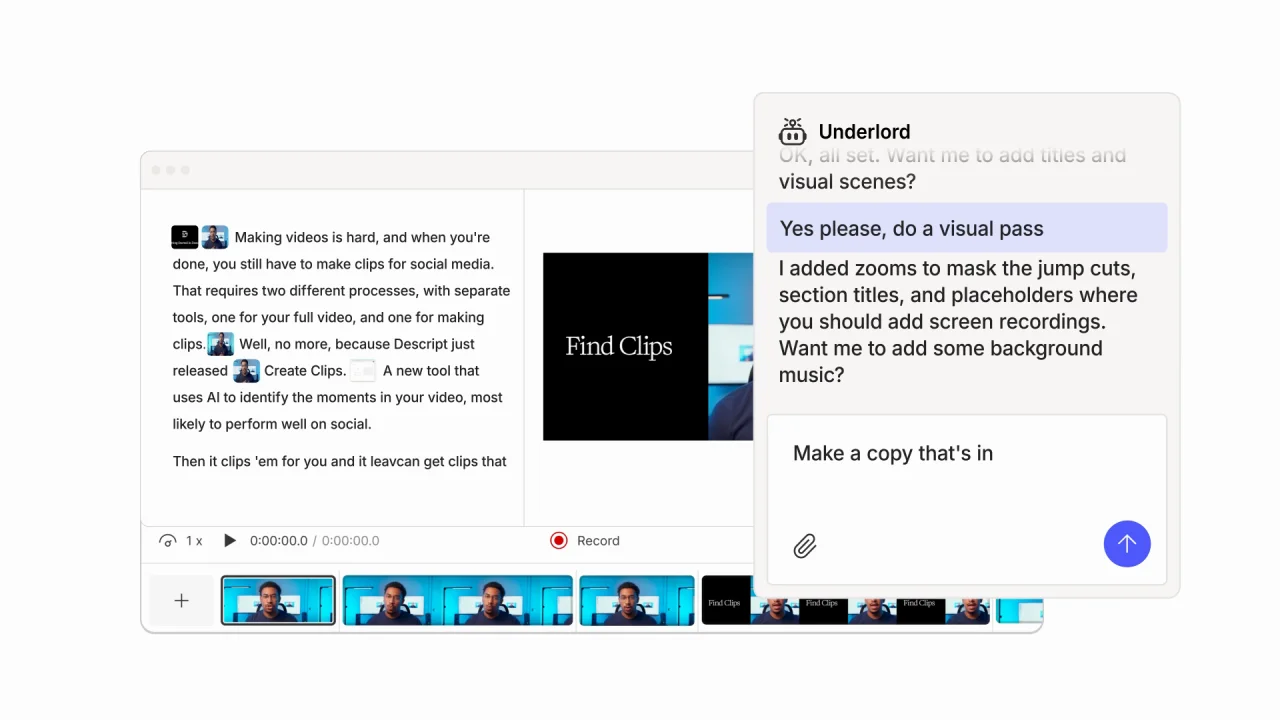
Descript is an AI video editing platform that simplifies video and audio production by turning editing into a text-based process. It allows users to edit content by editing the transcript, automates common post-production tasks, and supports video creation from both recordings and scripts. It includes tools for script generation, voice cloning, avatars, and automatic visual enhancements.
Key features include:
- Text-based video editing: Edit video like a document by modifying the transcript: cut, copy, and move sections just by editing text.
- AI video agent (Underlord): Generate scripts, edit content, apply designs, and create visuals just by describing what you want in natural language.
- Instant transcription: Automatically transcribe any audio or video file and use the transcript as the foundation for all edits.
- Voice regeneration & correction: Fix audio mistakes or reword speech by typing; Descript clones your voice and syncs mouth movements.
- AI-powered cleanup tools: Use features like Studio Sound, filler word removal, and green screen effects to polish content automatically.

Source: Descript
6. CapCut

CapCut is an AI-powered video editing platform for creators who want to produce trend-ready content quickly and easily. Whether building videos for YouTube, Instagram, TikTok, or other platforms, CapCut combines automation with creative tools. Users can generate videos from text, images, or prompts, automate captions and voiceovers, and apply cinematic effects.
Key features include:
- AI video generation: Instantly create videos from prompts, images, or links using tools like Smart Editor, Dreamina AI, and Pippit AI.
- Talking photo & dialogue scenes: Animate photos to speak, sing, or react using AI-generated avatars and scripted dialogue.
- AI caption generator: Add precise, timed captions automatically, with support for bilingual captions and filler word removal.
- Voice AI tools: Turn text into natural voiceovers, enhance audio quality, reduce noise, or clone your own voice for reuse.
- Creative effects library: Access thousands of built-in video effects, transitions, sound effects, and filters to style the content.

Source: CapCut
Video knowledge management platforms
7. Kaltura AI Genie
Kaltura AI Genie is an enterprise-ready, AI-powered knowledge assistant designed to turn internal content and organizational wisdom into actionable intelligence. It transforms scattered enterprise knowledge into instant, personalized insights while maintaining strict data security and source fidelity. Built on trusted company content, AI Genie ensures users access accurate, role-relevant information tailored to their needs.
Key features include:
- Internal multi-source search engine: Retrieve comprehensive answers from across your organization’s knowledge base (including documents, videos, and databases) through a unified, AI-driven interface that ensures contextually accurate responses.
- Interactive learning experiences: Turn enterprise content into engaging, dynamic learning sessions with personalized flashcards, quizzes, video snippets, and image highlights that adapt to each user’s progress and interests.
- Instant feedback and adaptive learning: Provide real-time insights and recommendations, helping employees and customers improve performance, fill knowledge gaps, and stay aligned with organizational updates.
- Suggested learning paths: Automatically generate contextual follow-ups and personalized learning routes to reinforce understanding of topics or skills users may have missed.
- Protected access controls: Leverage enterprise-grade permission settings that ensure sensitive content remains protected and only visible to relevant users based on their roles and credentials.
Kaltura AI Genie is ideal for large organizations seeking to unify knowledge access, increase productivity, and deliver personalized, always-on learning, without compromising data integrity or control.
8. Moments Lab

Moments Lab is a video discovery and content intelligence platform that transforms disorganized media archives into searchable, monetizable libraries using multimodal AI. Powered by its proprietary MXT-2 engine, Moments Lab analyzes visuals, audio, and story structure to automatically tag and index frames, making it easy to locate, repurpose, and distribute specific moments across video libraries.
Key features include:
- AI-powered search and discovery: Instantly find specific scenes, dialogue, or actions using MXT-2’s multimodal indexing of video, audio, and context.
- Smart metadata generation: Skip manual tagging, MXT-2 automatically extracts story-relevant metadata that goes beyond basic transcripts.
- Centralized video library: Consolidate footage from live feeds, legacy systems, and remote drives into a single, searchable content hub.
- Discovery agent interface: Ask natural-language questions to retrieve content, as if consulting a teammate who knows every second of your footage.
- Live ingest and indexing: Ingest content from live broadcasts and have it indexed in real time for immediate access and reuse.

Source: Moments Lab
9. VIDIZMO EnterpriseTube

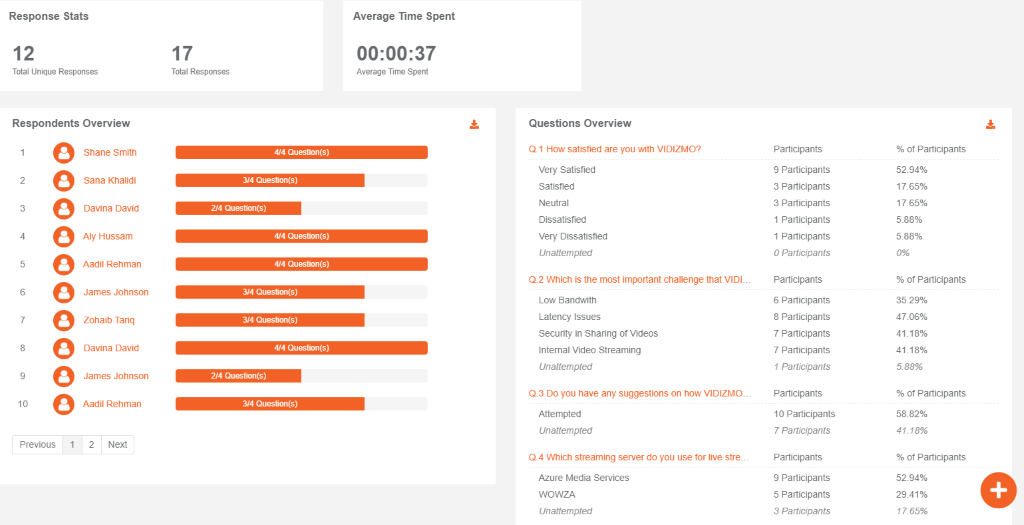
VIDIZMO EnterpriseTube is an AI-based enterprise video platform to manage, secure, and deliver video content at scale. Intended for organizations with complex video workflows, it enables content creation, hosting, live streaming, and video-on-demand, backed by security and flexible deployment options.
Key features include:
- AI-powered video management: Automate content tagging, in-video search, and analytics with built-in AI for simplified video workflows.
- Secure video hosting: Host videos privately with robust compliance and security standards suitable for regulated industries.
- Content creation tools: Record screen or webcam sessions directly within the platform to produce tutorials, lectures, and internal communications.
- Live streaming: Broadcast live events securely to global audiences with interactive features and real-time engagement.
- Video on demand (VOD): Deliver recorded content for on-demand access, allowing viewers to consume videos at their own pace.

Source: VIDIZMO
Video generation platforms
10. Sora

Sora is a text-to-video generation model developed by OpenAI that creates short video clips from natural language prompts. Designed as both a generative model and a social media app, Sora enables users to produce high-definition, AI-generated videos without needing cameras or production equipment. It can also extend existing clips, making it useful for creative iteration and experimentation.
Key features include:
- Text-to-video generation: Generate videos from written prompts using a diffusion transformer architecture optimized for 3D motion and visual realism.
- Video extension: Add to existing video clips with new AI-generated footage, enabling narrative continuity and creative expansion.
- Built-in social app: Share, view, and explore AI-generated videos within Sora’s integrated social media interface.
- Prompt-based scene design: Describe visuals, actions, or styles in plain language to create dynamic video content without any manual editing.
- Creative tools and feedback loop: Start from scratch or let the model suggest scripts, scenes, or visuals; users can iteratively refine outputs through feedback.

Source: OpenAI
11. Veo

Veo is Google DeepMind’s text-to-video generation model, designed to create visually rich, short-form videos directly from natural language prompts. First introduced at Google I/O in 2024, the technology has evolved through multiple versions, with Veo 3 adding synchronized audio to complement AI-generated visuals.
Key features include:
- Text-to-video generation: Create short video clips (up to 8 seconds) by describing scenes, actions, characters, or camera angles in natural language.
- Synchronized AI audio: Veo 3 introduces AI-generated dialogue, sound effects, and ambient sound matched to the visual content.
- High-resolution output: Supports video generation in HD (1080p) and 4K quality for professional-grade visuals.
- Diverse character and scene rendering: Generate human characters across various ethnicities and body types, as well as animals, cartoons, and animated content.
- Multimodal project creation: Use Veo through Gemini for short, fast-turnaround clips or Flow for longer, structured narratives with character continuity.

Source: Google
12. Luma Dream Machine

Luma Dream Machine is a text-to-video generation model developed by Luma Labs, known for its realistic motion rendering and fast generation speed. Released in June 2024, Dream Machine enables users to create five-second video clips from text prompts or still images. It is positioned as an accessible creative tool for generating short-form animated content.
Key features include:
- Text-to-video and image-to-video generation: Create five-second animated videos using natural language prompts or by animating still images.
- Realistic motion synthesis: Known for capturing fluid motion, Dream Machine produces smooth animations compared to other models in its class.
- Prompt augmentation: User prompts are modified using an internal language model to improve output quality and coherence.
- Viral content capability: Popular for generating recognizable and stylized content, including parodies, memes, and artwork recreations.
- Output resolution and length: Generates video clips at 1360×752 resolution, each with a maximum duration of five seconds.
Related content: Read our guide to AI video tools
Key Considerations for Choosing an AI Video Platform
Selecting an AI video platform involves more than just comparing feature checklists. The right platform must align with your technical requirements, content goals, and regulatory needs. Here are key considerations to evaluate when choosing a solution:
- Workflow integration: Ensure the platform integrates smoothly with your existing tools (e.g., LMS, CMS, CRM, or video hosting). Compatibility with file formats, APIs, and SSO systems can minimize friction during adoption.
- Use case fit: Platforms are often optimized for specific applications such as video marketing, training, content repurposing, or knowledge management. Choose one that aligns with your primary video goals to avoid paying for unused capabilities.
- AI transparency and control: Assess the transparency of AI-driven processes like voice cloning, transcription accuracy, or content generation. Look for platforms that offer user control over outputs, such as editable transcripts or customizable AI-generated visuals.
- Scalability and performance: Evaluate how well the platform handles scale—both in terms of content volume and number of users. Platforms should support batch processing, large libraries, and parallel workflows without bottlenecks.
- Data security and compliance: Confirm the platform’s compliance with data protection laws (e.g., GDPR, HIPAA) and its approach to user data, especially when using generative AI. Features like encryption, audit trails, and access controls are critical for regulated industries.
- Localization and accessibility: If you serve a global or diverse audience, prioritize platforms with robust multilingual support, automatic captioning, and accessibility features to ensure inclusive content delivery.
- Output quality and customization: Examine the visual and audio quality of the generated content. Some platforms offer higher realism, more avatar diversity, or better voice synthesis. Consider how much customization (branding, tone, style) is possible.
- Cost structure: Pricing models vary from seat-based subscriptions to usage-based billing. Understand what’s included (e.g., number of renders, avatar access, language packs) and avoid platforms with hidden charges for key features.
- Support and roadmap: Review the quality of vendor support, documentation, and community engagement. A clear product roadmap and responsiveness to user feedback can indicate long-term platform viability.
These factors help ensure the platform you choose fits both your immediate needs and future video strategy.
Conclusion
AI video platforms simplify video workflows by automating everything from creation to distribution. They support large-scale content production, simplify editing, and enable organizations to repurpose and personalize videos efficiently. As models evolve, these platforms are becoming central to how businesses, educators, and media producers generate and manage visual communication at scale.
Was this post useful?
Thank you for your feedback!