Best Webinar Tools for Online Teaching: Top 5 Solutions in 2026

Webinar tools have become essential in online education, enabling instructors to deliver interactive, scalable lessons from anywhere. These platforms go beyond basic video calls, offering structured environments for real-time teaching, collaboration, and assessment. In this guide, we explore the top solutions that support effective online learning.
Editor’s note: Updated the article to cover recent market trends, updated information about webinar tools to reflect features and capabilities in 2026.
How are webinar tools used for online teaching?
Webinar tools are software platforms for real-time, interactive web-based seminars, often used for online teaching, training, large meetings, and corporate events. They offer structured environments for educators to present, interact with attendees, and manage participation at scale.
These tools make it possible to deliver lectures, enable group collaboration, and simplify engagement even when instructors and students are geographically dispersed. Their core goal is to replicate and enhance classroom or seminar experiences in a virtual space.
Beyond basic video and audio communication, webinar tools provide innovative features that address the needs of educators and learners. These can include functions such as:
- Polls, Q&A and chat
- Digital whiteboards
- Attendance tracking
- Breakout rooms
These features enable instructors to manage webinars effectively, ensure active participation, obtain insights into attendee engagement, and ultimately make sure the webinar achieves a great return on investment for the organization.
This is part of a series of articles about virtual classrooms
Key features of webinar tools for online teaching
Webinar platforms often include built-in systems and tools to help educators and students interact and improve learning:
- Registration features: Collect participant information before sessions. Customizable registration pages can capture details such as names, email addresses, and organizational affiliations, simplifying enrollment and communication. Integration with calendar systems and automated reminders helps reduce no-shows by keeping sessions visible in attendees’ schedules.
- Promotion features: Shareable links, social media integration, and email invitations extend reach and simplify event distribution. Some tools also allow educators to segment registrants and send targeted follow-ups, improving attendance rates. Together, registration and promotion tools streamline the administrative side of organizing online classes and reduce the friction of managing participants manually.
- Virtual hand raising feature: Allows students to signal that they have a question or wish to contribute without disrupting the flow of the session. This mimics the in-person classroom convention and provides order, especially in large groups. Instructors can address student input at appropriate times, keeping discussions organized and focused.
- Reactions: Emojis or quick-response icons give learners a simple method to provide instant feedback. For example, students may use a thumbs up to indicate understanding, a question mark to request clarification, or applause to acknowledge a valuable point.
- Screen sharing: Enables instructors to display presentations, websites, or specific applications directly to all attendees. This visual aid ensures that complex concepts or step-by-step processes become much more accessible.
- Whiteboard tool: Provides a collaborative digital surface for drawing diagrams, jotting down key points, solving equations, or brainstorming ideas. Both teachers and, in some tools, students can annotate or highlight content in real time, making the session interactive and dynamic.
- Media playlists: Let instructors pre-load and organize videos, audio clips, or other multimedia assets for seamless use during a webinar. Instead of switching between files or external platforms, educators can queue up resources and play them at appropriate moments in the lesson.
- Breakout rooms: Allow instructors to split a larger class into smaller groups for discussions or collaborative activities. This feature mimics the small group work often used in traditional classrooms, enabling more personalized interactions and deeper engagement with learning material. Instructors can assign topics or problem sets, monitor progress by joining different rooms, and return all participants to the main session with a single command.
- Attendance tracking: Automates the monitoring of who attends, arrives late, or leaves webinars, freeing educators from the tedious task of taking roll manually. Most webinar tools generate attendance reports, indicating the exact times participants join or exit, and highlighting those who are absent.
- Integrated polls, quizzes and tests: Allow educators to assess student understanding during or after the webinar without leaving the platform. Instructors can launch multiple-choice questions, polls, or short-answer assessments that students complete in real time. Results are often available instantly, letting teachers adjust instruction immediately based on performance.
- Engagement reports: Consolidate data on student participation, including metrics such as attendance, chat activity, poll responses, and duration of stay. These dashboards give instructors a clear overview of how each learner interacted during the session.
- Session moderation, Q&A, and chat: Help instructors maintain order and relevance in interactive sessions. Instructors or co-hosts can mute participants, approve or dismiss questions, and control who can post in the chat. Q&A functions separate student questions from general chat, making it easier to address important queries without losing them in the stream of conversation. Questions can be upvoted by peers, allowing the most relevant issues to surface. Single sign-on (SSO) integration: Simplifies access by letting students log in with existing institutional or corporate credentials. This reduces login barriers, ensures consistent identity management, and supports compliance with IT policies. For large-scale deployments, SSO also enables centralized user provisioning and access control.
- Security features: Password protection, role-based permissions, encrypted streams, and waiting rooms prevent unauthorized access. Features like watermarking recordings or disabling downloads safeguard intellectual property.
- AI-powered repurposing and enrichment features: Extend the value of webinar sessions beyond live delivery. Automated transcription and translation make content accessible to wider audiences, while AI-generated summaries highlight key points for quick review. Some platforms create time-stamped notes or searchable transcripts, helping students revisit specific sections after class.
Related content: Read our guide to virtual classroom tools
Webinar tools: market trends
According to recent market research, the global webinar software market is expanding rapidly as organizations rely more on digital communication and virtual events. The market is valued at USD 9.4 billion and projected to grow to USD 31.05 billion by 2033.
Several factors are accelerating the adoption of webinar tools:
- Online learning, product demonstrations, customer engagement, and virtual sales funnels. Companies benefit from reduced travel and event costs while still reaching large audiences.
- Shift toward hybrid and remote work environments, which requires organizations to communicate and train distributed teams efficiently.
- Advanced features such as polling, Q&A sessions, and integrated analytics improve real-time interaction with participants.
- Artificial intelligence is increasingly integrated into webinar software to improve engagement and performance analysis. AI systems analyze signals such as chat activity, poll responses, interaction timing, and participant behavior to provide insights about audience engagement.
Webinar platforms are used across many sectors, including education, banking and financial services, IT and telecom, healthcare, government, media, and e-commerce. These industries rely on webinars for training, internal communication, and public events.
Notable webinar tools for online teaching
1. Kaltura

Kaltura is an all-in-one webinar platform designed to deliver interactive, branded, and data-driven learning experiences. Trusted by leading institutions and organizations across education, healthcare, and technology, it supports every session type—from live and simulive to on-demand.
General features include:
- Unified hub for all webinar formats
- Branded registration sites with AI-generated content
- Real-time analytics and engagement tracking
- Secure SSO access and session moderation
- Integration with major marketing automation platforms
Features for online teaching include:
- Interactive tools: Live polls, quizzes, chat, and gamification features such as leaderboards and certificates to boost engagement.
- AI-powered assistance: Real-time sentiment analysis and engagement insights help instructors “read the room” and adapt lessons on the fly.
- Flexible delivery: Educators can combine live broadcasts, breakout rooms, and instant on-demand recordings with automated captions.
- Content repurposing: AI tools transform recordings into shareable clips, galleries, and follow-up materials for continued learning.
- Performance analytics: Comprehensive reports on participation and focus rates support data-driven teaching improvements.
Kaltura’s flexible, AI-powered platform helps educators move beyond standard virtual classes, creating engaging and measurable learning experiences across formats and audiences.
2. Zoom

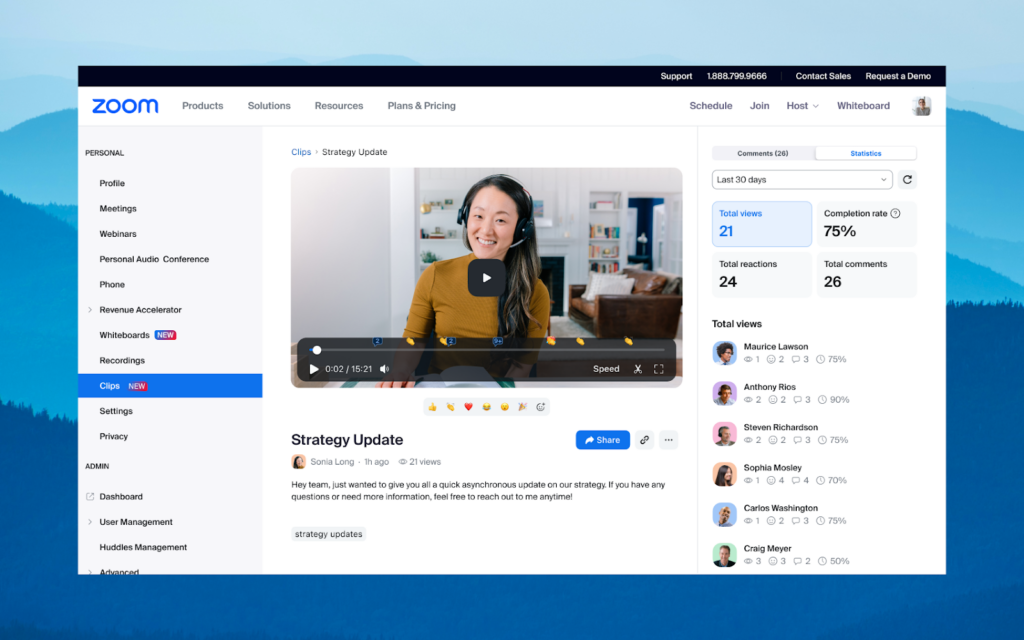
Zoom is a communication and collaboration platform used for virtual, hybrid, and in-person education. It supports live classes, campus communication, student services, and recorded learning content through meetings, webinars, events, video management, and AI tools.
General features include:
- Unified communication tools: Meetings, webinars, events, chat, phone, whiteboard, and rooms are available in one platform.
- AI-assisted workflows: AI Companion can generate summaries, study guides, notes, and learning insights.
- Video management: Record, organize, caption, transcribe, translate, and share videos through a centralized library.
- Security and compliance controls: Supports SSO, role-based permissions, audit trails, and controls for education-related compliance needs.
- LMS integration: Recordings and learning content can be shared through LMS workflows.
Features for online teaching include:
- Interactive class delivery: Breakout rooms, polls, annotations, whiteboards, and chat support real-time participation.
- Lecture capture: Educators can record lectures and presentations for later viewing.
- Accessibility support: Captions, transcripts, and translation help make learning content more accessible.
- Asynchronous learning: Zoom Clips and recorded sessions support flipped classrooms and self-paced review.
- Engagement analytics: Watch time and student engagement tracking help instructors understand how learners use recorded content.

Source: Zoom
3. BigBlueButton

BigBlueButton is an open-source virtual classroom platform built specifically for online teaching. It is widely integrated with learning management systems and focuses on live instruction, student engagement, and classroom collaboration.
General features include:
- Open-source classroom platform: Built for education rather than general business meetings.
- LMS integration: Embedded into major LMS platforms, including Canvas, Moodle, Sakai, D2L, Jenzabar, and Schoology.
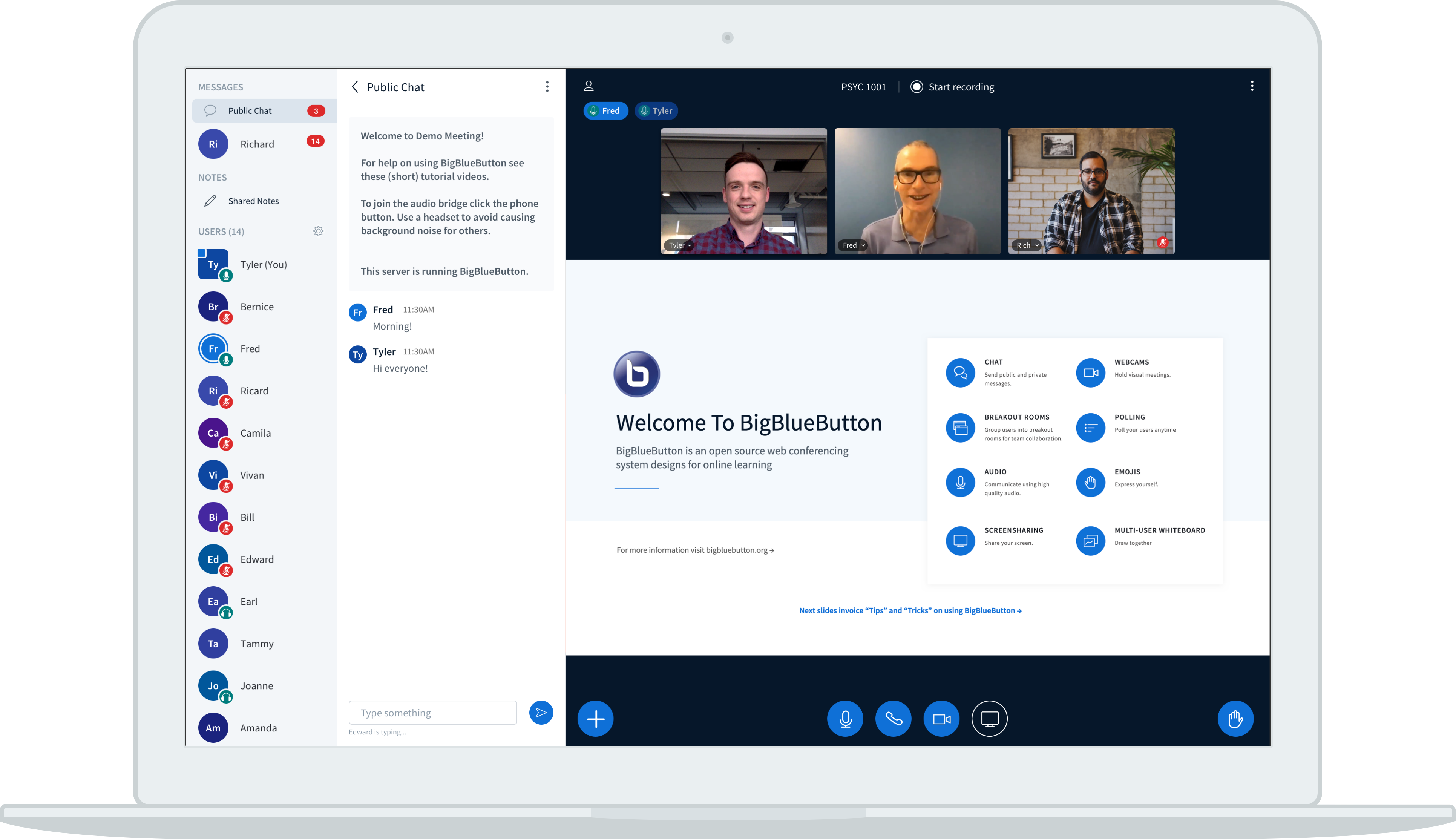
- Browser-based classroom interface: Provides a structured layout with user lists, chat, presentation areas, and speaker indicators.
- Document sharing: Supports uploads of PowerPoint, Word, PDF, and image files.
- Video and screen sharing: Enables webcam video, screen sharing, and adjustable video quality.
Features for online teaching include:
- Interactive whiteboard: Teachers can highlight content, explain concepts visually, and allow multi-user collaboration.
- Breakout rooms: Students can work in smaller groups during class.
- Polling: Instructors can check understanding and test knowledge during sessions.
- Shared notes: Students and instructors can collaborate on notes in real time.
- Class participation tools: Hand raising, emojis, public chat, and private chat help students respond during lessons.

Source: BigBlueButton
4. Adobe Connect

Adobe Connect is a virtual training and webinar platform designed for structured, interactive sessions. It supports customizable rooms, reusable layouts, engagement tools, AI assistance, and post-session content access.
General features include:
- Custom virtual rooms: Hosts can design persistent rooms using pods, layouts, branded themes, and reusable structures.
- Engagement tools: Native tools support polls, surveys, chat, resources, assessments, and interactive content.
- AI-assisted support: AI features help hosts get contextual help during live sessions and repurpose recordings into written content.
- Interactive recordings: Participants can access resources, links, transcripts, and session materials after the live event.
- Enterprise readiness: Supports use cases for training, webinars, government, and regulated organizations.
Features for online teaching include:
- Purpose-built training rooms: Educators can create structured virtual classrooms for complex or high-stakes training.
- Real-time engagement monitoring: Instructors can track engagement scores and adjust delivery during a session.
- Reusable learning layouts: Persistent rooms allow teachers to reuse materials, layouts, and activities across classes.
- Post-session learning access: Learners can revisit assessments, simulations, demos, downloads, and recordings after class.
- Blended learning integration: Adobe Connect can integrate with Adobe Learning Manager to combine live and self-paced learning.

Source: Adobe Connect
5. Panopto

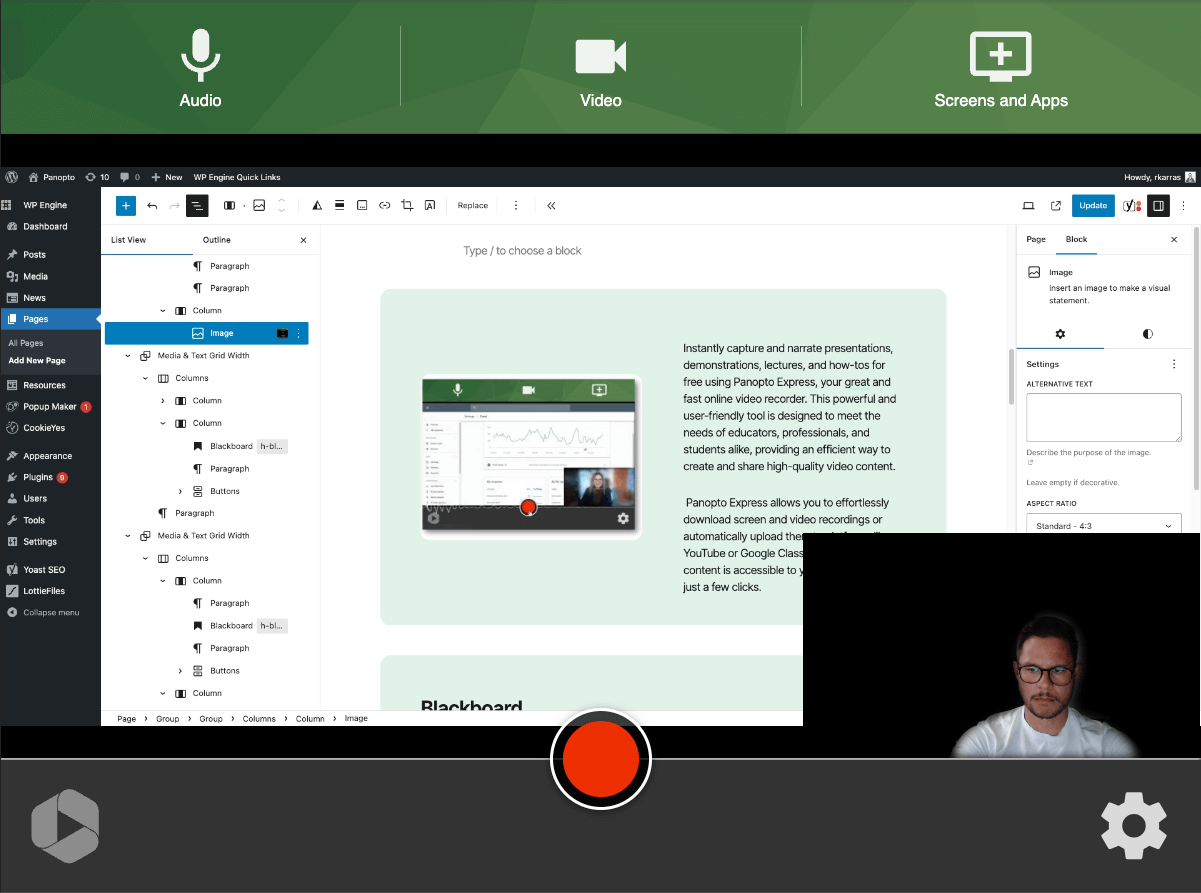
Panopto is a video learning platform for higher education that focuses on lecture capture, searchable recordings, LMS integration, accessibility, and content reuse. It helps institutions turn recorded sessions into reusable learning resources.
General features include:
- Lecture capture: Records classroom, online, and hybrid sessions for later access.
- Video content management: Stores and organizes course videos in a searchable library.
- LMS integration: Works with Canvas, Blackboard, Moodle, D2L, and other LMS platforms through LTI.
- SSO access: Students and faculty can access content without separate logins.
- System integrations: Connects with LMS platforms, Zoom, Microsoft Teams, and classroom AV systems.
Features for online teaching include:
- Searchable recordings: Students can search inside recorded lectures to find specific explanations or concepts.
- Automatic captions and transcripts: Recordings include captions and transcripts to support accessibility.
- Instant publishing: Recordings can be automatically published to the LMS.
- Content reuse: Faculty can reuse lectures across sections, semesters, and course formats.
- Learning analytics: Instructors can use viewing, quizzing, and analytics data inside LMS workflows.

Source: Panopto
Conclusion
The right webinar tool can transform how educators deliver content and connect with learners in digital environments. By combining live communication, interactive features, and administrative automation, these platforms help replicate, and often enhance, the dynamics of physical classrooms. Whether teaching small groups or large cohorts, educators can use these tools to boost engagement, track participation, and ensure effective knowledge transfer at scale.
Was this post useful?
Thank you for your feedback!