





Leading AI Avatar Solutions for Presentations: Top 8 in 2026

TL;DR: AI avatar solutions turn scripts, slides, and recordings into video delivered by a digital presenter. Kaltura is best for enterprises publishing avatar-led video across existing content hubs, Synthesia covers multilingual training at scale, HeyGen focuses on custom avatars from photos, and Adobe Firefly handles quick script-to-presenter clips.
What Are AI Avatar Solutions for Presentations?
AI avatar solutions for presentations are digital platforms that use artificial intelligence to generate lifelike human avatars capable of delivering spoken content. These tools allow users to input text, which is then converted to speech and synchronized with the avatar’s lip movements and facial expressions. The result is a video presentation where a realistic digital person narrates the information, often over slides or visual content.
AI avatar solutions can be accessed via web-based applications or integrated into existing presentation software. These platforms simplify the video creation process, eliminating the need for cameras, microphones, lighting, or on-screen talent. By leveraging pre-built avatars or enabling users to create custom digital presenters, these solutions make it possible to produce professional-looking video presentations in minutes.
AI Avatar Solutions for Presentations at a Glance
The table below summarizes the key differences between the solutions covered in this guide. We explore each one in more detail in the sections that follow.
| Category | Solution | Best For | Key Strengths | Things to Consider |
| Enterprise video platforms | Kaltura Avatar Video | Enterprises turning slides and recordings into avatar video | Multi-source creation, editable previews, live avatar follow-up | Reporting depth and regional pricing raised by platform users |
| Enterprise video platforms | Synthesia | Multilingual training and communications video at scale | 240+ avatars, 160+ languages, PowerPoint and document import | Gestures can feel flat; edits require a full re-render |
| Enterprise video platforms | Colossyan | Training teams converting slide decks into narrated video | Diagram extraction, scene citations, SCORM export | Generation can be slow; some features sit on higher plans |
| Enterprise video platforms | DeepBrain AI Studios | High-volume multilingual video from documents and decks | 2,000+ avatars, emotional TTS, docs-to-video | Premium pricing; slower processing at peak times |
| AI avatar video generators | Kaltura AI Avatar Generator | Standalone avatar generation for teams already on Kaltura’s video platform | Multi-source input, live conversational follow-up, enterprise governance | Same platform as Enterprise section entry; pricing and reporting feedback carry over |
| AI avatar video generators | HeyGen | Creating a custom presenter from a single photo | Avatar IV, voice cloning, 175+ languages and accents | Credit costs; no lip-sync preview before generating |
| AI avatar video generators | D-ID Creative Reality Studio | Animating a portrait or executive headshot into a presenter | Image-to-avatar, brand automation, personalized campaigns | Limited body movement; revisions consume credits |
| AI avatar video generators | Adobe Firefly Text to Avatar | Short script-to-presenter clips inside a creative suite | Preset actors, background control, audio preview | Beta feature; fixed cast of about 25 actors |
| AI avatar video generators | Elai.io | Turning PPTX decks into avatar-narrated learning video | PPTX-to-video, avatar dialogs, interactivity | Smaller avatar library; edits consume rendering minutes |
Why Use AI Avatars in Presentations?
Create More Engaging Presentations
AI avatars help transform static presentations into dynamic experiences by adding a human element to the content. Instead of relying solely on slides and text, presenters can leverage digital avatars to deliver information in a more personable and interactive manner. This approach captures attention more effectively, making it easier for audiences to stay focused and retain information. The visual presence of an avatar also helps break up the monotony of traditional slide presentations, which can otherwise lead to disengagement.
By using AI avatars, presenters can inject emotion and emphasis into their delivery, which can be challenging to achieve with plain text or voiceover alone. The avatars’ gestures, facial expressions, and tone of voice can be fine-tuned to match the context of the presentation, further enhancing engagement. As a result, viewers are more likely to connect with the material and respond positively to the message being conveyed.
Reduce Video Production Costs
Traditional video production requires substantial investment in equipment, studio space, editing software, and on-screen talent. AI avatar solutions drastically lower these costs by automating the creation process. Users can generate high-quality video presentations without hiring actors, booking studio time, or investing in expensive gear. This makes professional video content accessible to organizations of all sizes, including those with limited budgets.
AI avatar solutions also reduce the time and resources required for post-production. Changes to scripts or visual elements can be implemented quickly without the need for reshoots or new recordings. This flexibility allows teams to iterate and improve presentations at a fraction of the cost and effort associated with conventional video production methods, leading to faster project turnaround and increased productivity.
Scale Presentation Content Easily
AI avatar solutions enable organizations to produce large volumes of video presentations quickly and efficiently. Since the process is largely automated, creating new content or updating existing presentations can be done in minutes rather than days or weeks. This scalability is essential for businesses and educators who need to deliver consistent information to large or distributed audiences.
By removing the bottlenecks associated with traditional video production, AI avatars allow for rapid content iteration and deployment. This is particularly useful for training, marketing, or onboarding programs, where timely updates and consistent messaging are critical. Teams can easily roll out new modules or campaigns without being constrained by production schedules or resource limitations.
Maintain Consistent Branding
Consistency is key for brand recognition and trust, and AI avatar solutions make it easier to maintain uniformity across all presentation materials. Organizations can standardize the appearance, tone, and messaging of their avatars to align with brand guidelines. This ensures that every presentation, regardless of the creator or department, reflects the same look and feel.
AI avatars can also be customized with branded clothing, backgrounds, and color schemes, further reinforcing brand identity. By centralizing control over visual and verbal elements, organizations can avoid discrepancies that often arise in decentralized content creation environments. This not only strengthens branding but also enhances the professionalism of all public-facing materials.
Create Presentations in Multiple Languages
AI avatar solutions often include multilingual capabilities, enabling presenters to create content in various languages with native-like pronunciation and intonation. This is achieved through advanced text-to-speech engines that support a wide range of languages and dialects. As a result, organizations can reach global audiences without the need for separate voice actors or translation teams.
The ability to quickly generate presentations in multiple languages streamlines localization efforts and ensures consistent messaging across regions. This feature is especially valuable for multinational companies, educational institutions, and organizations with diverse audiences. By removing language barriers, AI avatars help maximize the impact and accessibility of presentation content worldwide.
Key Features to Look for in an AI Avatar Solution for Presentations
1. Realistic Avatar Quality
The realism of avatars is a critical factor in audience engagement and credibility. Look for solutions that offer high-fidelity avatars with:
- Natural facial expressions
- Accurate lip-sync
- Lifelike gestures
Advanced platforms use sophisticated AI models to generate avatars that closely mimic real human behavior, making the presentation more convincing and relatable. High-quality avatars also support a range of emotional expressions and body language, which can be tailored to suit different presentation contexts. This level of detail not only enhances the viewer’s experience but also helps convey complex ideas more effectively.
Related content: Learn what to look for when evaluating AI video platforms.
2. Custom Avatar Creation
Custom avatar creation allows organizations to design digital presenters that reflect their unique brand identity. Leading AI avatar solutions offer tools for creating personalized avatars based on:
- Photographs
- Videos
- Detailed character design interfaces
This customization ensures that the avatar represents the company’s image and values, fostering stronger brand recognition. Having the ability to create custom avatars also enables teams to maintain a consistent presenter across multiple presentations, further reinforcing branding efforts. Some platforms provide options for diverse skin tones, outfits, and accessories, allowing for inclusive representation.
3. AI Voice and Lip-Sync Quality
AI voice quality is essential for delivering clear and engaging presentations. The best solutions offer a range of natural-sounding voices, with:
- Accurate pronunciation
- Human-like pacing
- Realistic intonation
Advanced AI voices can also convey different emotions, making the narration more dynamic and compelling. Lip-sync accuracy is equally important, as it ensures that the avatar’s mouth movements match the spoken words, enhancing realism.
Poor voice synthesis or mismatched lip movements can break immersion and distract viewers. Therefore, it’s important to choose platforms that invest in high-quality voice engines and continuous improvements in speech-to-animation alignment. Some solutions even allow users to upload custom voice recordings for further personalization, adding another layer of authenticity to the presentation.
4. Presentation Templates
Pre-built presentation templates can accelerate the creation process and ensure a polished final product. Many AI avatar platforms offer a variety of professionally designed templates tailored for different use cases, such as training, marketing, or education. These templates typically include:
- Coordinated layouts
- Color schemes
- Smooth transitions
Templates also help maintain visual consistency across presentations, which is important for branding and professionalism. Users can customize templates to fit their specific needs, adding logos, adjusting color palettes, or rearranging content blocks. The availability of templates makes it easier for non-designers to create visually appealing presentations.
5. PowerPoint or Slide Integration
Seamless integration with PowerPoint or other slide-based tools is a valuable feature for users who already rely on these platforms. Some AI avatar solutions offer plugins or import/export capabilities that allow users to add avatars directly to their existing presentations. This integration:
- Simplifies workflow
- Avoids the need to recreate slides from scratch
By supporting popular presentation formats, these solutions enable users to leverage familiar tools while improving their content with AI avatars. Integration also simplifies the updating process, as changes made to slides can be quickly reflected in the final video. Look for platforms that offer compatibility and easy-to-use interfaces for embedding avatars within slide decks.
6. Collaboration Features
Collaboration features are essential for teams working together on presentation content. AI avatar solutions with multi-user support enable colleagues to:
- Co-edit
- Add live comments
- Review presentations in real time
Some platforms offer version control, task assignment, and approval workflows, ensuring that everyone stays aligned and that changes are tracked. Collaborative environments also help maintain consistency and quality across multiple projects. When choosing an AI avatar solution, consider how well it supports team-based workflows and whether it integrates with your organization’s preferred collaboration tools.
Notable AI Avatar Solutions for Presentations
How we selected these solutions: We shortlisted AI avatar platforms for presentations based on avatar realism and customization, script and slide import, multilingual voice and lip-sync accuracy, branding controls, and publishing options.
Enterprise Video Platforms with AI Avatar Capabilities
1. Kaltura Avatar Video

Best for: Enterprises turning slides and recordings into avatar video
Strengths: Multi-source creation, editable previews, live avatar follow-up
Things to consider: Reporting depth and regional pricing raised by platform users
Kaltura Avatar Video converts recordings, presentations, documents, and webpages into videos presented by an avatar. Users start by uploading a session recording, presentation, PDF, document, URL, or script, then guide the output with prompts covering the speaker, audience, and goal.
Before rendering, the platform shows the generated script, avatar narration, scene structure, background clips, and supporting visuals for review and editing. Finished videos publish to email, a website, an LMS, or an internal portal. The product sits inside Kaltura’s Agentic Digital Experience Platform, which handles creation, management, and distribution in one environment.
Key features include:
- Multi-source video creation: Builds a single video from recordings, slides, PDFs, and other source materials in one workflow, rather than requiring each input to be handled separately.
- Session highlights workflow: Converts long lectures, town halls, webinars, and training sessions into shorter videos, using the source recording as the basis for narration and scene selection.
- Flexible scene layouts: Mixes full-screen avatar segments with layouts that combine narration, slides, and visuals pulled from the source material.
- Preview and edit before generation: Displays the draft script, scene structure, and background clips for editing before the final video is produced.
- Live avatar interaction: Lets viewers continue the session after playback, with the avatar answering questions, expanding on related topics, clarifying points, quizzing viewers, and directing them to next steps.
- Localization and branding: Adapts videos for global audiences using AI dubbing while applying consistent branding across teams and regions.
- Enterprise governance: Provides administrative control, brand consistency controls, connection to an existing video and content ecosystem, and compliance with global security standards.
Limitations (as reported by users on G2): Avatar Video Production Studio reached general availability in 2026 and does not yet have its own listing, so the points below come from reviews of the wider Kaltura video platform it runs on.
- Reporting depth: Some reviewers would like reporting to be more intuitive and customizable, so detailed insights can be reached without working through complex data views.
- Regional pricing: Pricing is described as high relative to budgets in certain markets.
- Integration setup: Connecting the platform to some learning systems takes configuration effort, and reviewers note this in the context of LMS integration work.

Source: Kaltura

2. Synthesia

Best for: Multilingual training and communications video at scale
Strengths: 240+ avatars, 160+ languages, PowerPoint and document import
Things to consider: Gestures can feel flat; edits require a full re-render
Synthesia generates presenter-led video from a script, a prompt, a PowerPoint deck, a document, or a blank canvas, with the AI producing the script, selecting scenes, and rendering the finished video with lip-sync and voice included.
The platform offers four avatar types. Stock avatars provide a ready-made library, customizable avatars are prompted into specific outfits and settings, personal avatars are built from a single photo, and studio avatars are captured in a dedicated recording session. Personal avatars require live on-camera consent verification that cannot be uploaded or bypassed.
Key features include:
- Stock and customizable avatars: Provides 240+ full-body avatars with gestures and expressions, plus prompt-driven control over outfit, setting, and on-screen action, with scenes generated by Veo 3.
- PowerPoint and document import: Accepts a PowerPoint deck, PDF, Word document, link, or template as the starting point and converts it into a scripted video.
- Voice library and cloning: Includes 1,000+ voices across 160+ languages and accents, with some voices offering multiple emotional styles, and supports cloning a voice from a short recording.
- AI dubbing and translation: Translates and dubs existing video into 140+ languages with lip-sync matched to the new audio, and locks terminology through a translation glossary.
- Brand Kit: Applies logos, colors, fonts, and preferred avatars to every video automatically.
- Smart Updates: Refreshes embedded or link-shared videos with the latest edits without requiring redistribution.
- Interactivity and analytics: Adds quizzes, clickable moments, and branching paths, and reports views, watch time, completion rates, and drop-off points.
Limitations (as reported by users on G2):
- Avatar naturalness: Reviewers report that gestures and facial expressions do not always align with the emotional tone of a script, and that delivery can feel flat across longer modules.
- Pronunciation handling: Brand names, acronyms, and industry jargon often need manual phonetic correction, adding a review step to each video.
- Re-render on edits: Small script changes require regenerating the whole video, which reviewers describe as slowing down iterative work.
- Plan gating: Branding controls, translation, and outfit customization are described as sitting on higher tiers than some teams expect.
- Credit expiry: Monthly allowances are capped, and reviewers note that unused credits are lost at the end of a billing cycle.
- Editor precision: Timing animations to the voiceover and controlling scene transitions take trial and error, according to reviewers.

Source: Synthesia

3. Colossyan

Best for: Training teams converting slide decks into narrated video
Strengths: Diagram extraction, scene citations, SCORM export
Things to consider: Generation can be slow; some features sit on higher plans
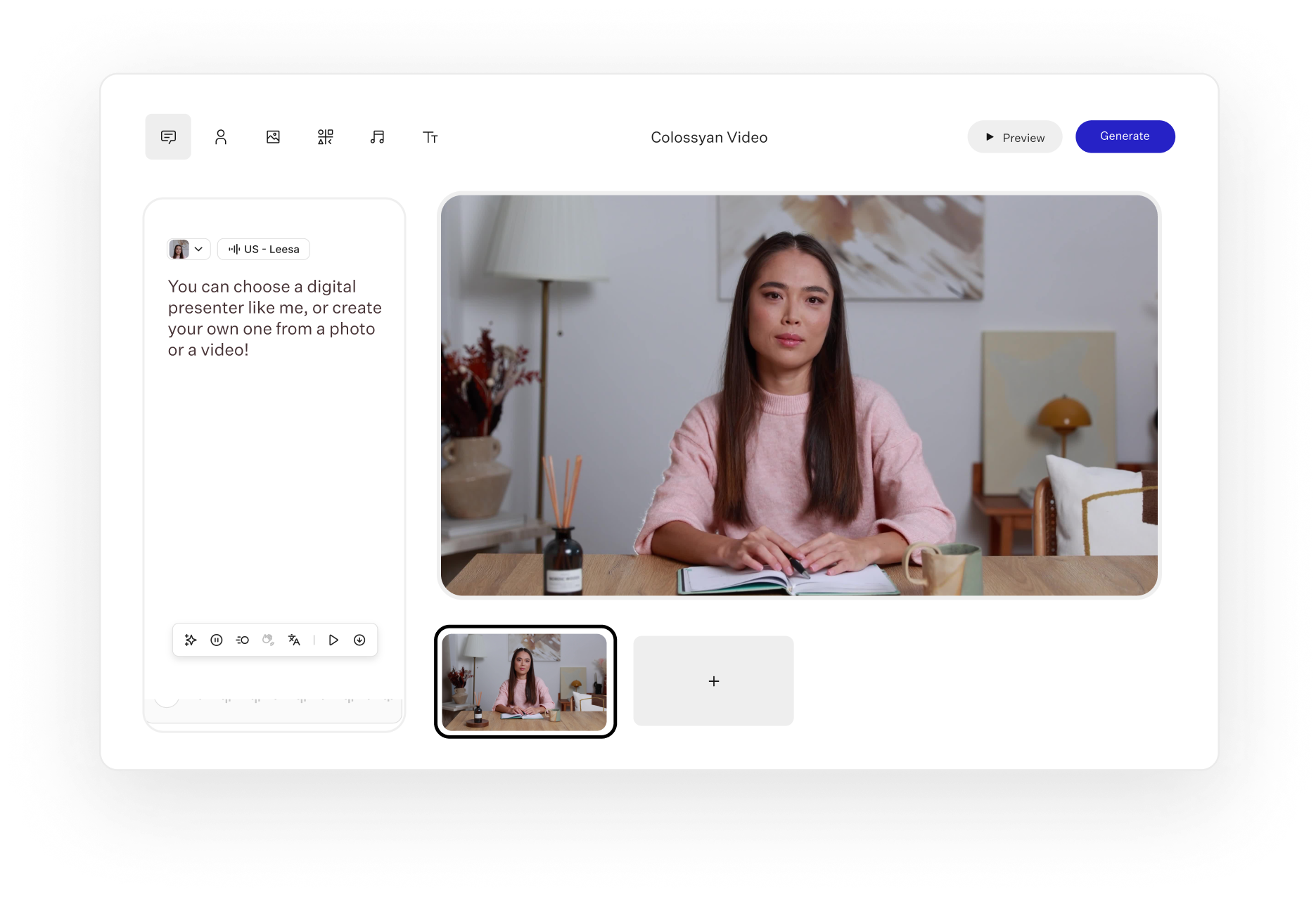
Colossyan converts PDFs, Word documents, slides, URLs, and scripts into avatar-narrated video. The platform reads the source, extracts headings, paragraphs, charts, tables, and figures, and drafts a scene-by-scene plan before anything renders.
Each scene in the plan carries a citation showing the page and paragraph it came from, and ambiguous passages are flagged for review rather than paraphrased. Two checkpoints sit before render: one to review the extraction pass, and one to review the plan. Avatars run on the NEO 2 engine, which handles full-body movement, gestures timed to speech, head turns, and eye contact.
Key features include:
- Slide and document import: Accepts PPT and PPTX files with layouts preserved, alongside PDFs, Word documents, URLs, and scripts, and can mix sources into a single draft.
- Page-aware diagram extraction: Pulls charts, tables, and figures from the source and places them in the scene that references them, instead of substituting stock backgrounds.
- Five avatar types: Offers 300+ stock avatars, custom avatars built with the vendor’s team, branded avatars wearing company outfits and backgrounds, scenario avatars placed in settings such as offices, warehouses, and retail floors, and cartoon avatars.
- Scene-level editing: Allows narration edits, reordering, audience or localization tagging, and regeneration at the scene level rather than for the whole video.
- Multilingual localization: Supports 100+ languages with lip-sync adapted per language, and translates video, on-screen text, and interactive elements together.
- Interactive elements: Adds branching scenarios and quizzes, with up to four avatars in a single scene for dialogue-based content.
- Delivery and export: Exports MP4 up to 1080p, publishes to an LMS via SCORM, or shares by link, with the brand kit applied to every scene by default.
- Security controls: Includes SOC 2 Type II, GDPR, and SAML SSO as part of the core product.
Limitations (as reported by users on G2):
- Generation speed: Reviewers report that generating videos and previews takes a long time, which slows down work that requires several adjustments.
- Plan gating: Some capabilities are only available on higher plans, and reviewers mention NEO 2 video creation being limited on certain tiers.
- Screen recorder quality: The built-in screen recorder is described as needing improvement, with some reviewers using a separate tool instead.
- Release stability: Bugs are reported when new enhancements are released.
- Lip-sync accuracy: Review summaries note lip-sync accuracy as an area with room to improve.

Source: Colossyan
4. DeepBrain AI Studios

Best for: High-volume multilingual video from documents and decks
Strengths: 2,000+ avatars, emotional TTS, docs-to-video
Things to consider: Premium pricing; slower processing at peak times
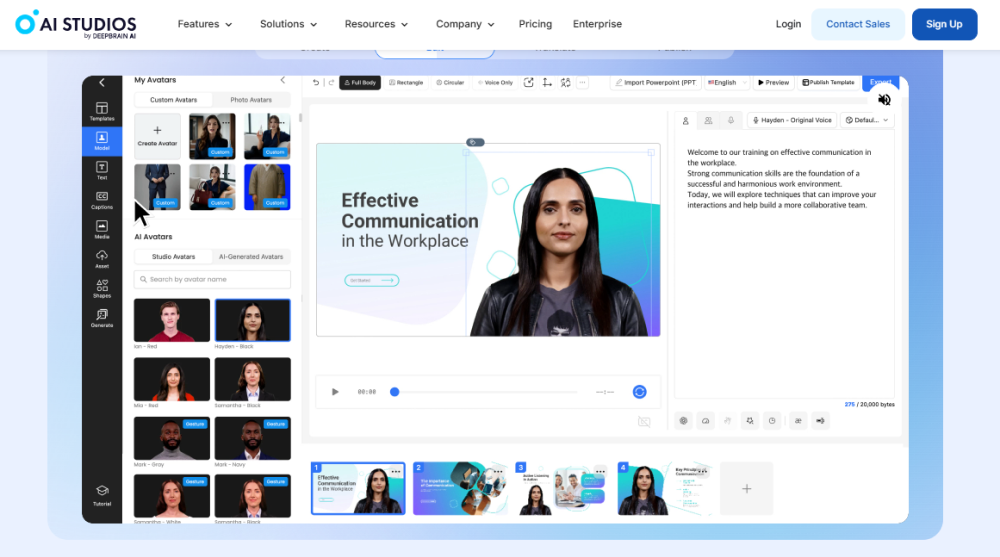
AI Studios, from DeepBrain AI, generates avatar videos from a typed script or uploaded audio, with the avatar delivering the content using facial expressions, gestures, and lip-sync. Deep-learning video rendering and voice models handle the motion and speech.
The platform provides several routes to a personal presenter: a Custom Avatar from a short webcam recording, a Photo Avatar from a single image, a Studio Avatar from a professional shoot, and a Product Avatar that interacts with physical products. Interactive AI Avatars add real-time conversation backed by a custom LLM trained on company data.
Key features include:
- Large stock avatar library: Provides 2,000+ ready-to-use avatars for social, product, and explainer video, spanning different looks, voices, and styles.
- Docs-to-video conversion: Converts presentations and PDFs into videos with a generated script, scenes, and an AI presenter, alongside separate PowerPoint-to-video and PDF-to-video paths.
- Emotional text-to-speech: Detects the tone and emotion of a script and adjusts delivery accordingly, covering whispers, laughter, and breath, and works across the full 1,000+ voice library.
- Language coverage: Supports 150+ languages and accents with lip-sync, plus voice cloning, and offers AI dubbing that translates existing video with matched lip movement.
- Template library: Includes 7,000+ templates organized by use case, such as business, education and training, commerce, marketing, and news.
- Background handling: Removes backgrounds automatically and replaces them with studio scenes, branded environments, product sets, e-commerce layouts, or uploaded images.
- All-in-one editor: Combines scripting, editing, and avatar creation in a single interface, with screen recording, auto captions, brand kit, and a script assistant.
- Likeness controls: Requires permission to use a person’s likeness and prohibits avatars of real people without consent.
Limitations (as reported by users on G2):
- Premium pricing: Reviewers describe the pricing as a barrier for some buyers despite the value the platform provides.
- Interface complexity: Balancing depth of functionality against ease of use is raised as an area with room for improvement in the user interface.
- Processing times: Some reviewers report lengthy processing and inconsistent output quality during periods of peak usage.

Source: AI Studios
AI Avatar Video Generators
5. Kaltura AI Avatar Generator
Best for: Standalone avatar generation for teams already invested in Kaltura’s video platform
Strengths: Multi-source input, live conversational follow-up, enterprise governance
Things to consider: Same underlying platform as the Enterprise Video Platforms entry above; pricing and reporting feedback carry over
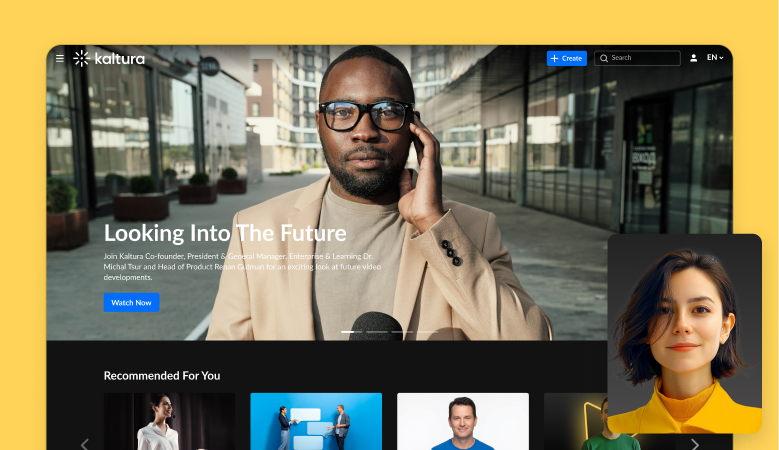
Beyond the enterprise workflow described earlier in this guide, Kaltura’s avatar generation engine also functions as a direct-purpose AI avatar generator: teams can go straight from a script, recording, document, or URL to an avatar-led video without needing the surrounding LMS or content-hub integration to get value from it. The same underlying model that powers Kaltura’s session-highlights and localization features is available as a focused avatar creation tool.
What differentiates it from most dedicated avatar generators in this category is the live, conversational layer: rather than a one-way rendered video, viewers can continue interacting with the avatar after playback ends, asking follow-up questions or requesting clarification, which none of the other tools in this section currently offer.
Key features include:
- Multi-source avatar generation: Builds avatar-led video directly from a script, recording, presentation, PDF, or URL, without requiring a dedicated design or editing pass.
- Preview and edit before rendering: Surfaces the generated script, scene structure, and background clips for review and adjustment prior to final generation, reducing wasted renders.
- Live avatar follow-up: Lets viewers continue engaging with the avatar after the video ends, including asking questions, requesting expansion on topics, or being directed to next steps.
- Localization and dubbing: Adapts avatar-led video for global audiences using AI dubbing while keeping branding consistent across markets.
- Enterprise governance controls: Applies administrative permissions, brand consistency rules, and compliance controls aligned with global security standards.
- Platform-native distribution: Publishes generated avatar video directly to email, a website, an LMS, or an internal portal without exporting to a separate delivery tool.
Limitations (as reported by users on G2): Avatar Video Production Studio reached general availability in 2026 and does not yet have its own dedicated listing, so the points below come from reviews of the wider Kaltura video platform it runs on.
- Reporting depth: Some reviewers would like reporting to be more intuitive and customizable, so detailed insights can be reached without working through complex data views.
- Regional pricing: Pricing is described as high relative to budgets in certain markets.
- Standalone positioning: Because the avatar generator ships as part of the broader Kaltura platform, teams evaluating it purely as a lightweight, single-purpose avatar tool may find the surrounding platform more than they need.

Source: Kaltura
6. HeyGen

Best for: Creating a custom presenter from a single photo
Strengths: Avatar IV, voice cloning, 175+ languages and accents
Things to consider: Credit costs; no lip-sync preview before generating
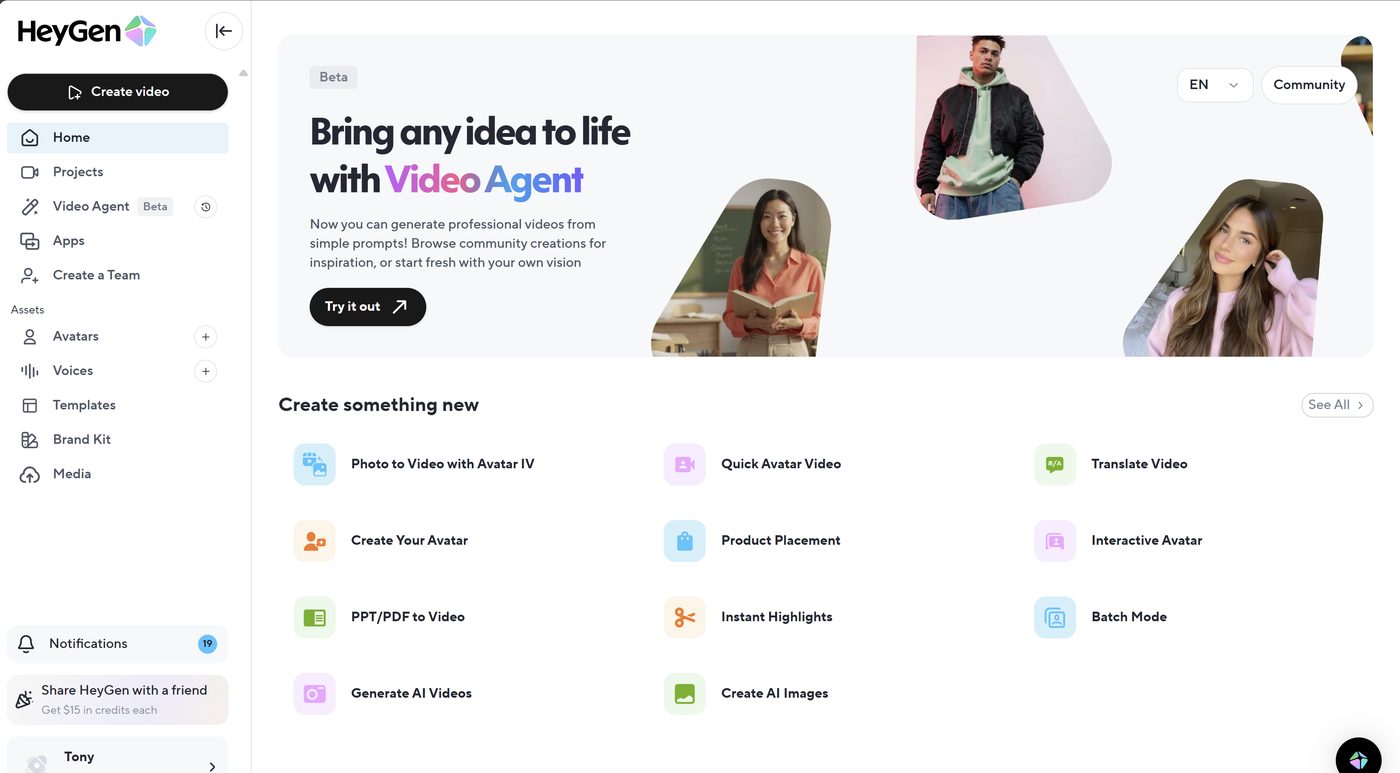
HeyGen generates avatar video from text, images, or audio. Its Avatar IV model turns a single image into a full video with lip-sync, facial expression, and hand movement, while the digital twin workflow builds a reusable avatar from a recorded calibration video.
Users select from over 1,000 pre-built avatar models covering professional presenters, influencer-style figures, and multicultural options, or create their own. Custom avatars can be restyled with different looks, outfits, and backgrounds, and Look Packs switch between professional, playful, and other styles.
Key features include:
- Avatar IV from a single image: Converts one photo into a video with lip-sync, facial expression, and hand gestures, without a recording session.
- Digital twin and photo avatars: Records a short calibration video to build a lifelike avatar, or generates unlimited photo avatars from one image plus text instructions.
- Stock avatar library: Provides over 1,000 pre-built avatar models, including industry-specific options for areas such as healthcare, sales, and corporate training.
- Voice options: Offers 100+ stock voices across 175+ languages and dialects, supports cloning your own voice, and integrates with third-party text-to-speech providers.
- Outfit and background customization: Adjusts avatar clothing, tone, backgrounds, and overall style so the presenter matches a defined brand personality.
- Text-based editor: Runs video production through a script-driven editor, so producing a video works more like writing a document than editing a timeline.
- Video translation: Translates existing video into other languages while retaining the speaker’s voice characteristics.
Limitations (as reported by users on G2):
- Credit costs: Pricing and credit consumption are the most frequently raised concerns, and reviewers note that re-rendering after a small script edit costs the same as generating a new video.
- No lip-sync preview: Reviewers report that output issues only become visible after credits have already been spent, since there is no preview before generation.
- Avatar expressiveness: Some reviewers describe movement as stiff or lacking emotional warmth, and note limited control over gestures and expressions.
- Plan restrictions: Watermarks on standard renders, download limits on free tiers, and expiring unused credits are all raised.
- Feature status clarity: Reviewers ask for clearer labelling of which capabilities are stable and which are experimental, since some features consume large amounts of credits while producing unpredictable output.
- Rendering delays: Rendering times are described as slowing work down when deadlines are tight, with no progress indicator in some cases.

Source: HeyGen
7. D-ID Creative Reality Studio

Best for: Animating a portrait or executive headshot into a presenter
Strengths: Image-to-avatar, brand automation, personalized campaigns
Things to consider: Limited body movement; revisions consume credits
D-ID’s Creative Reality Studio converts text, audio, or still images into video with digital avatars. Faces can be animated in three ways: selecting a pre-made avatar, uploading a facial image, or generating a portrait through a text-to-image generator built on Stable Diffusion.
The platform combines face animation technology with LLM text generation and text-to-image capabilities in one self-service interface, available on desktop and mobile. All output is MP4, with video length capped at five minutes and image uploads limited to 10 MB in JPEG, JPG, or PNG format.
Key features include:
- Image-to-avatar animation: Animates an uploaded front-facing portrait so it delivers a written script, which suits building a presenter from an existing headshot.
- Multilingual presenter library: Provides business and casual avatars with expressions, gestures, and speech that can be added to a video in a single step.
- Voice imitation and translation: Creates videos in a user’s own voice and translates them into 40+ languages, with the speaker’s voice cloned and lip movements adapted per language.
- Automated brand application: Applies company colors, fonts, backgrounds, and logos to every video, and supports adding product images, workplace backgrounds, and branded corporate characters.
- Personalized video campaigns: Generates videos in real time from customizable scripts with dynamic fields, and lets teams customize the video landing page with colors, text, logo, and call to action.
- Output specifications: Renders standard presenters up to 1280×1280 and premium presenters at 1080p on Trial, Pro, Advanced, and Enterprise plans, with a five-minute maximum video length.
- API and governance: Offers an API for programmatic generation alongside role-based permissions, brand guardrails, shared asset libraries, and admin controls.
Limitations (as reported by users on G2):
- Limited body movement: Reviewers describe avatars as mostly static upper-body shots with minimal movement, and note limited customization of gestures and body language.
- Monotony on longer videos: The restricted movement range is reported to make longer videos feel repetitive.
- Revision costs: The credit consumption model is described as unforgiving during client revision cycles, when multiple regenerations are needed.

Source: D-ID

8. Adobe Firefly Text to Avatar

Best for: Short script-to-presenter clips inside a creative suite
Strengths: Preset actors, background control, audio preview
Things to consider: Beta feature; fixed cast of about 25 actors
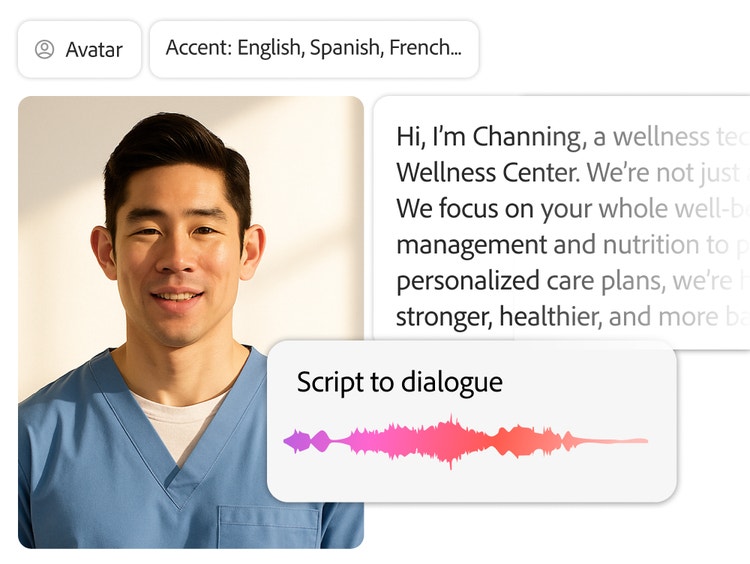
Adobe Firefly’s Text to Avatar generates a presenter-led video from a script, blog post, or article. Users select an avatar, set the accent, choose a background, then generate and make editing adjustments before exporting.
The feature sits inside Firefly alongside Generate Sound Effects and Generate Video, so audio effects and video elements can be added to the same project. Avatars are built on training data that Adobe describes as ethically sourced and commercially safe.
Key features include:
- Script-driven generation: Accepts a pasted script, blog, or article of at least 15 characters and produces a video of an avatar delivering it.
- Preset actor catalog: Provides a catalog of more than 25 actors with different appearances, wardrobes, voice styles, and accents.
- Accent selection: Sets the accent used for the avatar’s scripted dialogue through a dropdown in the scene settings.
- Background options: Supports a background color, image, or uploaded video, along with green screen output for compositing elsewhere.
- Audio preview before render: Generates and plays back the audio, displaying the rendered voice as waveforms, so the delivery can be checked before committing to a full video render.
- Templates: Offers templates with pre-selected avatar and background combinations that can be edited afterwards.
- Script formatting controls: Responds to punctuation, capitalization, spelled-out numbers, and character-acting quotes as cues that shape rhythm, tone, and emphasis.
Limitations (based on publicly available sources):
- Beta status: Text to avatar is labelled beta in Adobe’s own documentation and interface.
- Fixed avatar cast: The catalog contains just over 25 actors, and there is no documented path to build a personal avatar from your own likeness.
- Generation time: Rendering takes roughly seven minutes of processing for one minute of output, so longer scripts take proportionally longer.
- Voice variability: Adobe notes that AI-generated voices are nondeterministic, meaning identical scripts and voices can produce slightly different results between takes.
- Free tier caps: Free Adobe accounts are limited to a set number of daily generations, with a paid plan required for higher volume.

Source: Adobe Firefly
9. Elai.io

Best for: Turning PPTX decks into avatar-narrated learning video
Strengths: PPTX-to-video, avatar dialogs, interactivity
Things to consider: Smaller avatar library; edits consume rendering minutes
Elai.io generates video with digital presenters from text. Users choose from a library of avatars, write or import a script, and the platform renders a narrated video with slides and media. A prompt-based route also exists, where a topic produces text that can be reviewed and converted into video slides automatically.
Custom avatars come in four types: Selfie, Studio, Photo, and Animated mascot. The platform is browser-based, with a builder that treats video creation as a sequence of slides.
Key features include:
- PPTX-to-video conversion: Converts existing presentations into videos with talking avatars, animations, and a choice of voices and languages.
- Avatar library and custom avatars: Provides 80+ avatars and four custom avatar types, covering selfie-based, studio-recorded, photo-based, and animated mascot presenters.
- Voice coverage and cloning: Supports 75+ languages and 450+ voices with automated translation, and clones a user’s own voice for narration.
- Avatar dialogs and interactivity: Places multiple avatars in a scene for scenario-based conversations, and adds interactive elements within the video.
- URL-to-video and script assistance: Generates video from a web page link, and drafts or refines scripts through a GPT-based text editor.
- Templates and brand kit: Offers professional video templates in horizontal and vertical formats, and applies company logos and brand colors across videos.
- Screen recording: Records the computer screen and adds the capture to a video for tutorials, demos, and presentations.
- Personalization at scale: Generates personalized video messages through the builder and API using variables and custom graphic elements.
Limitations (as reported by users on G2):
- Avatar realism: Review summaries note limitations in avatar realism, and reviewers describe expressions as stiff relative to newer competitors.
- Rendering delays: Occasional delays during rendering are raised in review summaries.
- Pronunciation review: Some words need to be checked and corrected manually before a video is finalized.
- Text and design options: Reviewers ask for more font effects, describing on-screen text as appearing plainly.
- Preview limitations: Individual slide previews do not include the selected music track, which makes it harder to balance narration volume against the soundtrack.
- Edits consume minutes: Reviewers flag that edits draw down the monthly rendering allowance, which matters on plans with tight minute limits.

Source: Elai.io

Conclusion
AI avatar solutions can turn existing slides, scripts, and documents into presenter-led videos without requiring a traditional recording setup. For presentation workflows, the most important factors include avatar and voice quality, slide import capabilities, localization, branding controls, collaboration, and how easily content can be updated. Organizations should also evaluate security, publishing options, rendering limits, and pricing to ensure the solution can support ongoing presentation production at the required scale.
Was this post useful?
Thank you for your feedback!
