

Top 8 Agentic AI Companies for Enterprise Knowledge Delivery

TL;DR: Agentic AI platforms for enterprise knowledge delivery retrieve, synthesize, and act on internal content. Kaltura is best for video-first knowledge, Glean for cross-system search, Guru for governed knowledge, and Coveo for relevance at scale.
What is enterprise knowledge delivery?
Agentic AI companies for enterprise knowledge delivery combine autonomous reasoning with robust information retrieval to help employees find facts, automate workflows, and synthesize data across siloed systems.
Enterprise knowledge delivery refers to the systematic process by which organizations distribute relevant information and insights to employees, teams, and decision-makers. This process encompasses collecting, organizing, and making accessible the knowledge assets within an enterprise, including documents, data sets, expertise, and best practices. The goal is to ensure that users have timely access to the information they need to perform their roles effectively, drive innovation, and maintain a competitive edge.
Key capabilities:
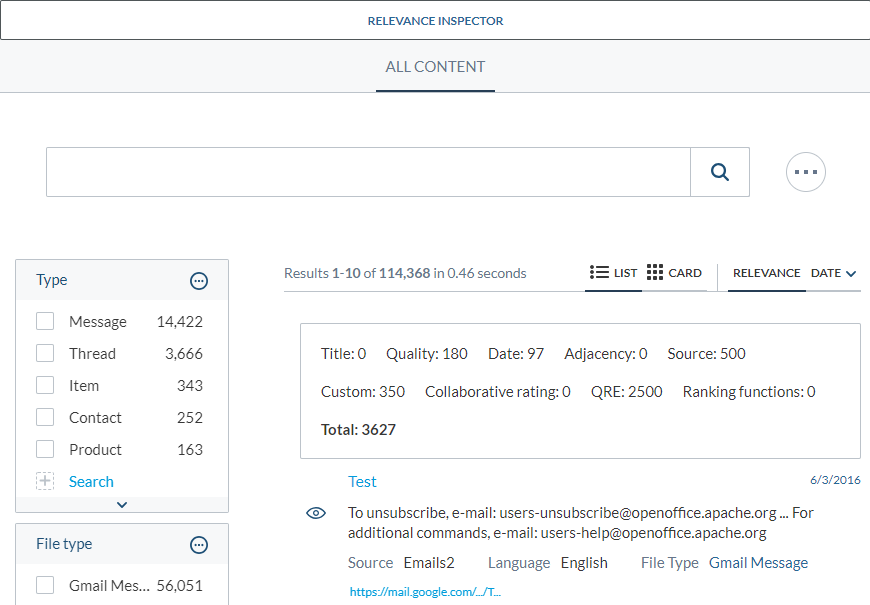
- Multimodal content understanding: Processes and indexes text, images, audio, video, and other enterprise content so knowledge can be discovered regardless of format.
- Automated metadata enrichment: Generates tags, descriptions, and classifications automatically to improve search, governance, and content organization.
- Natural-language and visual asset search: Lets employees find information using conversational queries or by searching for images, diagrams, videos, and other visual assets.
- Context-aware asset recommendations: Recommends relevant documents, templates, and resources based on the user’s role, activity, and business context.
- Brand and content governance: Applies policies for brand consistency, compliance, permissions, and content usage to ensure trusted knowledge delivery.
- Channel-aware media delivery: Optimizes and delivers knowledge assets in formats suited to email, intranets, mobile apps, collaboration tools, and other channels.
- Workflow orchestration: Automates multi-step knowledge processes such as approvals, reviews, notifications, and content lifecycle management.
This is part of a series of articles about agentic AI tools
Agentic AI platforms for enterprise knowledge delivery: Quick comparison
The table below summarizes the key differences between the platforms covered in this guide. We explore each one in more detail in the sections that follow.
| Category | Solution | Best for | Key strengths | Things to consider |
| Multimodal content and media intelligence | Kaltura | Video-first knowledge delivery from approved content | Multi-source internal search, generated media formats, agentic publishing | Scope centers on video and media assets |
| Multimodal content and media intelligence | Adobe Experience Manager Assets | Agentic DAM for large asset libraries | Conversational asset search, AI tagging, rights governance | Agentic ingestion listed as coming soon |
| Multimodal content and media intelligence | Bynder | Brand-governed asset discovery | Natural language and image search, taxonomy control | AI agents and AI search are add-on modules |
| Enterprise search and agentic knowledge platforms | Glean | Cross-system search and agents on company context | 250+ connectors, Enterprise Graph, agent governance | Horizontal platform with no media-specific processing |
| Enterprise search and agentic knowledge platforms | Microsoft 365 Copilot | Knowledge delivery inside Microsoft 365 apps | Work IQ context layer, agent store, Copilot Studio | Context and permissions tied to the Microsoft estate |
| Enterprise search and agentic knowledge platforms | Coveo AI-Relevance Platform | Relevance layer feeding search and agents | Unified index, generative answering, Passage Retrieval API | Delivery layer that does not store source content |
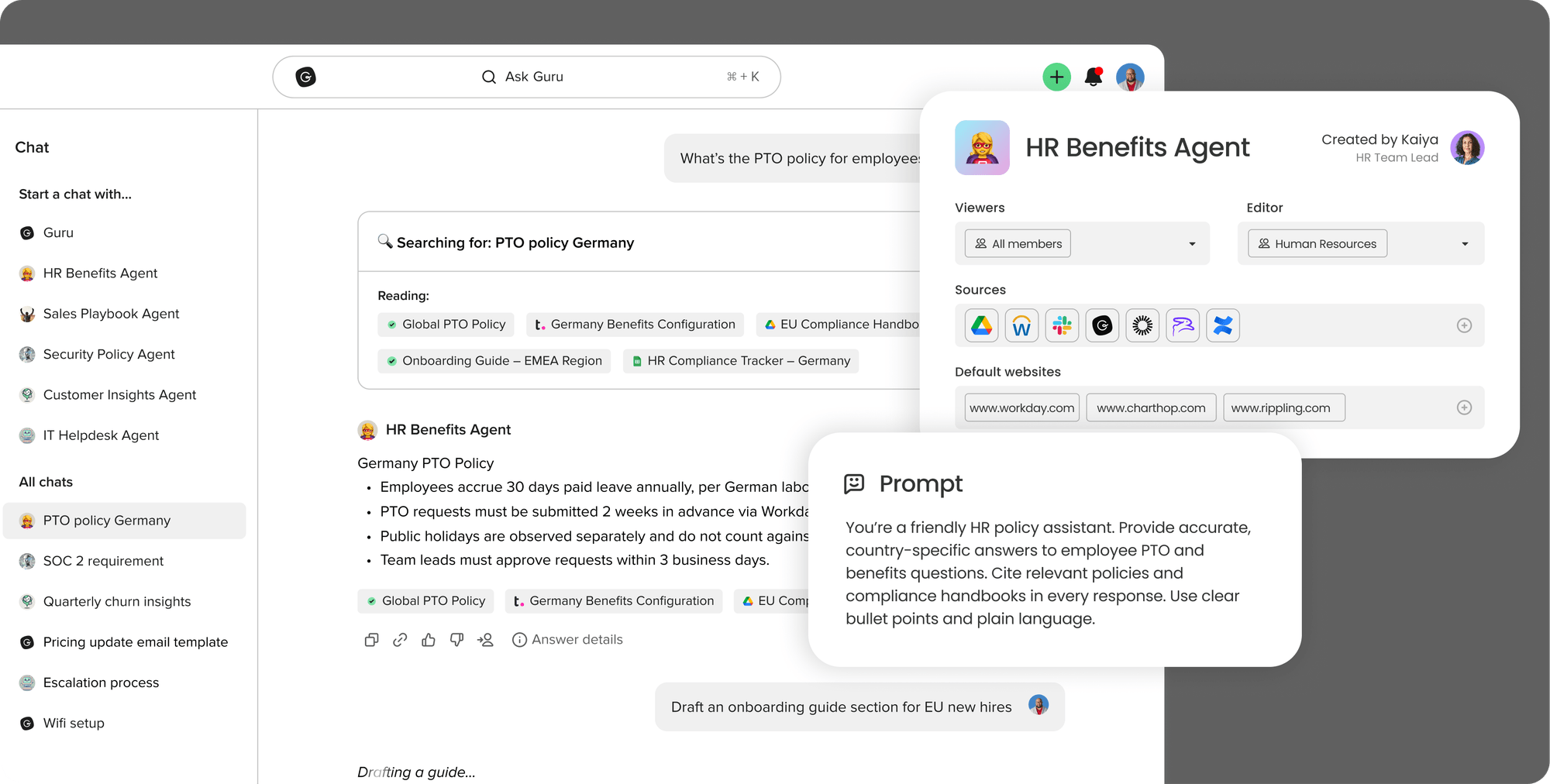
| Enterprise search and agentic knowledge platforms | Guru | Governed knowledge layer for people and AI tools | Auto-verification, citation enforcement, MCP delivery | Text-focused rather than media-focused |
| Enterprise search and agentic knowledge platforms | IBM watsonx Orchestrate | Governing agents across existing systems | Agentic control plane, governed catalog, hybrid deployment | A control plane, not a knowledge repository |
How agentic AI improves enterprise knowledge delivery
Connects to multiple enterprise knowledge sources
Agentic AI systems can integrate with a wide range of enterprise knowledge sources, including document management systems, databases, intranets, wikis, email archives, and cloud storage platforms. By establishing connections with these repositories, the AI agent can access a unified view of organizational knowledge. This connectivity reduces silos and ensures that information from relevant sources is available for:
- Retrieval
- Analysis
- Delivery to end users
Connecting to multiple sources also enables the AI agent to update its knowledge base as new content is created or modified. This approach ensures that users are not relying on outdated information and can trust the accuracy and relevance of the knowledge delivered. The result is an organization where teams can collaborate, make informed decisions, and avoid duplication of effort due to incomplete or inaccessible information.
Interprets user intent and business context
Agentic AI interprets the intent behind user queries, going beyond keyword matching to analyze the meaning and objectives of each request. By using natural language processing (NLP) and contextual analysis, these systems can determine what the user is seeking, even when the query is vague or ambiguous. This leads to more accurate and relevant information delivery, reducing the need for users to refine their searches multiple times.
In addition to interpreting intent, agentic AI considers business context, such as:
- The user’s role
- The department
- Current projects
- Previous interactions
This awareness allows the AI agent to tailor its responses, prioritizing information that is most relevant to the user’s situation. By aligning knowledge delivery with business context, organizations can improve productivity and ensure that employees receive insights that apply to their tasks.
Synthesizes information from several systems
Agentic AI can aggregate and synthesize information from multiple enterprise systems to provide coherent answers to complex queries. Instead of presenting users with a list of documents or data points, the AI agent analyzes and combines content from various sources, offering a unified response that saves time and reduces cognitive load. This capability is valuable for addressing multi-faceted questions that span different departments or domains.
By automating the synthesis of information, agentic AI reduces the risk of oversight and inconsistency. Users no longer need to piece together insights from scattered documents or systems. The AI agent ensures that relevant and up-to-date information is considered, resulting in more informed decision-making and a structured knowledge delivery process across the enterprise.
Plans multi-step research and retrieval tasks
Agentic AI can plan and execute multi-step research tasks that would otherwise require significant manual effort. When faced with a complex request, the AI agent can:
- Break down the task into subtasks
- Identify the appropriate sources
- Retrieve the necessary information in a logical order
This approach allows the AI to handle intricate workflows and deliver contextualized answers. The ability to plan multi-step tasks also enables agentic AI to automate recurring knowledge retrieval processes. Whether preparing reports, conducting compliance checks, or gathering insights for decisions, the AI agent can follow predefined workflows to ensure consistency and accuracy.
Related content: Read our article about agentic AI vs generative AI.
Key capabilities to look for in an enterprise knowledge agent
1. Multimodal content understanding
An enterprise knowledge agent must be able to process and understand content in various formats, including text, images, audio, and video. Multimodal content understanding uses AI models trained to extract meaning and context from different types of media, allowing the agent to index and retrieve information regardless of its original form. This capability is important in modern enterprises, where knowledge spans:
- Presentations
- Diagrams
- Recorded meetings
By supporting multimodal understanding, the knowledge agent can offer users a more complete set of results. For example, it can identify relevant information within a video transcript, extract insights from a chart, or recognize details in a scanned document. This versatility enables users to access organizational knowledge without format limitations.
2. Automated metadata enrichment
Automated metadata enrichment refers to using AI to generate and enhance metadata for enterprise assets, such as documents, images, and videos. Metadata supports:
- Search
- Categorization
- Retrieval
However, manually tagging assets is time-consuming and often inconsistent. AI-powered enrichment automates this process by analyzing content and assigning relevant tags, descriptions, and classifications at scale.
This automation improves the discoverability and organization of knowledge assets across the enterprise. As the knowledge agent processes new and existing content, it helps keep metadata accurate and structured. Enhanced metadata supports search, retrieval, compliance, governance, and analytics initiatives by providing a consistent view of enterprise information.
3. Natural-language and visual asset search
An enterprise knowledge agent should enable users to search using natural language queries, mirroring how they would ask a colleague for help. Natural-language search uses NLP to interpret user input and deliver relevant results, even when queries are conversational or complex. This approach makes knowledge retrieval accessible to employees regardless of technical expertise.
In addition to text-based search, the agent should support visual asset search, allowing users to find the following elements based on visual characteristics or content:
- Images
- Diagrams
- Videos
By combining natural-language and visual search, the knowledge agent provides a flexible interface for accessing enterprise assets. This capability accelerates information discovery and helps users locate needed resources.
4. Context-aware asset recommendations
Context-aware recommendations are a key capability for enterprise knowledge agents. By analyzing user behavior, preferences, and the current task, the agent can suggest relevant:
- Documents
- Templates
- Resources
This approach reduces the time spent searching for information and helps users discover assets they may not have known existed. The agent’s context awareness extends to organizational priorities, ongoing projects, and compliance requirements. By factoring in these elements, the agent ensures that recommendations align with business objectives and policies. This targeted delivery of knowledge supports user productivity and decision-making across the enterprise.
5. Brand and content governance
Brand and content governance ensures that enterprise knowledge assets adhere to corporate standards, compliance regulations, and intellectual property requirements. A knowledge agent with governance features can check content for:
- Brand consistency
- Legal compliance
- Usage rights
It can flag or restrict access to assets that do not meet established criteria, reducing risk and protecting organizational reputation. Automating governance processes supports auditability and accountability. The knowledge agent can maintain logs of content access, modifications, and approvals, providing a trail for compliance audits.
6. Channel-aware media delivery
Enterprise knowledge agents should be capable of delivering media assets in formats optimized for channels such as email, intranet, mobile apps, or social platforms. Channel-aware delivery involves adapting content to suit the requirements of each distribution medium, including for:
- Resizing images
- Reformatting documents
- Adjusting metadata
This helps maintain a consistent user experience across touchpoints. By understanding the intended channel, the knowledge agent can also enforce security and compliance policies specific to each environment. For example, sensitive information may be restricted from external sharing, while internal communications are prioritized for accessibility.
7. Workflow orchestration
Workflow orchestration enables the enterprise knowledge agent to automate and coordinate business processes involving multiple steps and stakeholders. The agent can initiate, track, and manage workflows such as:
- Document approval
- Knowledge curation
- Compliance review
This ensures that tasks are completed in the correct sequence and according to organizational policies. Integrating workflow orchestration with knowledge delivery allows the agent to trigger actions based on user queries or content updates. For example, uploading a new policy document could notify relevant teams, initiate a review cycle, and archive older versions. This automation increases operational efficiency, reduces errors, and provides a structured framework for managing enterprise knowledge assets.
Notable agentic AI platforms for enterprise knowledge delivery
How we selected these tools: We shortlisted agentic AI platforms for enterprise knowledge delivery based on multimodal content understanding, permission-aware retrieval across source systems, automated metadata enrichment, context-aware recommendations, governance controls, and workflow orchestration.
Multimodal content and media intelligence platforms
1. Kaltura

Best for: Video-first knowledge delivery grounded in approved content
Strengths: Multi-source search, generated media formats, agentic publishing
Things to consider: Scope centers on video and media assets
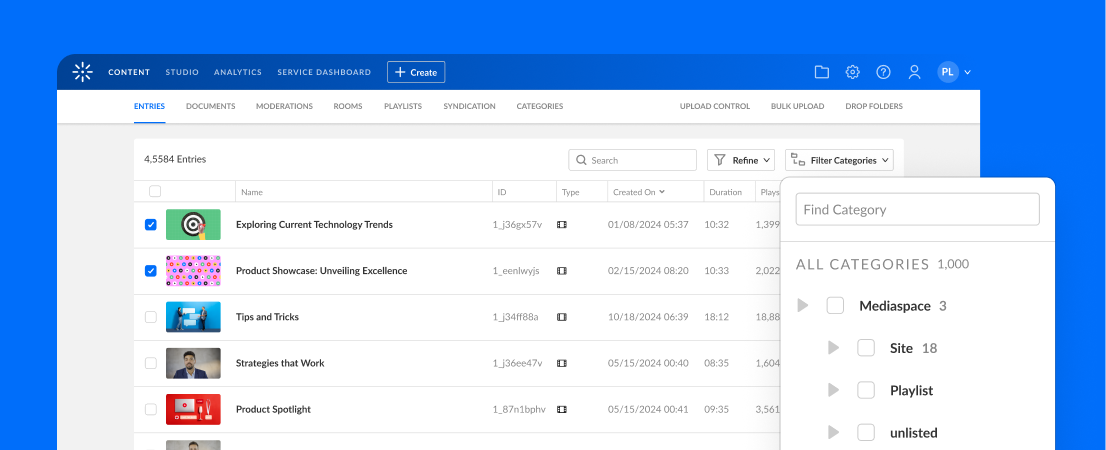
Kaltura delivers enterprise knowledge through two connected products. Work Genie is an adaptive assistant that answers queries using only the organization’s trusted content, drawing on user engagement data to tailor what each employee, customer, or partner receives. It returns answers assembled from relevant sources in the database rather than a single document.
The Publishing Agent handles content operations. It runs the video lifecycle as a workflow, applying enrichment, accessibility, compliance, and publishing steps on a schedule or on demand, and extends existing automation rather than replacing it. As policies change, it applies those changes across new and existing content.
Key features include:
- Internal multi-source search engine: Answers each query by pulling from relevant sources across the connected content database and returns a consolidated response instead of a result list.
- Generated interactive formats: Converts source content into flashcards with quizzes, video snippets, and image grabs.
- Adaptive next steps and feedback: Suggests learning paths that target concepts a user missed and delivers insights tied to that user’s activity.
- Permission-scoped access: Enterprise-level controls determine which users can access information, with no customer data used to train models and answers restricted to verified content.
- Agentic enrichment and publishing: Adds captions, audio description, translations, metadata, titles, tags, summaries, and chapters at scale, then coordinates publishing of approved content to its designated channel.
- Compliance and accessibility automation: Checks transcripts and visual content against defined policies, flags accessibility and policy violations, routes items for remediation, and maintains audit trails.
- Configurable triggers and approvals: Custom triggers, actions, and approval rules define when agents run and which combination of enrich, moderate, translate, approve, or publish steps they execute.
Limitations (based on publicly available sources):
- Newer AI capabilities: Work Genie and the Publishing Agent are recent additions to the platform, so independent review coverage specific to these agentic features is still limited compared with Kaltura’s established video cloud products.
- Workflow integration time: Some users note that connecting newer automation, such as Path-based workflows, into existing content pipelines can take iteration as the tooling matures.
- Scope of governance: Reporting and dashboard customization are areas some users would like to see deepened as agentic features expand.

Source: Kaltura
2. Adobe Experience Manager Assets

Best for: Agentic digital asset management across many channels
Strengths: Conversational asset search, AI tagging, rights governance
Things to consider: Agentic ingestion is listed as coming soon
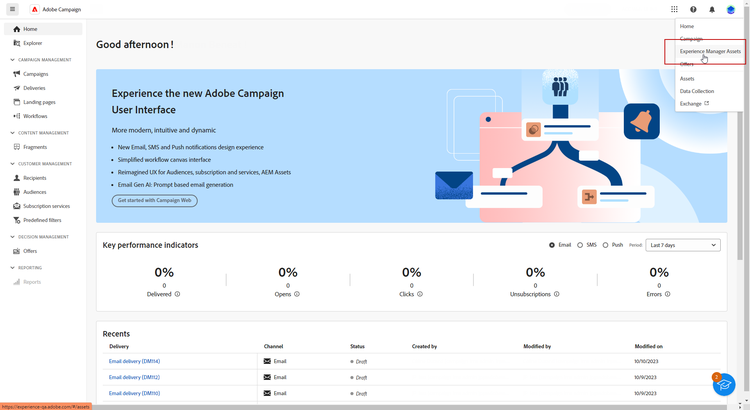
Adobe Experience Manager Assets is an enterprise digital asset management system that Adobe positions as an agentic DAM acting as a content advisor. It handles ingestion, organization, and classification of assets, then surfaces relevant items, applies usage rules, and adapts content for downstream channels.
The platform organizes its capabilities into discovery, governance, activation, and insights. Agentic intelligence runs across all four, from conversational retrieval through compliance scanning to resizing output for delivery requirements.
Key features include:
- Content advisor agent: Conversational search that locates relevant assets across multiple Experience Manager Assets instances, Content Hub, and other Experience Manager applications.
- AI-powered tagging: Automatically groups and classifies assets and applies brand-specific metadata, including generated metadata tags and automated tag translation for global search.
- Agentic governance and rights management: Scans for and flags expired, duplicate, and non-compliant assets, and supports digital rights management.
- Permission automation: Workflows simplify creation of role-based permissions and manage asset access, alongside versioning, duplication detection, and customizable workflows.
- Agentic content optimization: Resizes image and video content to meet downstream requirements or viewer bandwidth, and adapts, remixes, and transforms assets for screens, including video and 3D.
- Dynamic media templates: Templates that react to contextual, real-time insights to personalize delivered content.
- Usage insights: Reports on asset usage such as top downloads, integrates first- and third-party analytics for cross-channel performance, and surfaces insights on DAM usage data.
Limitations (as reported by users on G2):
- Learning curve: Reviewers describe a steep initial learning curve, particularly for users unfamiliar with the wider Adobe ecosystem.
- Setup and configuration complexity: Some users note that initial implementation and configuration require considerable time and technical investment.
- Cost: Licensing and implementation costs are described as high, which can put the platform out of reach for smaller organizations.

Source: Adobe
3. Bynder

Best for: Brand-governed asset discovery and activation
Strengths: Natural language and image search, taxonomy control
Things to consider: AI agents and AI search are add-on modules
Bynder positions its digital asset management product as the system of record for content, keeping assets brand-approved, findable, and ready for activation. Discovery, governance, activation, and customization form the four pillars of the product.
Its AI discovery layer goes beyond traditional metadata matching, accepting natural language prompts and reference images. Governance runs on a configurable taxonomy mapped to an organization’s business language, with support for multiple brands, markets, and teams on one platform.
Key features include:
- AI-powered search: Natural language prompts plus Search by Image, which accepts a URL or reference picture, and Similarity Search for visually comparable assets.
- Duplicate manager: Locates and manages duplicate assets to keep the library organized.
- Configurable taxonomy and access control: Taxonomy mapped to business language, role-based access controls, and multi-brand, multi-market support on a single platform.
- AI agents module: An add-on that creates customizable, context-aware agents operating against the asset library.
- Open integration for activation: More than 155 integrations connect systems so assets flow from the source of truth to the systems that need them.
- Audience-specific portals: Customizable homepages and portal experiences control what internal teams and external partners see and what they can access.
- Workflow modules: Asset workflow handles briefing, proofing, and approval of assets; content workflow covers creation, review, and approval of structured editorial content.
Limitations (as reported by users on G2):
- Missing features: Reviewers frequently mention gaps in native features, including advanced AI tooling and templating, with some capabilities requiring add-ons.
- Learning curve: Users note a learning curve when adapting to Bynder’s file organization and taxonomy model, especially coming from folder-based systems.
- Integration transparency: Some reviewers say integrations are not always clearly documented and can carry additional costs, with support sometimes deferring to third-party partners for troubleshooting.

Source: Bynder
Enterprise Search and Agentic Knowledge Platforms
4. Glean

Best for: Cross-system search and agents built on company context
Strengths: 250+ connectors, enterprise graph, agent governance
Things to consider: Horizontal platform with no media-specific processing
Glean assembles enterprise context as the foundation for its agents. Connectors capture signals from source systems, search indexes the underlying data, an enterprise graph maps how items relate to one another, and enterprise memory records how processes run.
On top of that context sit search, an assistant, and agents. Glean states that pre-connected enterprise context reduces token consumption and lowers the cost of scaling AI.
Key features include:
- Connectors and actions: More than 250 connectors bring source systems into a single index, with actions that let agents operate in those systems.
- Layered context graphs: A personal graph models how an individual works and an enterprise graph models how the company works, feeding hybrid search that combines both.
- Agent tooling: Agent Builder, Agent Orchestration, Agent Library, Agent Harness, and Agent Governance for control at scale.
- Glean Protect: Runs in a single-tenant cloud and enforces strict permissions so users see only what they are allowed to see.
- Open platform access: Open APIs, a UI-ready web SDK, headless MCP support, multi-cloud support, and model choice through Model Hub.
- Proactive intelligence: Surfaces what matters next rather than waiting for a query.
- Observability: Tracks every query, answer, and action across the platform.
Limitations (as reported by users on G2):
- Search precision on connected tools: Some users report occasional hallucinations or irrelevant results for specific integrations, such as JQL-based Jira searches, that require fine-tuning.
- Customization constraints: Reviewers note limited customization options can lead to a less tailored search experience for some teams.
- Pricing transparency: Users mention that Glean does not publish self-serve pricing, requiring a sales-led evaluation process.

Source: Glean
5. Microsoft 365 Copilot

Best for: Knowledge delivery inside Microsoft 365 apps
Strengths: Work IQ context layer, agent store, Copilot Studio
Things to consider: Context and permissions tied to the Microsoft estate
Microsoft 365 Copilot delivers answers and actions inside Microsoft applications. Underneath it sits Work IQ, a workplace intelligence layer that connects data, context, and tools so Copilot and agents have information about the user, their role, and their organization.
Copilot spans several interaction modes. Chat handles questions and drafting, Cowork accepts handoffs of longer multi-step tasks across concurrent projects, and search operates over work content and connected apps.
Key features include:
- Work IQ context layer: Connects data, context, and tools across Microsoft apps to ground Copilot and agent responses in the user’s role and company.
- AI-powered enterprise search: Accepts a question, phrase, or command and returns results from work content and connected applications.
- Cowork task handoff: Takes on complex tasks and keeps multiple projects moving at once, grounded in work context and selecting a model per task.
- Ready-to-use and custom agents: Agents from Microsoft and partners are available in the Agent Store, while Copilot Studio builds custom agents from templates or natural language.
- Notebooks: Groups chats, files, meeting notes, and project materials for analysis, including AI-generated podcast-style summaries.
- Content creation: Turns prompts, templates, or a company brand kit into content, videos, podcasts, and surveys.
- Inherited governance: Applies existing Microsoft 365 permissions, sensitivity labels, and retention policies, and prompts, inputs, and responses are not used to train models.
Limitations (as reported by users on G2):
- Response reliability: Reviewers note that suggestions can be inaccurate or require careful review, particularly for complex or highly specialized tasks.
- Value tied to usage frequency: Some users say the tool’s value depends heavily on how consistently it’s used across Microsoft 365 apps.
- Ecosystem dependence: Reviewers describe the tight coupling to the Microsoft ecosystem as useful but restrictive compared with more independent AI tools.

Source: Microsoft
6. Coveo AI-Relevance Platform

Best for: A relevance layer feeding search, recommendations, and agents
Strengths: Unified index, generative answering, Passage Retrieval API
Things to consider: A delivery layer that does not store source content
Coveo operates as a composable relevance layer that brings content from connected systems into any interface. It covers four solution areas: commerce, service, website, and workplace, with the workplace configuration aimed at employee-facing knowledge access.
The platform pairs a unified index with AI models. Semantic search, generative answering, personalization, and recommendations run over the same index, and a retrieval API exposes that index to autonomous agents.
Key features include:
- Relevance generative answering: Generates answers using enterprise-grade LLMs over the unified index, with security applied so employees receive answers scoped to their access.
- Passage Retrieval API: Supplies retrieval-grounded content to agents so their actions rest on indexed enterprise knowledge.
- Semantic encoder and relevance tuning: Vector-based understanding of queries, with Automatic Relevance Tuning adjusting results per query.
- Recommendations: Content Recommendations learn from clicks and views, while predictive recommendations surface a next best action or item.
- Conversational search: Handles complex questions as a dialogue, refining intent across turns before returning content.
- Smart snippets and query suggestions: Displays a direct, non-generated answer inside search results and recommends queries as users type.
- Connectors and compliance: More than 100 content sources connect to the platform, which is certified ISO 27001 and SOC 2 compliant, HIPAA compliant, with a 99.999% SLA.
- Headless architecture: The Headless toolkit lets teams build UI components in any web framework against the platform.
Limitations (as reported by users on G2 and Gartner Peer Insights):
- Developer dependency: Reviewers describe a steep learning curve that often requires dedicated developer time to configure even moderately complex use cases.
- Documentation gaps: Some users note that documentation can be vague or outdated, and the admin interface isn’t as intuitive as expected.
- Relevance depends on traffic: Reviewers point out that machine learning-driven relevance improves with usage data over time, so results may take time and sufficient activity to mature.

Source: Coveo
7. Guru

Best for: A governed knowledge layer serving people and AI tools
Strengths: Auto-verification, citation enforcement, MCP delivery
Things to consider: Text-focused rather than media-focused
Guru structures and governs company knowledge, then delivers it to people and other AI systems. Rather than only retrieving existing content, it reconciles conflicting versions, detects gaps, and drafts documentation where none existed.
Continuous improvement runs through the product. Guru reports handling roughly 80 to 90 percent of verification automatically using usage signals, content age, and policy rules, escalating to human experts when needed, and archiving stale or superseded content with human review.
Key features include:
- Connect and index: More than 100 source connectors feed a single retrieval index, with permission-aware ingestion so each source keeps its original access controls, plus HRIS and identity sync.
- Content reconciliation: Detects redundant and conflicting content across sources, reconciles it, surfaces missing knowledge, and extracts key facts and processes from raw sources.
- Agent-generated documentation: Turns conversations, meetings, and tickets into structured docs, routing drafts to subject matter experts for review before publication.
- Automated verification and cleanup: Usage signals, content age, and policy rules drive verification, with scheduled expert review cycles and auto-archival of low-trust content.
- Knowledge agent capabilities: Chat with follow-ups, configurable Skills, cited Q&A, deep research mode that synthesizes sources into structured reports, guided conversations, scoped web search across admin-approved domains, and actions taken in connected systems as the authenticated user.
- Citations and lineage: Citation enforcement at the platform level, visible reasoning chains and permission context, and audit logs with lineage for every answer, edit, and verification.
- Universal AI delivery: MCP support lets external AI tools pull governed knowledge with the same permissions and citations, with API, CLI, Slack, Teams, and browser extension surfaces.
- Access and compliance controls: Regex-based DLP masking of PII and PHI at ingestion, role-based access controls, configurable guardrails, SSO and SCIM, SOC 2 Type II, and HIPAA and GxP support.
Limitations (as reported by users on G2 and Capterra):
- Customization rigidity: Some users find the card-based structure and workflows feel rigid when trying to tailor the platform to specific team needs.
- Search at scale: Reviewers note that search can get cluttered and less precise as the knowledge base grows.
- Native integration breadth: Users would like more native integrations beyond core tools like Slack, and some content-heavy teams report a learning curve during initial setup.

Source: Guru
8. IBM watsonx Orchestrate

Best for: Governing and coordinating agents across existing systems
Strengths: Agentic control plane, governed catalog, hybrid deployment
Things to consider: A control plane rather than a knowledge repository
IBM watsonx Orchestrate is an agentic control plane that brings an organization’s agent ecosystem into one place. It targets the operational layer, showing what agents are doing, managing how they work together, and scaling the ones that produce results.
The product works with agents, tools, and systems already in place rather than requiring replacement. It connects workflows, data, and applications across the business and runs across cloud and on-premises environments.
Key features include:
- Agentic control plane: Centralized visibility, policy enforcement, and lifecycle control over agents across teams, tools, models, and runtimes, including agents built outside Orchestrate.
- Multi-agent orchestration: Coordinates agents, tools, and workflows across systems so automation becomes end-to-end execution.
- Flexible agent construction: No-code and pro-code build options, or bring existing agents, running anywhere in the enterprise without lock-in or rework.
- Governed agent catalog: A catalog for finding, evaluating, and reusing enterprise-ready agents and tools that arrive pre-integrated.
- Hybrid deployment: Runs across cloud and on premises, with built-in security, governance, and compliance.
- Cross-function coverage: Pre-built agents and use cases span customer experience, sales, HR, finance, procurement, and IT operations.
- Agent Connect ecosystem: Partners publish specialized agents into the watsonx Orchestrate catalog.
- Consumption-based pricing: Pricing scales across teams, environments, and workloads.
Limitations (as reported by users on G2):
- Advanced customization: Reviewers note limited flexibility for complex, multi-step workflow logic and integrations with legacy systems.
- Learning curve: Users describe a steeper learning curve and less intuitive interface for advanced multi-agent orchestration compared with some alternatives.
- Cost at scale: Some reviewers find the platform expensive to maintain as user bases and usage grow, particularly without committed package pricing.

Source: IBM
Conclusion
Agentic AI is transforming enterprise knowledge delivery by moving beyond traditional search toward autonomous systems that retrieve, synthesize, govern, and deliver information based on user intent and business context. By connecting to distributed knowledge sources, understanding multiple content formats, enforcing governance policies, and orchestrating knowledge workflows, these platforms help employees access trusted information more efficiently while reducing manual effort. As organizations continue to generate larger volumes of content, agentic AI provides a scalable way to improve knowledge discovery, decision-making, and operational productivity across the enterprise.
Was this post useful?
Thank you for your feedback!



.jpg?width=1280&auto=webp&quality=80&format=jpg&disable=upscale)