

Trusted Platforms for Hosting Live Webinars: Top 8 in 2026

TL;DR: Live webinar platforms broadcast branded, interactive sessions to large remote audiences and turn them into on-demand content. Kaltura is best for marketing-led webinar programs, ON24 enterprise demand generation, Zoom Webinars large-scale broadcasts on a familiar interface, and GoTo Webinar straightforward recurring sessions.
What Are Platforms for Hosting Live Webinars?
Choosing a trusted platform for hosting live webinars depends on your audience size, budget, and need for interactive tools like Q&A and polls. These platforms allow hosts to broadcast video and audio to a remote audience, typically supporting features such as screen sharing, chat, Q&A, and polls. They are used by businesses, educators, and organizations to deliver content, provide training, or engage with large groups without requiring physical presence.
Webinar platforms differ from simple video conferencing tools by focusing on scalability, audience engagement tools, and content management. Modern webinar platforms often integrate with marketing automation and customer relationship management (CRM) tools, making them suitable for lead generation, product demos, and educational sessions. They also offer analytics to track attendee behavior and engagement.
Live Webinar Platforms at a Glance
The table below summarizes the main differences between the platforms covered in this guide, including who each one suits and the trade-offs reported by users. Each platform is explored in more detail in the sections that follow.
| Category | Platform | Best For | Key Strengths | User Ratings |
| Webinar and virtual event platforms | Kaltura Webinars | Marketing teams running an ongoing webinar program | Live, simulive and on-demand formats, SSO, cross-webinar analytics | 4.3/5 (117 reviews, G2 — listed as Kaltura Video Cloud) |
| Webinar and virtual event platforms | ON24 | Enterprise demand generation and regulated industries | Console customization, 20+ engagement tools, deep CRM analytics | 4.3/5 (1,221 reviews, G2) |
| Webinar and virtual event platforms | BigMarker | Highly branded webinars and demand generation programs | Browser-based delivery, 50,000 attendees, native CRM integrations | 4.7/5 (447 reviews, G2) |
| Webinar and virtual event platforms | Adobe Connect Webinar Rooms | Interactive, storyboard-driven webinars and training | Persistent custom rooms, pods and layouts, browser-based joining | 4.0/5 (974 reviews, G2) |
| Webinar and virtual event platforms | Livestorm | Teams running frequent browser-based marketing webinars | No-download joining, email cadences, restreaming, automation | 4.4/5 (1,705 reviews, G2) |
| Conferencing platforms with webinar products | Zoom Webinars | Large broadcasts on an interface audiences already know | Up to 100,000 attendees, Production Studio, Simulive, AI captions | 4.5/5 (390 reviews, G2 — listed as Zoom Events and Webinars) |
| Conferencing platforms with webinar products | Webex Webinars | Global audiences needing translation and accessibility | 100+ language translation, rehearsal mode, stage management | 4.6/5 (1,078 reviews, G2 — listed as Webex Events & Webinars) |
| Conferencing platforms with webinar products | GoTo Webinar | Recurring training, education and internal communications | Practice Mode, branded registration, Simulive, session encryption | 4.2/5 (795 reviews, G2) |
What Makes a Webinar Platform Trustworthy?
1. Platform Reliability and Uptime
A trustworthy webinar platform must deliver consistent reliability and high uptime. Uptime refers to the percentage of time the service is operational and accessible without interruption. For organizations hosting live events, even brief outages can disrupt presentations, lead to loss of audience, and harm reputation. Leading platforms often guarantee uptimes of 99.9% or higher, backed by redundant infrastructure and proactive monitoring.
Reliability is also about platform stability under varying loads. As audience sizes change, a dependable platform should handle high traffic without performance degradation. This requires:
- Robust server architecture
- Load balancing
- Efficient resource allocation
Organizations should review a platform’s service level agreements (SLAs) and historical uptime records before making a selection.
2. Reliable Live Streaming
Reliable live streaming is central to the webinar experience. A trustworthy platform ensures that video and audio streams are delivered with minimal latency and buffering, regardless of the number of attendees. This is achieved through adaptive streaming technologies that adjust video quality based on the viewer’s bandwidth, as well as global content delivery networks (CDNs) that distribute content efficiently.
Technical failures during live streaming can significantly affect attendee engagement and satisfaction, such as:
- Dropped connections
- Poor audio/video quality
A reliable platform should offer real-time diagnostics and failover mechanisms to mitigate disruptions. Before committing, organizations should conduct trial runs and review case studies to assess a platform’s live streaming capabilities under real-world conditions.
Related content: read our article on what a webcast is.
3. Security and Access Controls
Security is a critical aspect of any webinar platform, especially when sensitive content or private discussions are involved. Trustworthy platforms employ end-to-end encryption for video, audio, and data streams to prevent unauthorized access. They also provide granular access controls, allowing hosts to restrict entry through:
- Password protection
- Registration requirements
- Domain allowlisting
In addition to basic access controls, advanced security features such as multi-factor authentication (MFA) and detailed audit logs further protect against breaches and misuse. Compliance with industry standards, like GDPR or HIPAA, is also important for organizations dealing with regulated data. Security policies and third-party security audits should be reviewed to ensure the platform meets necessary requirements.
4. Recording and On-Demand Access
Recording capabilities are essential for extending the value of a live webinar. A reliable platform allows hosts to record sessions in high quality and make them available for on-demand viewing. This benefits attendees who could not join live and provides organizations with reusable content for training or marketing. The recording process should be seamless, with options for automatic or manual initiation.
On-demand access should include flexible controls, such as:
- Time-limited availability
- Viewer authentication
- Tracking of playback analytics
Trustworthy platforms offer secure storage for recordings, ensuring they are protected from unauthorized download or sharing. Integration with content management systems (CMS) can further simplify post-event content distribution and access management.
5. Customer Support
Effective customer support is a hallmark of a trustworthy webinar platform. Live events can encounter unexpected technical issues, so access to responsive support is critical. Reliable platforms offer multiple support channels, such as live chat, phone, and email, with guaranteed response times. Many also provide dedicated onboarding and training resources to help users get started.
Beyond real-time troubleshooting, ongoing support should include:
- Detailed documentation
- FAQs
- Community forums
Proactive communication about system updates or maintenance can help organizations plan ahead and avoid disruptions. Before choosing a platform, organizations should review support SLAs and seek feedback from current users on the quality of customer assistance.
Related content: Learn how support fits into the wider process in our guide to webinar management.
How to Evaluate a Webinar Platform’s Reputation and Reliability
Evaluating a webinar platform requires looking beyond its feature list. Organizations should verify how the service performs in real deployments, how transparently the provider handles problems, and whether its policies support expected usage:
- Review independent user feedback: Check recent reviews from organizations with similar audience sizes and requirements. Look for recurring reports about connection problems, billing issues, administration, or product limitations rather than relying on individual reviews.
- Check the provider’s track record: Consider how long the provider has operated its webinar service and its experience with events at the required scale. Review past service incidents and how quickly the provider communicated, resolved the problem, and addressed its root cause.
- Examine status and incident transparency: Look for a public status page that documents current service health and previous incidents. Detailed incident histories can reveal repeated problems affecting broadcasting, registration, analytics, or other components.
- Assess product development and maintenance: Review release notes to determine whether the platform receives regular bug fixes, compatibility updates, and improvements. Check whether changes are documented clearly and whether updates create recurring problems for existing workflows or integrations.
- Verify business and contract terms: Review cancellation policies, automatic renewals, account limits, data retention periods, and export options. Confirm that webinar recordings, attendee information, and analytics can be exported if the organization changes platforms.
- Test with a realistic pilot webinar: Run a session that reflects the expected audience size, presenter setup, and interaction level. This can expose usability or performance problems that are difficult to identify from product documentation.
- Check browser and device compatibility: Verify that attendees can join from commonly used browsers, operating systems, and mobile devices without installing unnecessary software. Review any limitations that apply to specific devices or attendee roles.
- Evaluate third-party integrations: Confirm that integrations with CRM, marketing, payment, or analytics systems work reliably. Check whether integrations are native, depend on third-party connectors, or require custom API development.
- Review data portability: Determine whether registration records, attendee activity, recordings, and reports can be exported in standard formats. Easy data export reduces dependency on the provider and simplifies future migration.
- Investigate account and billing practices: Look for reports of unexpected charges, difficult cancellations, or unclear usage limits. Transparent pricing and account policies reduce the risk of operational or budget problems.
- Check references from similar organizations: Ask the provider for customer references with comparable webinar volumes and use cases. These references can provide practical information about long-term platform performance and vendor responsiveness.
Related content: Read our guide to webinar promotion
Notable Trusted Platforms for Hosting Live Webinars
How we selected these platforms: We shortlisted webinar hosting platforms based on reliable live streaming at scale, security and access controls, recording and on-demand delivery, audience engagement tooling, analytics, and integration with CRM and marketing automation systems.
Webinar and Virtual Event Platforms
1. Kaltura Webinars

Best for: Marketing teams running an ongoing, branded webinar program
Strengths: Live, simulive and on-demand formats with SSO and cross-webinar analytics
Things to consider: Initial configuration takes planning and internal preparation
Ratings: 4.3 out of 5 on G2 (117 reviews, listed as Kaltura Video Cloud)
Kaltura Webinars handles live broadcasts, simulive sessions, breakout rooms and on-demand recordings from a single hub, so different session formats are managed and streamed through one interface. Each webinar generates a branded site and landing page, built with the help of a generative AI content and agenda builder that produces titles, agendas and page copy from basic inputs.
During the session, hosts run live and scheduled polls, moderated Q&A, announcements, group chat and 1:1 networking. Recorded sessions convert automatically into on-demand content inside a content lab, where they can be chaptered, captioned with ASR, clipped into shareable segments and organized into galleries for reuse after the live date.
Key features include:
- All session types in one hub: Live broadcasts, simulive events, breakout rooms and on-demand recordings are created and streamed from the same interface, with shared video playback that avoids lag or distortion.
- Branded registration sites: Every webinar produces a branded minisite and matching landing page, generated from images, speaker headshots and event details, with an embedded webinar calendar for upcoming sessions.
- Access control and sign-on: The platform supports single sign-on, so registration and viewing can be tied to existing identity systems rather than standalone credentials.
- Engagement and gamification tools: Live polls, real-time notifications, moderated Q&A, leaderboards, badges and certifications run inside the session, supported by a real-time AI assistant and a sentiment analyzer that reads the room during the broadcast.
- Automatic on-demand conversion: Recordings are published back to the same webinar site automatically, with ASR captioning, chaptering and the option to add VOD content in advance of the live session.
- Real-time first-party analytics: Attendee interactions, focus rates and performance metrics are tracked live and rolled up into cross-webinar reports and lead scoring that pass into marketing automation platforms.
- Marketing stack integrations: Native connections to Marketo, HubSpot, Eloqua and Pardot push registration and engagement data into existing campaign workflows.
- Content repurposing: The built-in content lab edits recordings into clips and galleries, and generates follow-up emails and on-demand links for post-event distribution.
Limitations (as reported by users on G2):
- Initial configuration effort: Getting the platform set up takes preparation on the customer side, and reviewers advise having an internal team ready before implementation.
- Learning curve on advanced setup: Some advanced configuration, such as building detailed registration forms, takes time to learn and would benefit from more guided workflows.
- Basic editing tools: Built-in video editing covers straightforward changes, and more involved edits are usually handled in an external tool.
What users say: Reviewers on G2 consistently point to Kaltura’s breadth of formats and enterprise-grade content management as standout strengths, with several noting the platform holds up well across virtual events, video hosting, and webinar use cases in one ecosystem. The recurring counterpoint is that Kaltura’s usability and setup experience lag behind more consumer-friendly competitors, and reviewers frequently recommend budgeting real internal time for onboarding before going live with a first program.

Source: Kaltura
2. ON24

Best for: Enterprise demand generation and regulated industries
Strengths: Console customization, 20+ engagement tools and deep CRM analytics
Things to consider: Steep learning curve on the builder and console setup
Ratings: 4.3 out of 5 on G2 (1,221 reviews)
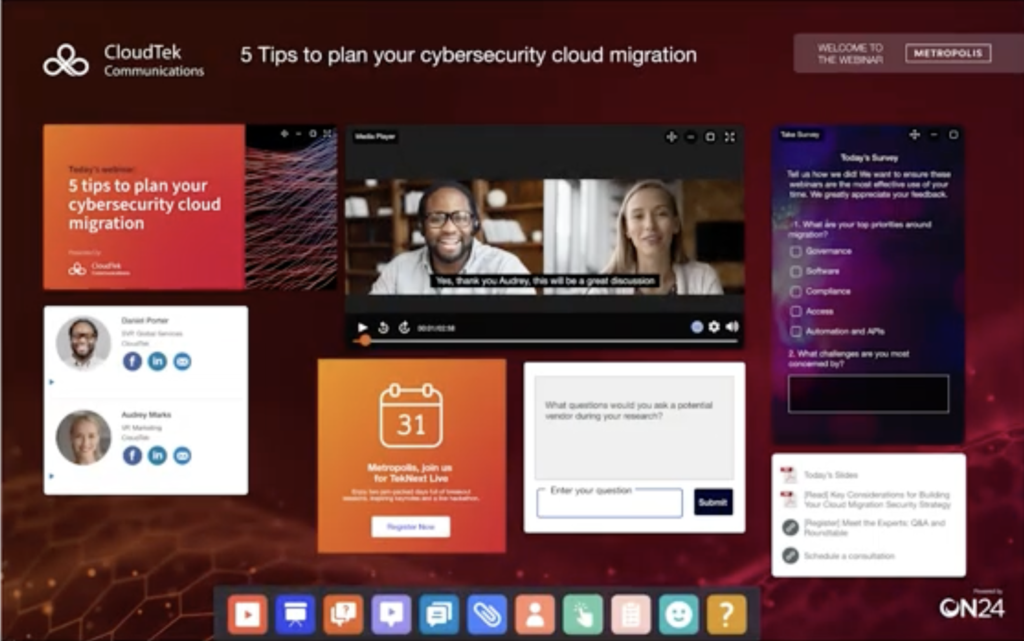
ON24 runs live, simulive, sim-2-live, pre-recorded and on-demand webinars from a single platform. Simulive sessions play pre-recorded content at a scheduled time while presenters answer questions live, and sim-2-live sessions roll a recorded segment into a live Q&A at the end. Every live webinar becomes an on-demand asset automatically, on the same audience URL.
Production is handled through four builders covering registration pages, email campaigns, audience segments and the attendee console itself, which can be restyled with custom layouts, colors and backgrounds. Attendee behavior feeds analytics that pass in real time into marketing automation platforms and CRMs, and AI tools generate transcripts, blog posts, highlights and social clips from the recording.
Key features include:
- Multiple broadcast formats: Live, simulive, sim-2-live, pre-recorded and on-demand webinars all run on the same platform, with recordings retaining the engagement tools used in the live session.
- Console and registration builders: Drag-and-drop tools build registration pages, email campaigns, audience segments and branded attendee consoles with customizable layouts, colors and backgrounds.
- Engagement and conversion tools: More than 20 tools cover real-time Q&A, live polls and surveys, chat, downloadable resources, personalized calls to action and breakout rooms.
- Captioning and interpretation: Automated live captioning covers English plus six other Western European languages, automated on-demand captioning covers 15+ source languages with translation into 60+, and human captioning, subtitling and live audio interpretation extend to 100+ languages and two sign languages.
- Browser-based delivery: Hosts and attendees join through a modern browser such as Chrome, Firefox or Edge with a stable connection, and no separate webcam or microphone hardware is required of hosts.
- Analytics and CRM integration: Real-time attendee engagement metrics, attendance rates, interaction levels and AI-identified key moments feed into Salesforce, Marketo and Google Analytics.
- Support and services: 24/7 technical support, onboarding, training and dedicated account teams are available, alongside event management, production and customization services.
- Data protection compliance: The platform operates under GDPR and CCPA compliance measures for handling personal data.
Limitations (as reported by users on G2):
- Learning curve: The back end and console customization take time to learn, and onboarding presenters or guests unfamiliar with the interface can slow event preparation.
- Interface and performance: Reviewers describe the webinar builder as dated and unintuitive, and note sluggishness when managing large guest lists.
- Customization limits: Visual page adjustments and console branding options are narrower than some teams expect, including registration page layout controls.
- Upload reliability: On-demand webcast uploads sometimes return unclear import errors, requiring users to wait and re-check whether processing succeeded.
- Cost and gated features: Pricing is regarded as high, with several capabilities placed behind higher tiers or additional charges.
- Self-service support: The knowledge base and AI help chat are described as difficult to navigate, with some articles out of step with the current interface.
What users say: G2 named the ON24 Intelligent Engagement Platform the #1 enterprise webinar solution in its Winter 2026 report, and reviewers consistently praise its registration flexibility (from one-click sign-up to multi-session series) and depth of first-party engagement data for sales and marketing follow-up. The tradeoff reviewers describe most often is a real learning curve on the console and builder tools, along with a sense that pricing and some capabilities are gated behind higher tiers than expected for the platform’s depth.

Source: ON24
3. BigMarker

Best for: Highly branded webinars and demand generation programs
Strengths: Browser-based delivery, 50,000 attendees and native CRM integrations
Things to consider: The large number of settings makes the admin side confusing
Ratings: 4.7 out of 5 on G2 (447 reviews)
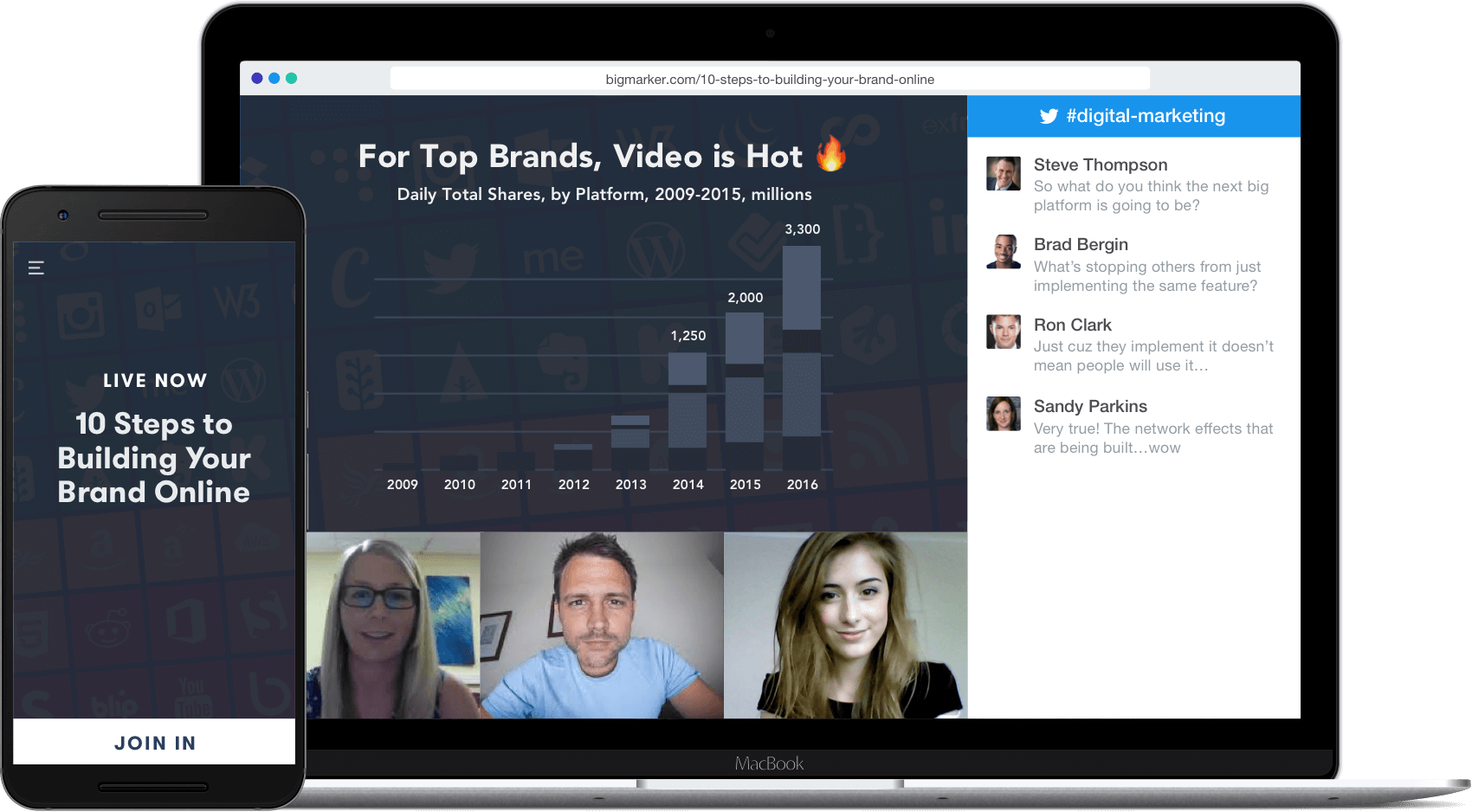
BigMarker runs entirely in the browser, so attendees join without installing software and hosts keep control over the look of the interface. Sessions can be broadcast from the platform’s own studio or pushed in over RTMP, and can be run live, on a recurring schedule, as simulive automated events, or published on demand.
The platform bundles the surrounding marketing workflow rather than leaving it to separate tools. Each webinar gets a branded landing page built from one of 15+ templates, its own email dashboard for invitations and reminders, and data capture through forms, polls, Q&A and offers that syncs into a CRM or marketing automation system.
Key features include:
- Browser-based joining: Sessions run in the cloud through a web browser with no downloads for attendees, and hosts control the interface theme, logo and room branding.
- Multiple webinar formats: Live, recurring, simulive automated and on-demand webinars can be created without limits, streamed from the built-in studio or from an external encoder over RTMP.
- Enterprise scale and security: Enterprise plans add advanced security features and scale to 50,000 attendees, with HD audio and video, HD screen sharing and up to 64 people on camera at once.
- Recording and on-demand delivery: Webinars can be recorded and republished on demand, embedded into a website alongside registration forms and live sessions.
- In-session engagement: Public and private chat, Q&A with upvoting, polls and quizzes, breakout rooms, handout resources, whiteboard markup and the ability to bring attendees on screen.
- Presentation controls: Presenters pre-load or upload slides in session, play YouTube and MP4 videos with synchronized play and pause, and add presenters without a fixed limit.
- Telephony and simulcast: Dial-in is included for presenters with an option to extend it to attendees, and sessions can be streamed simultaneously to Facebook and YouTube Live.
- CRM and marketing integrations: Native connections cover Salesforce, HubSpot, ActiveCampaign, Marketo, Pardot and Eloqua, pushing form, poll, Q&A and offer data into existing systems.
- Monetization and compliance extras: Sponsor banners can be sold and displayed, and attendance certificates track completion against CEU requirements.
Limitations (as reported by users on G2):
- Setting sprawl: The volume of configuration options across webinar settings pages makes the admin interface hard to navigate, particularly for new users.
- Customization boundaries: Page templates and branding controls are limited without vendor assistance, and some reviewers describe the design interface as dated.
- Integration gaps: Salesforce syncing is inconsistent for some teams, and certain CRM platforms are not supported natively.
- Occasional glitches: Users report bugs where buttons or features do not behave as expected, including occasional audio and recording issues during live sessions.
- Recording output: Recordings are supplied as a single master file rather than separate audio and video tracks per presenter, which limits post-production editing.
What users say: Reviewers give BigMarker some of the strongest marks in this category, frequently citing its customer support responsiveness and flexible customization and branding options as reasons they chose it over larger competitors. Users also highlight strong integration capabilities that streamline running multiple events, though the tradeoff for that depth of configuration is an admin interface some reviewers find harder to navigate than more streamlined alternatives.

Source: BigMarker
4. Adobe Connect Webinar Rooms

Best for: Interactive, storyboard-driven webinars and virtual training
Strengths: Persistent custom rooms, pods and layouts with browser-based joining
Things to consider: Performance can degrade as participant numbers grow
Ratings: 4.0 out of 5 on G2 (974 reviews)
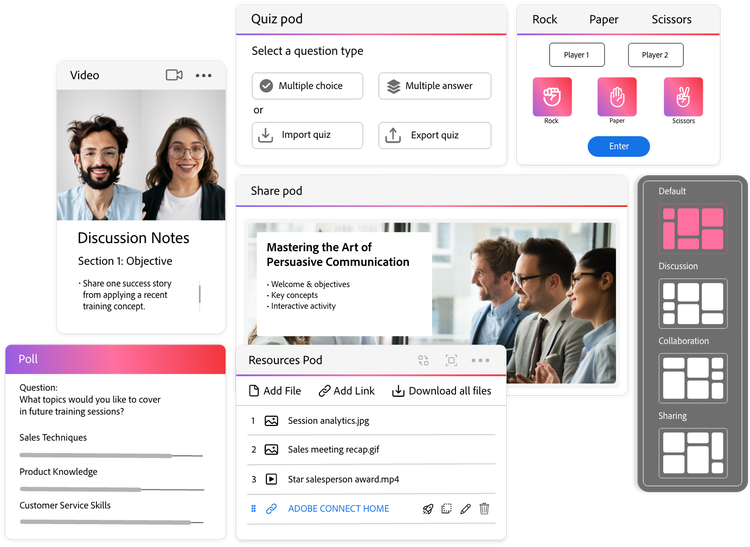
Adobe Connect Webinar Rooms builds sessions around storyboards rather than a linear slide deck. Hosts assemble layouts from interactive components and switch between them during the broadcast, while backstage tools and moderation controls let a production team manage large audiences without disrupting what attendees see.
Room appearance is controlled at a detailed level, from background images and wallpapers through to banners, logos and colors on login and administrative pages, with account and event URLs mapped to an enterprise domain. Promotion, registration, delivery and conversion tracking sit inside the same package, drawing on Adobe Experience Manager and Adobe Analytics.
Key features include:
- Storyboard-based sessions: Layouts are built from interactive components rather than static slides, and hosts move between them during the broadcast to structure the session.
- Backstage and moderation controls: Production tools let hosts manage large events and moderate audience activity separately from what attendees see on screen.
- Single-click browser joining: Attendees enter from any modern browser on any device without an install step, reducing barriers to entry for external audiences.
- Interactive on-demand recordings: Recordings retain the interactive elements of the live session, so the same session continues to generate demand after the live date.
- Room and account branding: Background images, wallpapers, banners, logos and colors are customizable, and account and event URLs can use the organization’s own domain.
- Registration and campaign tracking: Promotion, registration, delivery and conversion tracking by campaign run through the embedded Adobe Experience Manager and Adobe Analytics capabilities.
- CRM integration: Custom integrations connect webinar and registration data into existing customer relationship management workflows.
- Accessible, repeatable sessions: Presenters build repeatable sessions that stay consistent for audiences in different time zones and for participants with accessibility needs.
Limitations (as reported by users on Capterra):
- Performance at scale: Sessions slow down as participant numbers rise, with delays reported once larger groups begin using microphones or the whiteboard.
- Stability during sharing: Reviewers report freezes, dropped connections and audio or video stutter, most often when screen sharing.
- Dated experience: The platform is described as slower and less modern than comparable tools, with some administrative screens feeling out of date.
- Mobile gaps: The mobile application lacks capabilities available in the desktop version.
- Cost and onboarding: Pricing is regarded as high, and account setup and admin configuration are difficult for organizations without IT support.
What users say: Long-time users describe Adobe Connect’s event configuration and persistent custom rooms as a genuine strength, particularly for teams that repeat the same interactive session format across cohorts or time zones. The most common friction reviewers report is around support quality and mobile functionality, both scoring meaningfully lower in head-to-head comparisons against newer webinar platforms, alongside the general sense that the interface feels dated next to browser-native competitors.

Source: Adobe Connect
5. Livestorm

Best for: Teams running frequent browser-based marketing webinars
Strengths: No-download joining, email cadences, restreaming and automation
Things to consider: Branding and layout controls are limited on lower tiers
Ratings: 4.4 out of 5 on G2 (1,705 reviews)
Livestorm runs webinars, on-demand webinars, fully automated webinars and virtual events from the browser, with a restreaming option that pushes a session to several platforms at once. Attendees join without installing anything, which reduces the technical friction that causes drop-off at the start of a session.
The platform covers the surrounding workflow as well: customizable registration pages, unlimited reminder and follow-up email cadences using templates or custom HTML, and a reporting dashboard tracking registrations, attendance rate and engagement. An enterprise tier adds reliability commitments, deeper customization and global legal compliance for larger organizations.
Key features include:
- Browser-based joining: Live webinars and virtual events run in the browser with no downloads for hosts or attendees, across devices and operating systems.
- Multiple webinar modes: The platform supports live webinars, on-demand webinars, fully automated webinars driven by preset workflows, and multi-session virtual events.
- Restreaming: A single session can be streamed simultaneously to multiple external platforms.
- Registration and custom fields: Registration pages are built for conversion and extended with custom fields, so participation forms collect the data a team needs.
- Email cadences: Unlimited customized reminder and follow-up emails are built from templates, plain text or custom HTML, and scheduled around each event.
- In-session engagement: Customizable polls with real-time results, a dedicated Q&A tab that centralizes audience questions, emoji reactions and live chat.
- Branding controls: Registration pages, emails and the event room accept a logo, background images and custom colors for a consistent brand presentation.
- Reporting and CRM sync: An integrated dashboard covers engagement data, attendance rate and exportable contact records, with native integrations to Salesforce, HubSpot, Marketo, Pardot and Zapier.
- Enterprise tier: Adds reliability commitments, advanced customization, global legal compliance and premium support for larger organizations.
Limitations (as reported by users on G2):
- Branding constraints: Layout controls are locked into preset templates, font choices are limited and custom CSS or HTML is not available for event pages.
- Plan gating and pricing: Costs climb as contact and attendee limits increase, and several customization, analytics and branding features sit on higher tiers.
- Performance on large events: Reviewers report lag, occasional disconnections and quality drops during larger sessions or on weaker connections.
- Analytics depth: Reporting is regarded as basic, with limited flexibility for exporting and segmenting engagement data.
- Form logic: Registration forms lack conditional fields and custom validation rules, which limits tailored lead capture.
What users say: Reviewers consistently highlight Livestorm’s browser-based, no-download joining experience as its defining strength, with many describing the all-in-one workflow (registration, reminders, analytics) as genuinely simplifying event logistics for teams running frequent sessions. The most common limitation cited is depth of customization: branding, layout, and advanced reporting controls are seen as more restrictive than competitors offer, particularly on lower-tier plans.

Source: Livestorm
Conferencing Platforms with Dedicated Webinar Products
6. Zoom Webinars

Best for: Large broadcasts on an interface audiences already know
Strengths: Up to 100,000 attendees, Production Studio, Simulive and AI captions
Things to consider: Back-end setup for multi-session events is layered
Ratings: 4.5 out of 5 on G2 (390 reviews, listed as Zoom Events and Webinars)
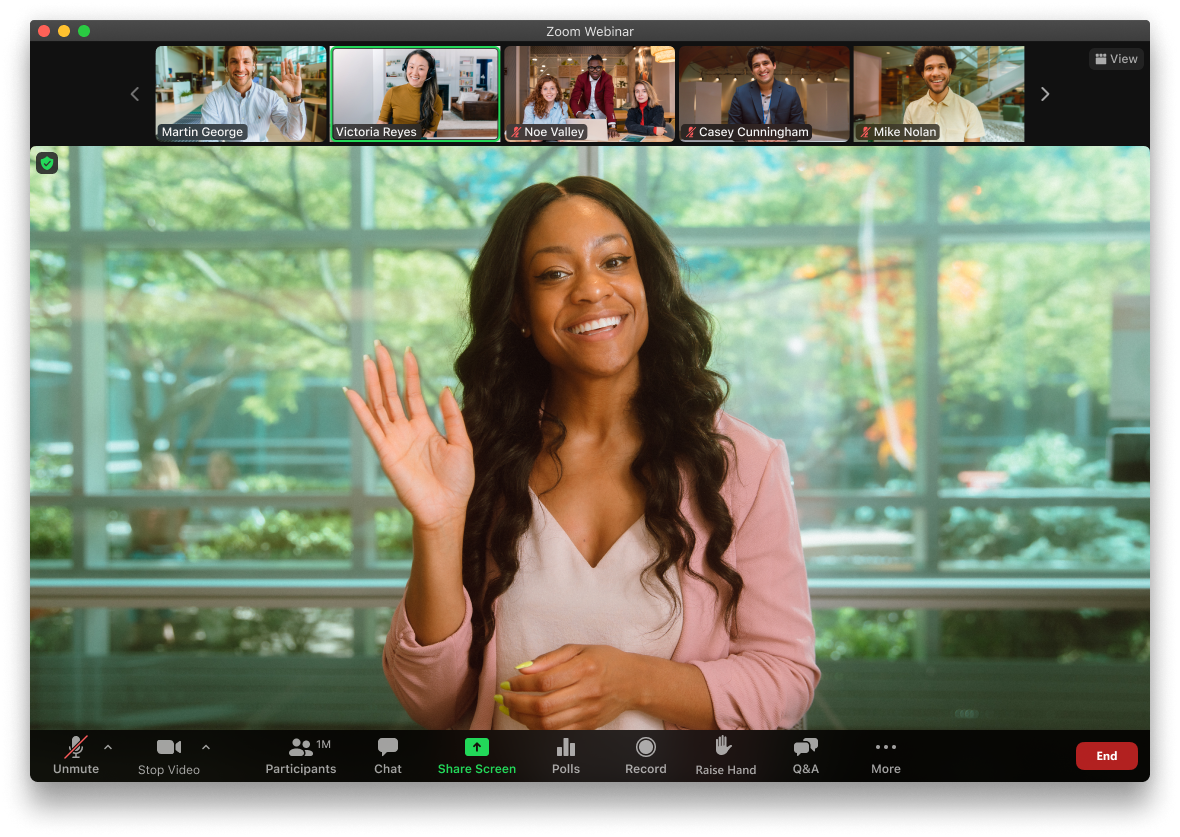
Zoom Webinars extends the meeting platform into a one-to-many broadcast format, where hosts and panelists present and attendees participate through controlled tools rather than open audio and video. It supports one-time webinars, recurring series and multi-session conferences, and scales to 100,000 attendees on the same infrastructure.
Production tooling sits alongside the broadcast itself. Production Studio handles custom layouts, pre-loaded videos and scene switching, a backstage area lets the team coordinate privately, and Simulive plays pre-recorded content at a scheduled time while presenters handle live Q&A. Recordings feed branded video hubs with AI-generated chapters and highlights.
Key features include:
- Scale and format flexibility: One-time webinars, recurring series and multi-session conferences run on one platform, supporting audiences from ten people to 100,000 attendees.
- Production Studio: Custom layouts, pre-loaded video, scene switching and branding produce a structured broadcast without a separate production crew.
- Simulive and backstage: Pre-recorded content is scheduled to run as a live event with presenters joining for live Q&A, while a private backstage area is used to manage speakers and resolve issues mid-event.
- Isolated recording tracks: Separate audio and video from each participant is recorded for import into Premiere, Final Cut Pro or DaVinci Resolve for post-production.
- Multi-platform streaming: Events broadcast simultaneously to YouTube, LinkedIn and Facebook over RTMP while production control stays in Zoom.
- Registration and engagement: Branded registration pages, event lobbies and emails sit alongside real-time polls, Q&A, chat, reactions and breakout rooms.
- Accessibility: AI-powered captions are available in more than 20 languages during live sessions.
- On-demand video hubs: Recordings are organized into searchable branded libraries with AI-generated chapters and highlights, auto-generated social clips and viewer engagement tracking.
- Analytics and CRM connection: Interactive dashboards allow sorting and filtering of attendee and engagement data, and participant records connect directly to a CRM for pipeline attribution.
- Bandwidth management: A native eCDN option is available for organizations distributing large internal broadcasts.
Limitations (as reported by users on G2):
- Back-end navigation: Event creation, registration settings and customization are layered, and configuring multi-session or multi-day events takes time to learn.
- Branding limits: Customization of the live attendee experience and event pages is narrower than dedicated webinar platforms offer.
- Reporting depth: Post-event analytics and attendee reporting are described as limited, with data spread across separate reports.
- Cost at scale: Pricing rises significantly for larger audiences, which reviewers flag as a barrier for smaller teams.
- Occasional performance issues: Users report lag, freezing and slow loading, particularly when switching between sessions or joining on lower bandwidth.
What users say: Reviewers frequently cite the platform’s familiarity and ease of use as its core advantage, noting that presenters and attendees already comfortable with Zoom meetings adapt to the webinar format with minimal friction, and several specifically praise integration capabilities for tasks like meeting transcription and cross-platform embedding. Complaints are relatively rare in proportion to review volume, though the recurring one is that event creation and multi-session configuration require more back-end setup than reviewers initially expect.

Source: Zoom
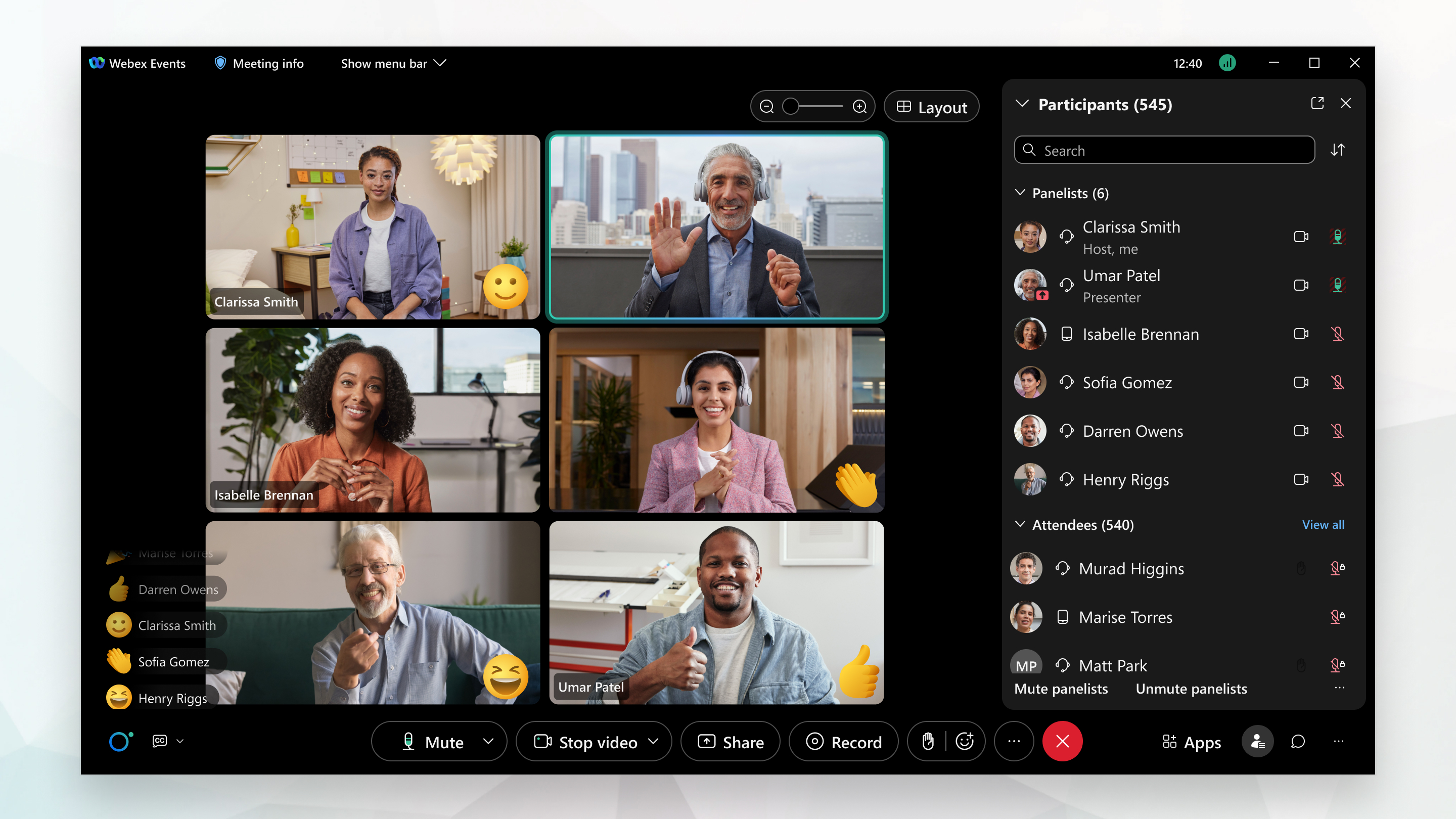
7. Webex Webinars

Best for: Global audiences needing translation and accessibility support
Strengths: 100+ language translation, rehearsal mode and stage management
Things to consider: The console can feel cluttered for first-time hosts
Ratings: 4.6 out of 5 on G2 (1,078 reviews, listed as Webex Events & Webinars)
Webex Webinars, part of the Webex Suite, handles sessions from small briefings up to 100,000 attendees. Accessibility and reach are central to the product: real-time translations cover more than 100 languages, and live interpreters can be brought into the session so attendees follow along in their preferred language.
Hosts get stage management controls over what the audience sees before, during and after the event, plus a rehearsal mode for running the full presentation with co-panelists before going live. Engagement runs through moderated Q&A, live polling, chat, emoji reactions and gesture recognition, with breakout sessions for smaller group discussion.
Key features include:
- Scale and reach: Sessions accommodate up to 100,000 attendees, with real-time translations available in more than 100 languages.
- Rehearsal mode: Presenters run through the entire presentation with co-panelists before going live on stage, reducing the chance of surprises during the broadcast.
- Stage management: Hosts control the stage and the content the audience sees before, during and after the event.
- Live interpretation: Interpreters join the session so attendees can listen to the event in their preferred language.
- Audience engagement: Moderated Q&A, live polling, chat, emoji reactions and gesture recognition are built into the session.
- Immersive share: Presenters can place themselves directly onto the content they are sharing rather than appearing in a separate panel.
- Branded registration: Registration experiences are customized with branding options and themes.
- Breakout sessions: Attendees split into smaller groups for deeper discussion with panelists and return to the main session.
- App integrations: Native connections include Miro and Slido, alongside the wider Webex Suite.
- Production support: A Production Services Team is available to assist with running larger or higher-stakes webinars.
Limitations (as reported by users on G2):
- Interface complexity: The console and back-end menus feel cluttered, and first-time hosts generally need training before running an event.
- Customization limits: Registration page fonts, color themes and event layouts offer less branding control than newer platforms, and some design elements are fixed.
- Client weight: The application is resource-heavy on older devices and limited bandwidth, and the browser experience does not always match the desktop client.
- Complex event setup: Building registration forms and managing panelists across multi-session events is time-consuming.
- Reporting speed: Generating reports on large data sets can be slow.
What users say: Webex Webinars scores well above several competitors on ease of use, setup, and quality of support in head-to-head G2 comparisons, with reviewers specifically calling out its translation and interpretation features as valuable for reaching global audiences. Where feedback is more mixed is on initial console complexity, particularly for first-time hosts who need to learn stage management and multi-panelist workflows before running a polished session.

Source: Webex
8. GoTo Webinar

Best for: Recurring training, education and internal communications
Strengths: Practice Mode, branded registration, Simulive and session encryption
Things to consider: The interface is dated and some features sit on higher tiers
Ratings: 4.2 out of 5 on G2 (795 reviews)
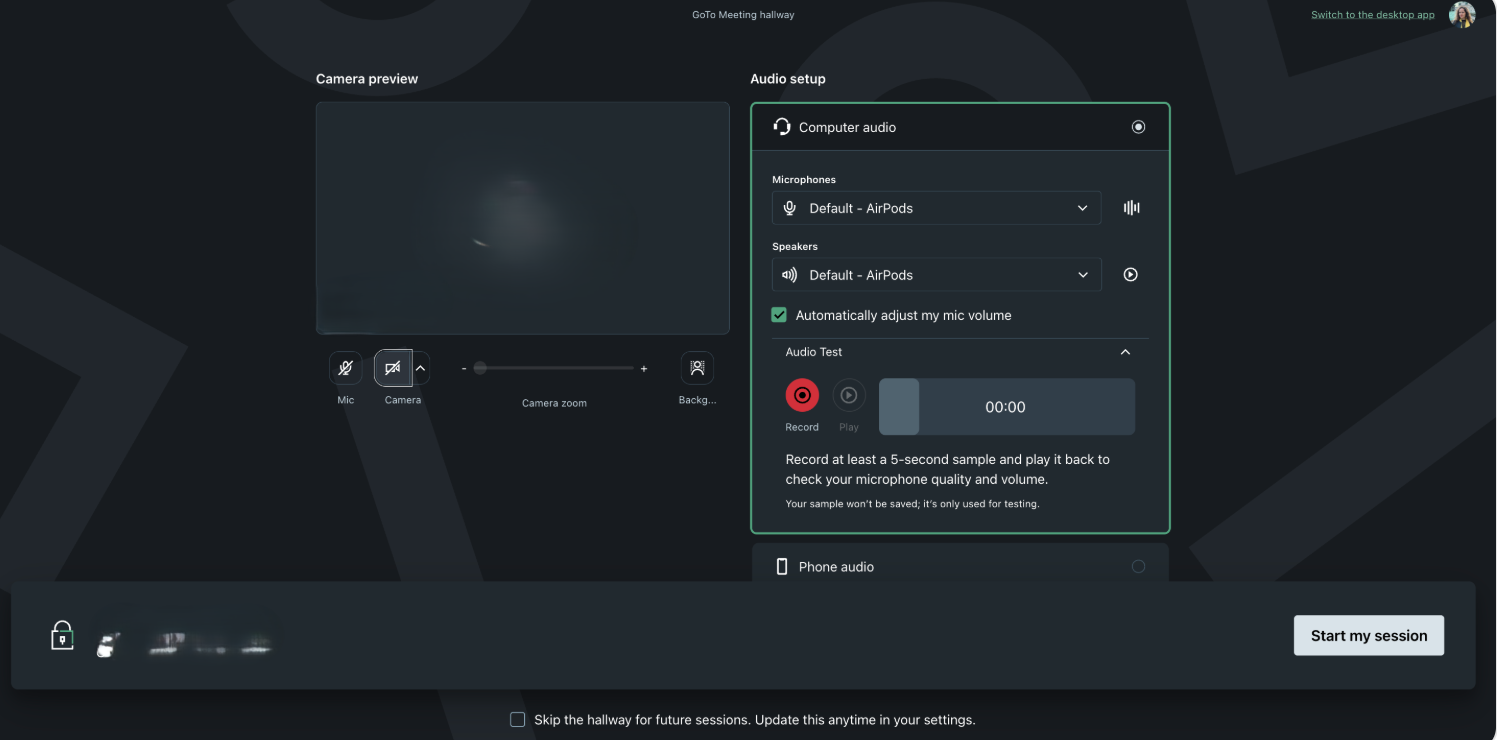
GoTo Webinar covers the full event cycle in one platform, from scheduling and promotion through to post-event reporting, and powers more than 2.8 million events a year. Sessions are scheduled from a single dashboard, and Practice Mode lets presenters rehearse in the live environment before the audience is admitted.
Promotion and data capture run through branded registration pages and custom forms, backed by automated invitations, confirmations and reminders. Paid events and certifications are supported through secure payments, and registrant data syncs to CRM and marketing tools so attendance can be tracked across the customer journey.
Key features include:
- Scheduling and rehearsal: Webinars are scheduled from a single dashboard, and Practice Mode allows a full rehearsal before going live.
- Branded registration: Custom registration pages and forms capture lead data, supported by customizable email invitations, confirmations and reminders.
- Simulive events: Content is pre-recorded and broadcast as a scheduled event, with polls and Q&A prepared in advance to run alongside it.
- Engagement toolkit: Interactive polls, live Q&A and breakout rooms run during the session, with analytics available afterwards.
- Recording and on-demand access: Sessions are recorded for flexible on-demand viewing, and Webcast Mode and GoTo Stage extend distribution.
- Security and compliance: Enterprise-grade security covers secure logins, session encryption, data privacy and GDPR compliance.
- Payments and certification: Payments are accepted securely for paid events and certification courses.
- Accessibility: Closed captioning and screen reader support are available for attendees.
- CRM and marketing integrations: Connections include HubSpot, Marketo, Salesforce Pardot, Prezi, Intellum and Interprefy, syncing registrant data and tracking the customer journey.
- Attendance reporting: Post-session reports track attendance and measure engagement across events.
- Managed services: Webcasting Services and Event Services are available for teams that want production support.
Limitations (as reported by users on G2):
- Dated interface: The host console is described as clunky, with common actions such as locating the registration link buried several layers deep.
- Attendee join friction: Some attendees are prompted to install the desktop application, and firewall restrictions prevent participation in certain corporate environments.
- Feature ceiling: Customization, integrations and newer capabilities lag behind competing platforms, and embedding streams elsewhere requires third-party tools.
- Plan gating: Cloud recording, spreadsheet imports of registrants and single sign-up for multi-session series sit on higher pricing tiers.
- Support responsiveness: Reviewers report slow, outsourced support, incomplete answers and difficulty resolving billing or cancellation issues.
- In-session issues: Reports include webcam, microphone and screen-sharing problems during live sessions, and inconsistent behavior when changing dates in a webinar series.
What users say: Reviewers consistently describe GoTo Webinar as easy to quickly set up and manage, especially for recurring internal and training-style sessions, with the intuitive dashboard cited as a key reason teams stick with it. The most common criticism is that the interface feels dated relative to newer entrants, paired with recurring comments that pricing feels high for the feature set and that some capabilities (like cloud recording) sit behind higher-tier plans.

Source: GoTo
Conclusion
A trusted webinar platform should combine reliable streaming, strong security, flexible audience engagement, and dependable recording and reporting. The right choice depends on expected audience size, event complexity, branding requirements, accessibility needs, integrations, and support expectations. Organizations should also test performance under realistic conditions and review pricing, data portability, and contract terms before standardizing on a platform for recurring live events.
Was this post useful?
Thank you for your feedback!