

Video marketing tools: Key categories & 10 tools to know in 2026

Video has become a key aspect of digital marketing, helping brands capture attention, explain products, and convert viewers into customers. The right tools make it easier to create, manage, and measure video content across platforms.
Editor’s note: Updated the article to cover recent market trends, updated product information to reflect features and capabilities in 2026.
What are video marketing tools?
Video marketing tools include platforms for AI-powered video creation, hosting, and distribution like Kaltura, pure video hosting platforms like Vimeo, and video editing software like Adobe Express. These tools cover the entire video lifecycle, from ideation and creation to hosting, distribution, and performance analysis.
Video marketing tools enable teams to create videos efficiently, maintain brand consistency, track viewer engagement, and adapt strategies based on data. Whether you’re building brand awareness, driving sales, or educating customers, video marketing tools simplify the process of producing and managing video content at scale.
Video advertising market trends
Video advertising market growth
The global video advertising market continues to expand as brands shift more of their marketing budgets toward digital video. The market is projected to grow from USD 82.68 billion to USD 145.97 billion by 2031, with a 9.92% CAGR.
Advances in generative AI are changing how marketers create and distribute video content:
- AI can generate highlight reels, recaps, summaries, and short-form clips with minimal manual effort, allowing brands to produce more content in less time. This makes it easier to maintain a consistent presence across channels and keep audiences engaged between major campaigns, launches, or events.
- AI is also enabling more personalized video experiences. Marketers can create customized content based on audience interests, preferences, and behaviors, such as tailored video digests, targeted messaging, and personalized recommendations. Real-time optimization capabilities allow AI systems to test and refine content continuously, helping improve engagement and relevance.
- As video marketing becomes more data-driven, AI can combine engagement signals from multiple touchpoints to build richer audience profiles. These insights support more precise targeting, more relevant advertising, and interactive experiences that encourage deeper audience participation.
Categories of video marketing tools
Video Creation and Enrichment
These tools help users design, shoot, and edit videos, often with minimal technical skills required. They range from beginner-friendly editors with drag-and-drop interfaces to advanced platforms with AI automation, templates, and collaboration features. The goal is to speed up the production process while ensuring professional-quality results.
Some tools offer text-to-video capabilities, automatic video generation, and branded asset libraries, allowing marketing teams to produce videos faster and more consistently.
Hosting and distribution platforms
Hosting and distribution platforms store your video files and make them accessible to viewers online. They provide streaming infrastructure, embed options, privacy settings, and playback controls.
These platforms also enable teams to manage large video libraries, restrict access, and share videos through websites, emails, or social media. Unlike social media platforms that monetize through ads, professional hosting services often emphasize control, branding, and analytics, making them suitable for business use cases.
Video analytics and optimization
Analytics and optimization tools track how videos perform across platforms, measuring views, watch time, engagement, and conversion metrics. These tools help marketers understand which content resonates with viewers and where improvements can be made.
Features often include A/B testing, heatmaps, audience segmentation, and SEO insights. Some tools also provide AI-driven recommendations to improve titles, thumbnails, or publishing schedules for better results.
Automated video content
Automated video content tools generate videos at scale using data inputs, templates, or artificial intelligence. These platforms are designed to create dynamic, personalized, or data-driven videos with minimal manual effort.
Common use cases include generating hundreds of product videos from a catalog, creating personalized sales or onboarding videos using CRM data, or turning blog posts and articles into short-form video content. Automation reduces production time and cost, making it feasible to deliver tailored video experiences across customer segments, channels, or campaigns.
Related content: Read our guide to video personalization
Notable video marketing tools
Video Creation Tools
Kaltura for Video Creation

Kaltura is a comprehensive video content management system built to handle the entire media lifecycle—from upload to global distribution. It’s trusted by leading organizations across industries, including technology, finance, healthcare, education, and media.
Kaltura combines powerful video creation, enrichment, management, and streaming capabilities with full flexibility and open integration. Its intuitive tools and APIs allow users to customize workflows to fit any business need. The platform seamlessly integrates with existing systems, ensuring smooth playback and scalability without requiring major platform changes.
Key features include:
- Upload & store: Quickly ingest and manage media assets of any size or format from multiple sources.
- Search & enrich: Intelligent tagging and metadata tools make content easy to find and accessible for all users.
- Edit & rework: Simple yet robust editing tools allow for quick trimming, enhancements, and adjustments.
- Secure & direct: Role-based permissions help safeguard digital assets and maintain compliance.
- Embed & publish: Delivers seamless playback across devices and operating systems.
- Syndicate & distribute: One-click publishing extends reach across distribution partners and content networks.
Bottom Line: With Kaltura, organizations gain a flexible, enterprise-grade system that keeps their media operations running at peak performance—ensuring that the bitrate never drops and the message always gets through.
Runway

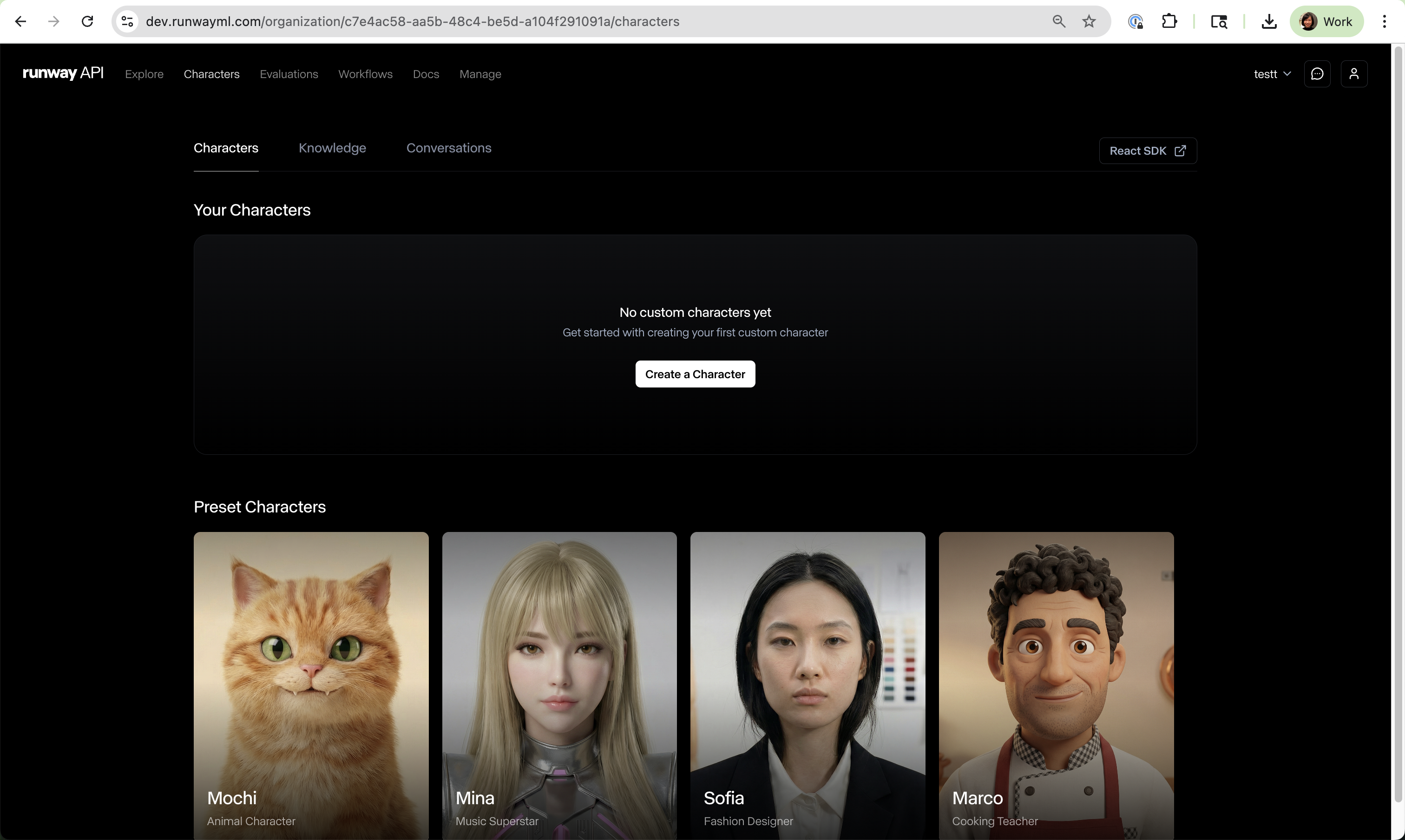
Runway is an AI-powered video creation platform that combines video generation, editing, image creation, audio tools, and language models in a single workspace. It supports a range of video workflows, from generating videos from text prompts to editing existing footage and creating multi-shot sequences. The platform also includes tools for automating video production and building custom workflows that connect multiple AI models and creative tasks.
Key features include:
- Text, image, video, and audio-to-video generation: Create videos using text prompts, images, existing videos, or audio inputs.
- AI video editing: Modify footage by changing lighting, restyling scenes, and adding or removing visual elements through natural language instructions.
- Conversational video creation: Generate end-to-end videos through chat-based interactions with AI-powered creation tools.
- Multi-shot video generation: Produce videos with multiple scenes and shots from a single prompt.
- Custom workflows: Build node-based workflows that combine different models, media types, and processing steps for greater control over content creation.
- Integrated creative toolkit: Access video, image, audio, editing, and language models from a unified platform.

Source: Runway
Biteable

Biteable is an online video creation tool to help teams produce on-brand, professional videos quickly and with minimal effort. It supports a range of use cases, including marketing, internal communication, sales, recruitment, and education.
Key features include:
- Pre-built templates: Access to hundreds of customizable video templates designed for various business needs.
- Text-to-video creation: Users can generate videos by entering text, simplifying the video-making process.
- Brand customization: Apply company fonts, colors, and logos to maintain brand consistency.
- Collaborative editing: Team members can work together on video projects from anywhere.
- Use case flexibility: Supports multiple departments, including HR, sales, marketing, and operations.

Source: Biteable
Synthesia

Synthesia is an AI video platform for creating explainers and marketing content with AI avatars and multilingual voiceovers. It supports script generation, templates, collaboration, and rapid updates to existing videos. Videos can be exported as MP4, shared by link, or embedded; enterprise options add scale and compliance.
Key features include:
- AI avatars and languages: Select from over 230 avatars and generate consistent voiceovers in more than 140 languages with automatic closed captions.
- Script and text-to-video: Write a custom script or use AI prompts, then convert text into narrated videos with editable styles, fonts, and layouts.
- Collaboration and sharing: Share projects for feedback, then export MP4 files, publish via shareable links, or embed videos directly using the provided code.
- Rapid updates: Edit existing videos to reflect product changes and generate updated versions within minutes, without re-recording voiceovers or reshooting footage.
- Enterprise security and scale: Offers unrestricted video creation, personalized onboarding, SOC 2 and GDPR compliance, and governance aligned with ethical use guidance.

Source: Synthesia
Hosting and Distribution Platforms
Kaltura for Video Hosting
Kaltura’s Video Portal redefines enterprise video hosting by combining limitless scalability, intelligent content control, seamless collaboration, and immersive content experiences.
Infused with AI-powered capabilities, Kaltura enables users to automatically generate highlight clips, quizzes, and summaries through its Content Lab, while Work Genie personalizes learning and engagement experiences. These innovations transform static hosting into an active, insight-driven content ecosystem.
Key features include:
- Create and customize: Build branded, fully modular video hubs that reflect your organization’s identity and user journeys.
- Powerful creation tools: Record, edit, and enrich videos directly within the platform with captions, quizzes, and accessibility enhancements.
- Smart content management: Simplify video organization and discovery with advanced search, filtering, and social engagement options.
- AI-enriched discovery: Make every spoken word and on-screen text searchable through Optical Character Recognition (OCR) and Automatic Speech Recognition (ASR).
- Enterprise-grade security: A zero-trust approach with full access controls ensures compliance and content protection.
- Actionable analytics: Real-time dashboards and granular engagement metrics empower teams to optimize their content strategy.
Bottom Line: Kaltura for Video Hosting turns enterprise video management into an AI-enhanced content powerhouse—delivering complete creative freedom, airtight security, and the insights needed to continually elevate audience engagement.
Vimeo

Vimeo is a professional video hosting and management platform for creators, teams, and businesses that need control over their video content. Unlike ad-supported platforms, Vimeo offers an ad-free environment, ensuring that content plays without interruption. It caters to a range of needs, from showcasing creative portfolios to managing enterprise-scale video libraries.
Key features include:
- Customizable video player: Adjust colors, logos, thumbnails, and player controls to align with your brand.
- Ad-free playback: No third-party ads are shown before, during, or after your videos, maintaining viewer focus on your message.
- Built-in accessibility: Support for multiple audio tracks, descriptive audio, and automated captions in over 7 languages.
- Privacy controls: Password protection, domain-level embed restrictions, and visibility settings for secure content distribution.
- Version control: Update videos without changing their URL or losing analytics, simplifying content management.

Source: Vimeo
Vidyard

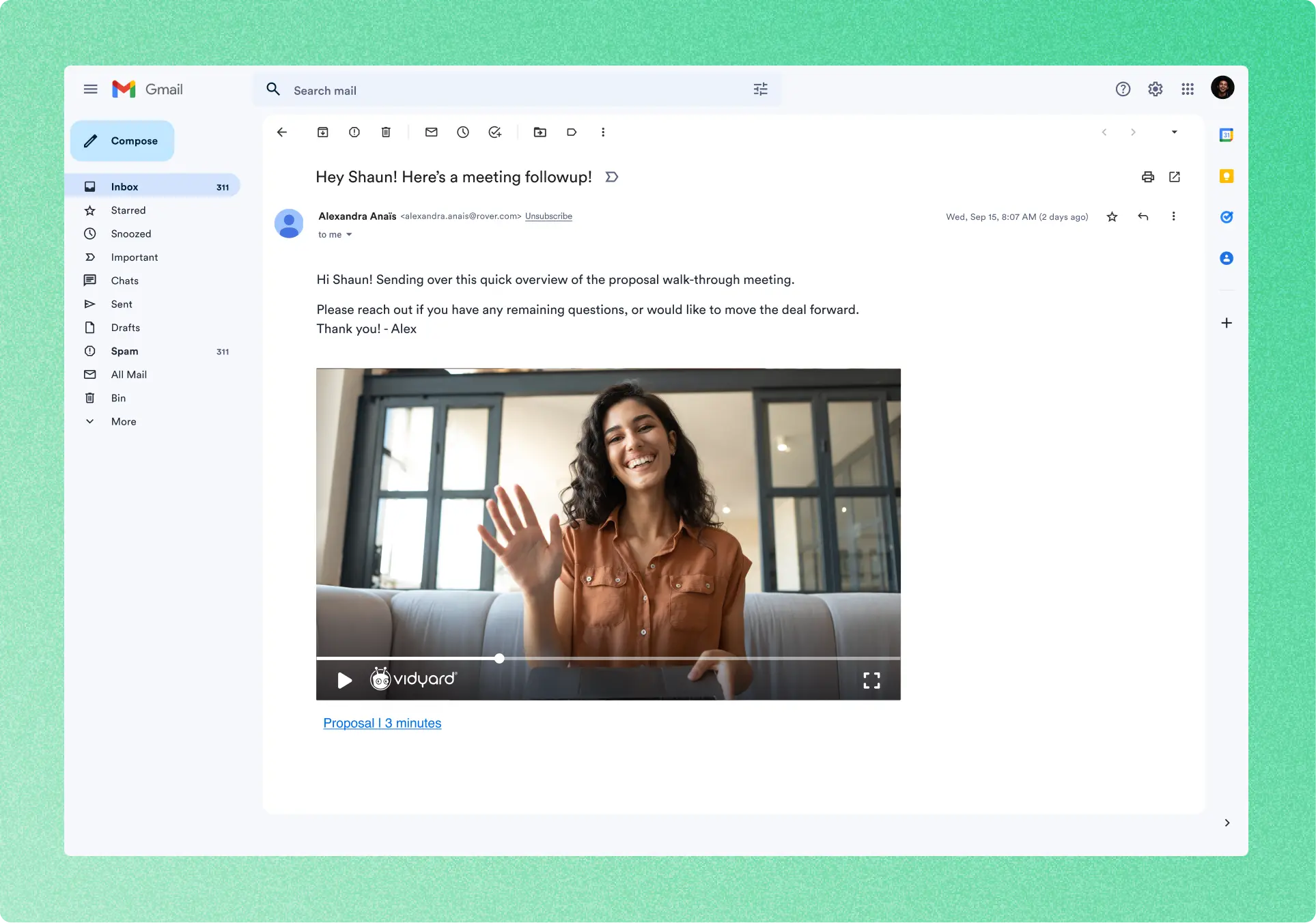
Vidyard is a business-focused video hosting and analytics platform to support marketing, sales, and internal communication efforts. It centralizes video management while offering customization, viewer analytics, and integrations with CRM and marketing automation tools.
Key features include:
- Centralized video management: Upload, organize, and publish videos in a single platform with folder structures and permission controls.
- Custom video player: Deliver an ad-free experience with branded thumbnails, chapters, and in-video calls to action.
- Sharing options: Easily distribute videos through email, social media, websites, or private links with password protection.
- High-quality streaming: Videos automatically optimized for smooth playback in up to 4K across all devices.
- SEO and accessibility: Auto-captioning and SEO enhancements help increase discoverability and compliance.

Source: Vidyard
Video Analytics and Optimization Tools
Kaltura for Video Analytics
Kaltura’s Video Analytics suite empowers organizations to transform raw viewing data into meaningful insights that drive engagement, retention, and performance. Designed for enterprises that depend on video as a core communication, learning, or marketing tool, Kaltura turns analytics into a strategic advantage.
The platform collects audience interaction data, tracking everything from viewer drop-off points and engagement hotspots to content performance across channels. Integrated with other Kaltura modules, it seamlessly connects analytics to content creation, hosting, and distribution, enabling a complete feedback loop for continuous improvement.
Key features include:
- Granular insights: Drill down to per-user, per-video, and per-segment analytics to understand exactly what content resonates.
- Engagement tracking: Measure watch time, repeat views, and interaction metrics like quizzes or feedback forms.
- Comparative dashboards: Benchmark engagement across teams, departments, or audience segments to inform strategy.
- AI-enhanced insights: Predict viewer behavior trends and surface actionable recommendations using machine learning.
- Cross-platform measurement: Consolidate data from embedded videos, apps, and third-party integrations into one unified dashboard.
- Data-driven optimization: Leverage insights to refine video length, pacing, placement, and messaging for maximum viewer impact.
Bottom Line: Kaltura for Video Analytics gives organizations a clear window into what works and why. By combining deep data intelligence with easy-to-read dashboards, it helps teams create smarter content strategies that move the needle on engagement, learning outcomes, and ROI.
Wistia

Wistia provides video marketing analytics to measure performance across accounts, projects, individual videos, and webinars. It includes heatmaps, A/B testing, conversion metrics, and attribution by embed location and campaign source. Integrations with marketing platforms enable automated workflows and downstream reporting.
Key features include:
- Engagement heatmaps: Visualize which parts viewers watch, rewatch, or skip, including second-by-second engagement and device or page context for each viewer.
- A/B testing: Compare thumbnails, videos, or alternate edits to determine which version drives higher engagement and results with the audience.
- Attribution and tracking: Track views by embed location and traffic by UTM parameters, then assess play rate, average engagement, and conversion performance.
- Webinar analytics: Measure impressions, registrants, attendees, and engagement for virtual events, with attendee-level data flowing into connected marketing platforms.
- Integrations and workflows: Connect to marketing automation platforms to trigger workflows, build email lists, and inform sales outreach based on viewer behavior data.

Source: Wistia
Hootsuite

Hootsuite is a social media platform for scheduling, analytics, messaging, and social listening in one dashboard. An AI assistant supports content creation and strategy based on real-time social data. The platform includes competitor benchmarking, a unified inbox, trend discovery, and support for over 100 integrations.
Key features include:
- AI-assisted content and strategy: Generate captions, hashtags, and strategy recommendations with OwlyGPT, an assistant trained on real-time social trends and performance data.
- Scheduling and publishing: Plan and queue posts across networks, use Canva templates, and manage everything in one tab with scheduling to publish at specific times.
- Analytics and benchmarking: View reports highlighting engagement and revenue drivers, benchmark against competitors, and identify the best time to post per network.
- Unified inbox and messaging: Reply to comments and messages across platforms from a single hub, with saved replies and optional AI chatbot add-on.
- Social listening and trend tracking: Monitor mentions, keywords, and conversations, discover hot topics by industry, and suspend scheduled posts during crises or unexpected events.

Source: Hootsuite
Video Editing and Automation Tools
Adobe Express

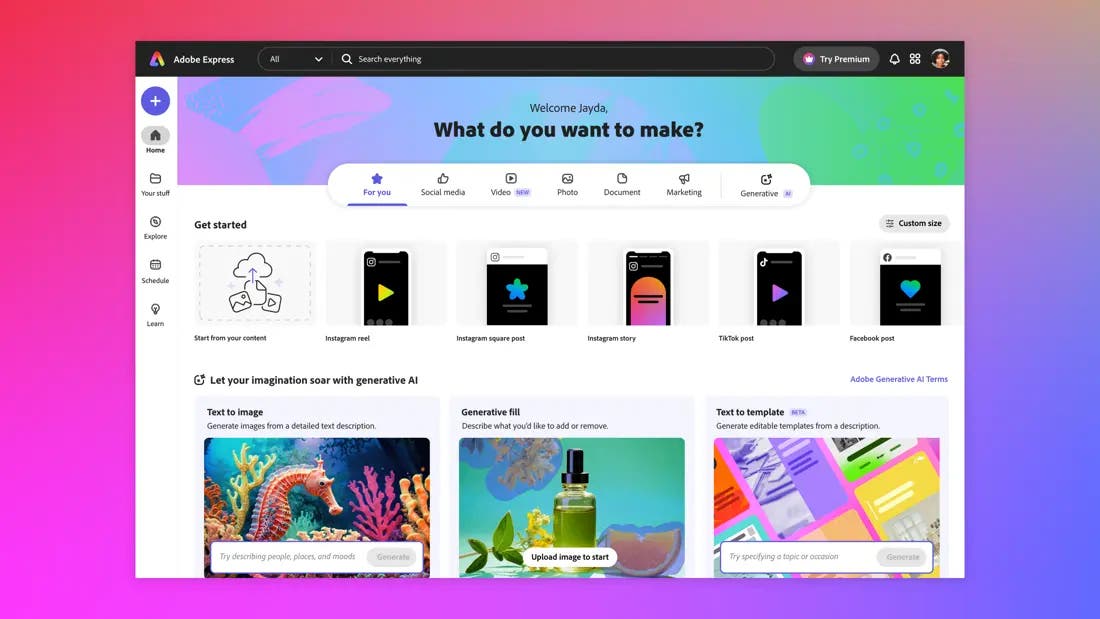
Adobe Express is a fast design and video creation platform that helps individuals, teams, and businesses create content. From social media posts and videos to flyers and branded graphics, Adobe Express simplifies the creative process through drag-and-drop tools, AI-powered features, and cross-device syncing.
Key features include:
- All-in-one editor: Create videos, images, and social content using an intuitive editor with prebuilt layouts and assets.
- Generative AI tools: Use AI to auto-generate visuals and text content, all designed to be commercially safe.
- One-click edits: Apply filters, resize content, or edit templates instantly to speed up your workflow.
- Cross-platform syncing: Work seamlessly across web and mobile; your projects stay synced and accessible anytime.
- Video editing made simple: Drag-and-drop clips, add voiceovers, and export directly to platforms like Vimeo.

Source: Adobe Express
Hypernatural

Hypernatural is an AI-powered video creation platform to help creators, marketers, and storytellers produce polished, short-form videos. Unlike generic stock footage or glitchy AI clips, Hypernatural transforms ideas, scripts, audio, or podcasts into ready-to-share content.
Key features include:
- Text-to-video: Turn scripts, ideas, or audio snippets into high-quality videos with just a few clicks.
- Custom video styles: Start from scratch or choose from over 200 style templates to match your brand or creative vision.
- Consistent AI characters: Create and reuse custom characters across scenes and styles to maintain visual consistency.
- B-roll generation: Automatically generate original B-roll that matches your script or enhance your video with GIFs and stickers.
- AI narration: Choose from a library of lifelike AI voices or upload your own audio; narration is synced with AI-generated captions.

Source: Hypernatural
Predis.ai

Predis.ai is an AI-powered ad and content creation platform built for brands, marketers, and agencies that want to scale their social media and ad campaigns without increasing workload or cost. It combines ad generation, UGC video creation, post scheduling, and multilingual content capabilities into a single tool.
Key features include:
- AI ad generator: Instantly generate branded ad creatives from simple text inputs, optimized for engagement and conversions.
- UGC video ads with AI avatars: Create realistic video ads using customizable AI avatars; no actors, shoots, or studios required.
- eCommerce ad creation: Generate product ads, reels, and TikToks using just a product image, complete with captions and calls-to-action.
- Automated content scheduling: Auto-post content across Instagram, LinkedIn, YouTube, and other platforms directly from the app.
- AI photoshoot generator: Turn basic product images into studio-quality photos with AI-powered editing, cutting shoot costs.

Source: Predis.ai
Conclusion
Video continues to be one of the most effective ways to engage audiences, explain complex ideas, and drive action. Whether you’re creating short-form social content or detailed product explainers, the right tools can dramatically reduce production time, improve quality, and maximize impact. Modern video marketing tools support every stage of the workflow, from creation and editing to hosting, distribution, and optimization, making it easier to scale your content strategy and deliver measurable results.
Was this post useful?
Thank you for your feedback!