





7 Panopto Alternatives to Know in 2026

Organizations increasingly rely on video to train teams, share knowledge, and deliver updates, but not all platforms meet evolving needs. If Panopto isn’t the right fit, several alternatives offer better performance, flexibility, or ease of use depending on your priorities.
What is Panopto?
Panopto is a video platform designed for creating, storing, and sharing video content, primarily in education and enterprise environments. It integrates with learning management systems (LMS) and enterprise tools to support lecture capture, corporate training, onboarding, and knowledge sharing.
Popular alternatives to Panopto include Kaltura, Brightcove, Wistia, and Vimeo. Organizations may also consider using video hosting platforms, dedicated learning platforms, or screen recording tools, depending on their specific use cases, budget, team skillset, and existing tool stack.
Key factors to consider when choosing an alternative include:
- Use case: Are you primarily creating training videos, managing large video libraries, or delivering live events?
- Integration: Does the solution need to integrate with existing learning platforms or internal systems?
- Budget: What is your budget for a new video platform?
- Features: Do you need advanced analytics, interactive features, live streaming, or specific editing capabilities?
Key Panopto limitations
While Panopto offers a range of tools for video capture, management, and delivery, several limitations can impact its usability and administrative efficiency. These issues affect both everyday users and administrators managing large video libraries or complex permissions.
These limitations were reported by users on the G2 platform:
- Limited editing capabilities: Panopto’s video editor lacks features like audio/video stream separation, transitions, annotations, and stream locking. This makes it insufficient for users who need more fine-grained editing.
- Slow interface performance: The platform becomes sluggish when dealing with large libraries. For example, the “Browse > All Folders” function can be significantly delayed when loading hundreds of folders.
- Weak live streaming experience: Although strong for lecture capture, Panopto falls short for live streaming scenarios. Many users rely on Zoom to fill this gap, indicating that Panopto isn’t yet a complete solution for synchronous video delivery.
- Folder-level permissions: Editing rights are tied to the folder level rather than individual videos. Granting someone edit access to a single video means giving them access to all videos in that folder, which complicates permission management and increases the risk of unauthorized changes.
- Inadequate caption accuracy: Automatic captioning is still unreliable and often requires manual correction, reducing its effectiveness for accessibility compliance and content clarity.
- Cumbersome archive management: Creators cannot directly delete archived videos. They must first restore the content, which takes up to 48 hours, and then request an admin to complete the deletion, increasing overhead and delay.
- Limited troubleshooting tools: Panopto lacks an “act as user” feature for admins. This makes support tasks more difficult, often requiring real-time screen sharing with users to diagnose issues.
- User confusion around sharing: Sharing settings are not always intuitive, leading to frequent issues where users send incorrect links instead of using embed options. Admins often need to intervene to resolve these problems.
- Limited admin-level reporting: While user-level analytics are strong, reporting tools for administrators are lacking. Custom reporting often requires manipulating raw data manually, adding complexity to storage and usage management.
Notable Panopto Alternatives
In light of the above limitations, many organizations are seeking alternatives. Here are a few popular options.
1. Kaltura

Kaltura is an AI-powered Video Content Management System designed to handle the entire media lifecycle with the flexibility that many rigid platforms lack. Built for scale and backed by advanced AI, it serves as a unified ecosystem for live teaching, on-demand learning, and corporate training. Unlike more restrictive tools, Kaltura’s open APIs and modular tools allow organizations to adjust the platform to fit their specific workflows.
Key features:
- Advanced editing tools: Easy-to-use editing tools for everything from basic video trimming to complex image transformations.
- High-performance interface: “On-the-fly” video packaging and AI-powered indexing to ensure media is always available and searchable, regardless of library size.
- Superior live & synchronous delivery: Unified platform for live teaching and branded academic events with real-time engagement features like breakouts and whiteboards.
- Granular permission management: Precise management of user types and admin permissions, ensuring content security without the risks associated with folder-level permission restrictions.
- High-accuracy AI captioning: Built-in AI-powered captions, audio descriptions, and translations to ensure full accessibility and compliance.
- Simplified content lifecycle: Instantly repurpose, clip, and summarize sessions into a library of ready-to-use assets with no manual lift.
- Intuitive troubleshooting & sharing: Admins can govern the experience at scale with role-based access, while students and employees use intelligent assistants to find trusted, source-linked answers instantly.
- Actionable admin analytics: Deep analytics engine that tracks engagement, knowledge retention, and ROI across teams and regions, eliminating the need for manual data manipulation.
2. Brightcove

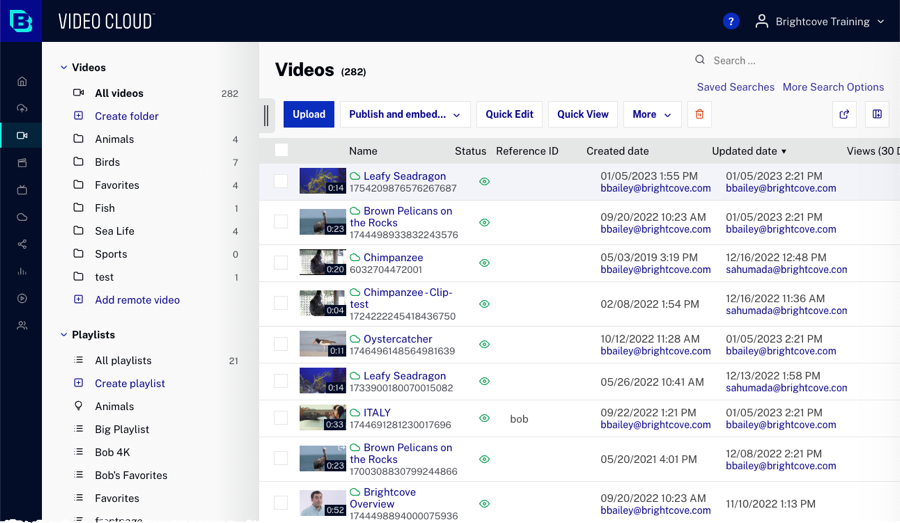
Brightcove is a streaming and video engagement platform built for enterprises and media organizations. It enables companies to host, distribute, and monetize video content at scale while delivering broadcast-quality streaming. The platform supports a range of business goals, from employee engagement to product marketing and revenue generation.
Key features:
- Audience engagement: Provides tools to strengthen workforce communication, support corporate culture, and deliver engaging experiences comparable to consumer streaming platforms.
- eCommerce support: Helps businesses use video to increase product visibility and sales in competitive markets.
- Content monetization: Enables media organizations to generate revenue from video through scalable streaming and monetization workflows.
- Branded experiences: Includes features like Brightcove CorpTV, which allows organizations to deliver binge-worthy, Netflix-style video hubs tailored to their audience.

Source: Brightcove
3. Loom

Loom is a video messaging platform that enables users to quickly record and share screen, camera, or hybrid videos across teams and customers. It replaces long emails, meetings, and chat threads with concise, visual communication.
Key features:
- Fast video recording: Record screen, camera, or both from the Chrome extension, desktop, or mobile apps.
- AI-enhanced productivity: Loom AI auto-polishes videos and converts scripts into documents, messages, or bug reports.
- Built-in editing tools: Trim, stitch clips, add backgrounds, and overlay text, arrows, or boxes for clearer communication.
- Collaboration features: Enable comments, emojis, tasks, and call-to-actions directly inside videos to improve engagement.
- Seamless integrations: Works with Google Workspace, Slack, Salesforce, Figma, Jira, and many other business tools.

Source: Loom
4. Wistia

Wistia is a video platform that combines hosting, webinars, recording, and analytics in one place. It helps reduce tool overload by offering an integrated solution for video management and marketing. With customizable video players, AI-powered editing, and integrations with popular marketing tools, it enables teams to create, share, and track video content.
Key features
- Video hosting and management: Ad-free, branded video player with options to embed anywhere and organize libraries using folders, filters, and tags.
- Webinar hosting: Run customizable webinars that connect to marketing tools, with recordings that can be repurposed as evergreen content.
- Recording and editing: Capture video directly from a laptop and refine it with AI editing tools for a polished result.
- Actionable insights: Provides detailed viewer engagement analytics and syncs data with marketing platforms for campaign optimization.
- Marketing integrations: Connects with tools like HubSpot, Mailchimp, ActiveCampaign, Google Analytics, LinkedIn, and more to automate workflows.

Source: Wistia

5. Zoom Workplace

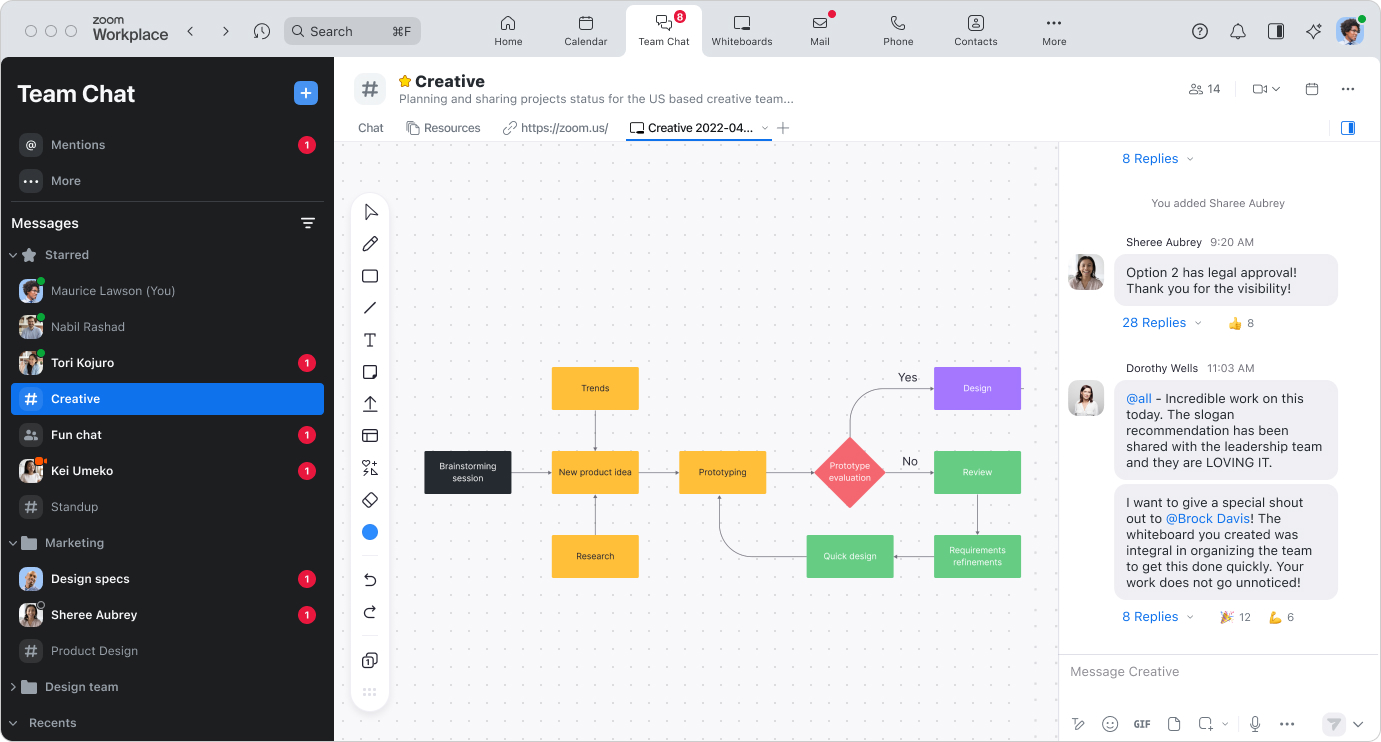
Zoom Workplace is an integrated collaboration platform that combines video conferencing, chat, email, calendar, whiteboards, and document sharing into a unified experience. It helps teams manage meetings, communication, and productivity without switching between multiple tools.
Key features:
- Integrated collaboration tools: Combines meetings, chat, email, calendar, whiteboards, and document editing in a single interface to reduce tool sprawl.
- AI-powered assistance: Zoom AI Companion provides features like meeting summaries, message drafting, and task automation to enhance productivity across workflows.
- High-quality communication: Delivers reliable audio and video with enterprise-grade security, supporting clear and secure meetings and presentations.
- Meeting lifecycle management: Supports the lifecycle of meetings from scheduling and hosting to follow-up and documentation, with AI features built in.
- Ecosystem integrations: Offers integrations with tools like Microsoft, Slack, and Salesforce, enabling seamless workflows across systems.
- Scalable plans and deployment: Available in multiple tiers, Zoom Workplace can scale from small teams to large enterprises, with support for up to 300 meeting participants and advanced admin controls.

Source: Zoom
6. Hippo Video

Hippo Video is a video creation and automation platform to scale personalized communication across sales, marketing, support, and training teams. It uses Agentic AI to simplify the video creation process and automate campaigns with lifelike avatars, multilingual support, and audience-specific personalization.
Key features:
- AI-powered video creation: Transforms text, documents, or prompts into videos using avatars, scripts, and interactive elements via the Agentic AI Creation Agent.
- Automated campaign workflows: The Campaign Agent helps launch personalized outreach or marketing campaigns at scale, with built-in interactivity like polls and CTAs.
- Real-time AI avatars: The Video Co-Pilot delivers demos and support using avatars that mimic human tone and gestures for more authentic communication.
- Multilingual content generation: Supports video creation in more than 30 languages with localized voiceovers and accents to reach global audiences.
- Performance analytics: Provides insights into viewer engagement and campaign effectiveness to optimize outreach strategies.

Source: Hippo Video

7. Echo360

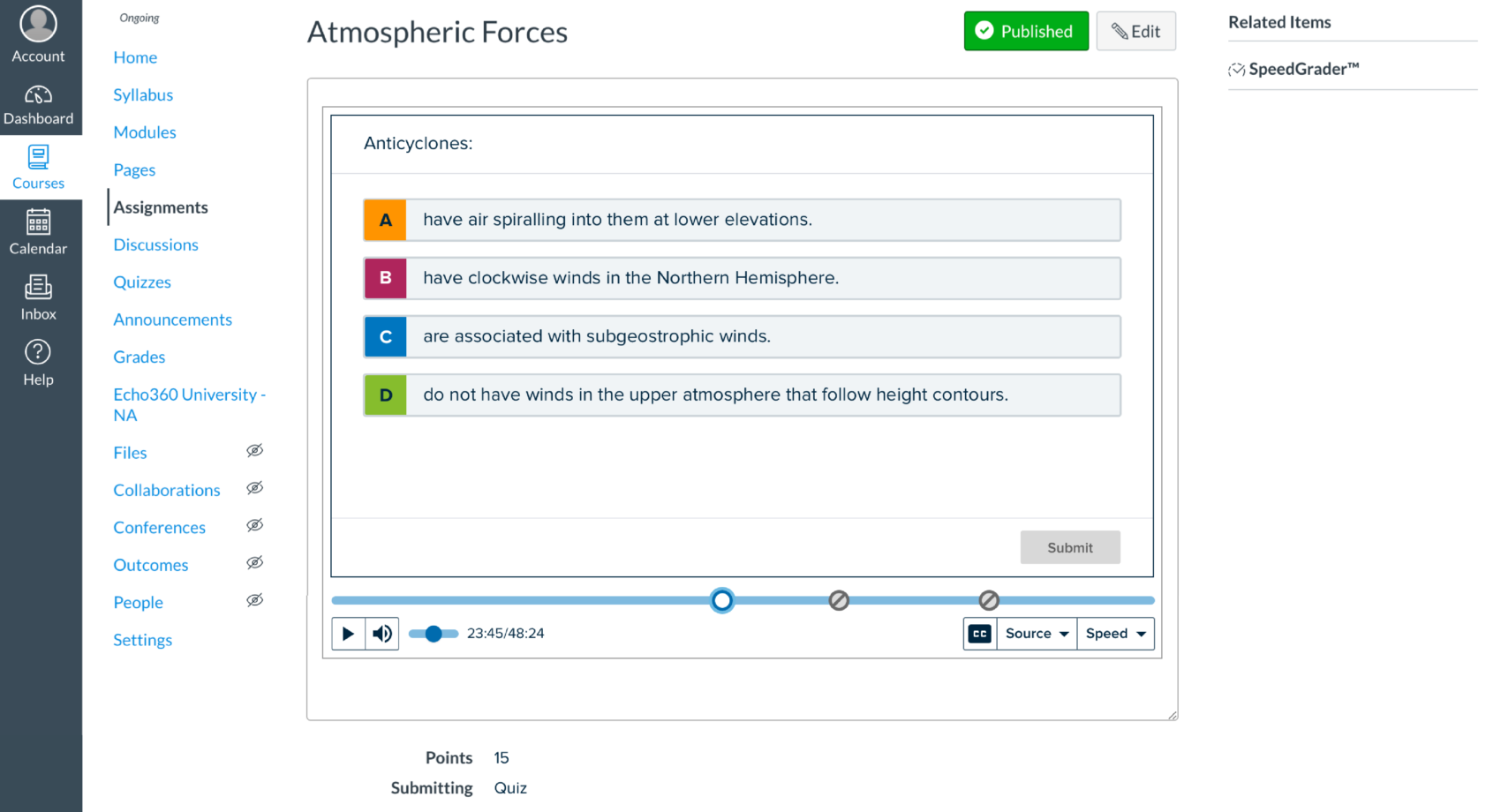
Echo360 is a learning-focused video and content platform used in educational and corporate environments. It offers a modular suite of tools, known as the Echosystem, for content creation, video capture, assessments, and audience engagement.
Key features:
- End-to-end video management: Enables recording, storing, managing, and searching of video content across education and business use cases.
- Interactive learning tools: Includes features like polling, gamification, and high-stakes assessments to drive learner engagement and track understanding.
- Mobile-optimized content delivery: Supports mobile-friendly content creation and distribution, helping reach users in varied environments.
- System integration: Works with existing LMS and HRIS platforms, offering centralized access and simplified IT deployment.
- Enterprise-ready support: Backed by 24/7 global customer service to ensure continuous availability and support for mission-critical learning environments.

Source: Echo360
Key Factors to Consider When Choosing a Panopto Alternative
When evaluating alternatives to Panopto, it’s important to focus on how well each platform addresses the gaps in Panopto while aligning with your organization’s goals. The following factors help guide a practical selection:
- Video capture and editing capabilities: Check whether the platform supports multi-stream recording, screen capture, and basic-to-advanced editing features. Some tools are built for quick communication, while others provide broadcast-level production options.
- Search and accessibility: Look for automatic transcription, captioning accuracy, and full-text video search. Strong accessibility features not only improve inclusivity but also reduce compliance risk.
- Live streaming vs. on-demand: Decide if your priority is synchronous events, like town halls or webinars, or asynchronous learning and training libraries. Some platforms excel at one but provide limited functionality for the other.
- Integration with existing systems: Consider how well the tool connects to LMSs, CRMs, collaboration apps, and identity management systems. Tight integration reduces administrative overhead and improves adoption.
- Scalability and performance: Platforms vary in how they handle large libraries, concurrent viewers, and global delivery. Multi-CDN infrastructure or optimized storage can make a difference for organizations with high traffic.
- Permission and user management: Granular access controls are essential for enterprise and education settings. Evaluate whether permissions can be set at the video, folder, or role level, and whether admins have tools to troubleshoot user issues effectively.
- Analytics and reporting: Analytics should provide insights at both the user and administrator level. Look for actionable data, such as viewer engagement, content performance, and storage usage, without requiring manual data manipulation.
- Cost and licensing flexibility: Pricing models differ widely; some charge per user, others per bandwidth or feature set. Align the licensing structure with how your organization creates, shares, and consumes video.
- Branding and customization: If user experience and brand consistency are important, confirm that the platform allows branded portals, customizable players, and tailored video experiences.
- Support and vendor reliability: Assess the level of support available (self-service resources, live help, or dedicated account management) as well as the vendor’s track record for updates, security, and long-term viability.
Conclusion
Video has become central to how organizations train employees, share knowledge, and communicate at scale. When Panopto falls short, whether due to usability limits, editing gaps, or admin constraints, teams need platforms that better match their goals. Alternatives should not only fill the functional gaps but also offer smoother integration, scalability, and a more intuitive user experience.
Was this post useful?
Thank you for your feedback!
