Edtech: Technologies, Best Practices & Impact of AI

Education is undergoing a transformation driven by digital innovation. From remote classrooms to AI-powered tutors, educational technology—EdTech—is reshaping how students learn and how teachers teach. This guide breaks down the core technologies, benefits, and best practices shaping the future of learning.
What is EdTech?
EdTech, short for “education technology,” refers to the use of digital tools, platforms, and systems to support and enhance teaching and learning. It includes software like learning management systems, educational apps, virtual classrooms, and tools for assessment or collaboration. EdTech also covers hardware such as tablets, laptops, and interactive whiteboards.
The main purpose of EdTech is to make education more accessible, efficient, and personalized by using technology to improve how content is delivered, how students engage, and how progress is tracked.
What roles does EdTech play in an educational institution?
EdTech provides tools that simplify and improve educational processes:
- Instructional delivery: Enables digital content distribution through virtual classrooms, LMS platforms, and multimedia, supporting in-person, hybrid, and remote learning environments.
- Assessment and grading: Provides tools for automating quizzes, exams, and assignments with instant feedback and performance analytics.
- Curriculum management: Helps structure courses, track progress, and align instruction with standards using centralized planning tools.
- Student support: Offers AI tutors, chatbots, and communication tools to assist students outside class hours and personalize learning paths.
- Data and analytics: Collects learning data to monitor engagement, identify at-risk students, and support data-informed decision-making.
- Professional development: Enables training and peer collaboration for educators through online platforms and content repositories.
- Administrative efficiency: Automates tasks like attendance tracking, enrollment, and communication with parents or students.
- Equity and accessibility: Delivers assistive technologies and flexible formats to ensure learning is inclusive for students with diverse needs.
- Infrastructure integration: Connects devices, smart classrooms, and cloud services to simplify operations and support digital learning ecosystems.
How does EdTech help students and teachers?
EdTech benefits both students and teachers by making learning more engaging and instruction more efficient. It removes barriers of time, place, and pace, while giving educators better tools to guide and support their classes.
Benefits for students:
- Personalized learning: Adaptive platforms tailor instruction to individual progress and learning styles.
- Flexible access: Students can learn anytime, anywhere with mobile apps, recorded lessons, and cloud-based tools.
- Interactive resources: Multimedia content and simulations make complex topics easier to understand.
- Collaboration: Tools for group work and peer feedback enhance teamwork and communication skills.
- Instant feedback: Real-time assessments and AI tutors help students learn from mistakes immediately.
- Increased motivation: Gamified elements and progress tracking boost engagement and goal-setting.
Benefits for teachers:
- Time savings: Automation reduces time spent on grading, attendance, and administrative tasks.
- Data-driven instruction: Analytics highlight learning gaps and suggest interventions or content adjustments.
- Instructional support: AI copilots help with lesson planning, resource creation, and content customization.
- Classroom management: Digital tools support student tracking, communication, and behavior monitoring.
- Professional growth: Access to training modules, teaching communities, and digital resources expands teaching capacity.
- Inclusive teaching: EdTech enables differentiated instruction and accommodations for students with diverse needs.
5 key EdTech technologies
1. Audio/video and multimedia resources
Multimedia tools such as videos, podcasts, animations, and interactive modules help bring abstract concepts to life. For example, science lessons can include simulations of chemical reactions, while history classes might feature documentaries or reenactments. These resources support varied learning styles, helping visual and auditory learners grasp material more effectively. Many platforms also allow teachers to pause, annotate, or embed questions in videos to increase engagement and comprehension.
Multimedia enables asynchronous learning, which means students can watch lectures or tutorials at their own pace and revisit difficult topics as needed. This flexibility supports flipped classroom models and blended learning environments. When paired with subtitles or translations, audio/video content also improves accessibility for students with hearing impairments or language barriers.
2. Computers, tablets, and mobile devices
Personal computing devices are the backbone of most EdTech implementations. Laptops and tablets give students access to digital textbooks, learning platforms, and productivity tools like word processors or spreadsheets. These devices also support assessments, project work, and communication with peers or instructors. For teachers, computers are essential for lesson planning, grading, and accessing teaching aids.
Mobile devices expand learning beyond the classroom by enabling study on the go. Educational apps for smartphones offer microlearning experiences, flashcards, or practice quizzes that reinforce classroom instruction. Schools often implement device management systems to ensure safe usage, while also providing charging stations, loaner programs, and maintenance support to maximize device availability.
3. Interactive whiteboards and smart displays
Interactive whiteboards and smart displays allow teachers to present content dynamically and engage students in real-time. These large touchscreen devices replace traditional chalkboards with digital capabilities such as drawing tools, drag-and-drop activities, and multimedia integration. Teachers can annotate over images, display interactive maps, or solve math problems step-by-step while recording the session for later review.
Students can also interact directly with the board, for example, solving problems, manipulating diagrams, or participating in quizzes. This hands-on engagement increases participation and supports kinesthetic learning. Many smart boards integrate with learning management systems or cloud storage, enabling seamless content sharing, collaboration, and saving of lessons for asynchronous access.
4. Virtual classrooms and Learning Management Systems (LMS)
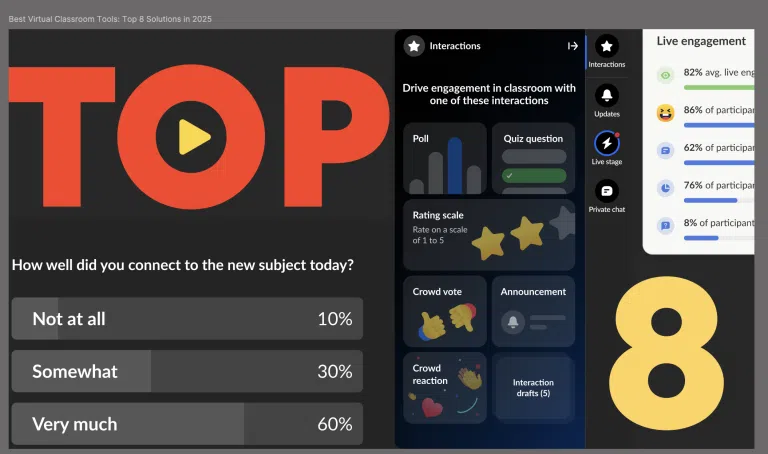
Virtual classrooms replicate many elements of in-person learning through video conferencing, breakout rooms, chat, and screen sharing. These platforms enable synchronous instruction across distance and support remote learning scenarios. Tools like polls, whiteboards, and hand-raising features foster interaction and allow instructors to maintain classroom structure.
Learning management systems (LMS) like the open-source Moodle, Google Classroom, or Kaltura serve as centralized hubs for course content, assignments, grading, and communication. They allow educators to organize curriculum, monitor student progress, and deliver materials in structured formats. For students, LMS platforms offer consistent access to lessons, deadlines, and feedback, supporting better time management and self-directed learning.
5. Internet of Things and assistive devices
Internet of Things (IoT) technologies connect classroom equipment and infrastructure for smarter learning environments. Examples include smart attendance systems, sensor-equipped desks that track posture or focus, and environmental controls that adjust lighting or temperature for comfort. IoT can also automate lab equipment or trigger alerts for safety and maintenance, reducing administrative load.
Assistive technologies expand access for students with disabilities. Text-to-speech tools, screen readers, alternative input devices (like eye-tracking or sip-and-puff controllers), and real-time captioning enable more inclusive participation. Combined with personalized settings and user profiles, these tools ensure that learners with physical, cognitive, or sensory impairments can engage with digital content on equal footing.
AI in education today
AI is taking center stage in educational technology. Here are a few ways AI is transforming EdTech and its impact on education environments.
1. Predictive analytics for student success
Predictive models use student data—such as attendance, assignment completion, and engagement patterns—to identify who may be at risk of falling behind. These systems alert teachers early, so interventions like tutoring, tailored assignments, or counseling can be applied before performance drops. Institutions also use predictive analytics for enrollment forecasting and resource planning.
2. Intelligent tutoring and copilots
AI-driven tutors and copilots guide students through lessons by answering questions, explaining concepts, and offering step-by-step problem-solving. Unlike static content, they adapt to each learner’s progress, giving hints when needed and challenging students who advance quickly. For teachers, copilots suggest instructional resources, draft lesson plans, or generate practice exercises, reducing workload while supporting differentiated instruction.
3. Automated assessment and feedback loops
AI tools automate grading for quizzes, short answers, and even essays, providing immediate scoring and feedback. This reduces manual work for educators and gives students faster responses to their efforts. Continuous assessment data feeds into feedback loops, helping teachers adjust instruction and students track their own progress. Over time, these loops create a clearer picture of skill development and gaps.
4. Generative content creation for courses
Generative AI creates draft course materials such as quizzes, reading passages, slide decks, or practice problems. Instructors can refine this output instead of building everything from scratch, accelerating course design. For personalized learning, generative tools can produce variations of assignments at different difficulty levels, making it easier to adapt content for diverse classrooms.
Edtech challenges and criticisms
Effectiveness and evidence gaps
Many EdTech solutions enter classrooms without solid research proving they improve learning outcomes. Adoption is often driven by novelty or vendor claims rather than peer-reviewed evidence.
Teachers may find that tools promise personalization or engagement but fail to deliver measurable gains. Another challenge is limited long-term studies: while short pilots may show positive results, sustained improvements over semesters or years are less certain. This gap makes it difficult for schools to choose tools that truly support teaching and learning rather than adding complexity.
Privacy, surveillance, and bias
EdTech platforms collect large amounts of student data, from attendance records to keystroke patterns. Without strict safeguards, this data can be misused, sold, or exposed in breaches.
Monitoring features such as proctoring software raise concerns about excessive surveillance, creating stress and trust issues for students. AI systems may also inherit bias from their training data, producing unfair or inaccurate judgments in areas like grading or behavior tracking. These risks require strong policies on consent, transparency, and accountability.
Equity and infrastructure disparities
Not all students or schools have equal access to devices, high-speed internet, or modern software. Rural areas, underfunded districts, and low-income households face connectivity gaps that limit participation in digital learning.
Even when equal access is provided, differences in digital literacy affect how well students and teachers can use the tools. Overreliance on EdTech can widen achievement gaps if infrastructure and training are not addressed alongside adoption.
EdTech best practices: Making the most of EdTech in your organization
1. Align technology to explicit learning goals
Technology should serve pedagogy, not the other way around. Schools should identify the learning objectives first—such as improving reading comprehension or supporting problem-based learning—then select tools that directly support those goals. Clear alignment prevents adoption of flashy but ineffective solutions and ensures that EdTech enhances rather than distracts from instruction.
2. Design for equity and accessibility from day one
Platforms and devices must accommodate all learners, including those with disabilities or limited access to technology. This means incorporating features like screen reader compatibility, captions, and offline functionality. Equity planning also involves providing devices, subsidized internet, and training to reduce digital divides. Building inclusivity into the design phase avoids retrofitting fixes later and ensures fair participation from the start.
3. Apply privacy-by-default and minimal data collection
Schools and vendors should limit the personal information collected and store only what is necessary for learning purposes. Tools should offer transparent data practices and give students and parents control over consent. Privacy-by-default reduces exposure to breaches and misuse, while clear governance policies help build trust in EdTech systems.
4. Prefer interoperable, scalable architectures
Adopting tools that integrate smoothly with existing systems reduces complexity and cost. Standards-based platforms allow data and content to move between different applications, avoiding lock-in to a single vendor. Scalable architectures ensure that solutions can grow with the institution, supporting both small pilot programs and large deployments without disruption.
5. Invest in continuous teacher professional development
Teachers need ongoing training to use EdTech effectively, not just one-time introductions. Professional development should focus on integrating tools into daily practice, aligning with curriculum, and troubleshooting common issues. Regular workshops, peer mentoring, and access to instructional coaches help ensure that technology becomes a genuine aid rather than a burden.
6. Measure impact with controlled pilots and analytics
Before scaling adoption, institutions should test new tools in controlled pilots with clear success metrics. Analytics on engagement, performance, and retention help determine whether the technology is meeting its intended goals. Evidence from these pilots guides purchasing decisions and ensures that resources are spent on tools with demonstrated educational value.
Kaltura for Education
Kaltura provides a unified suite of video-based learning tools designed to power modern digital education—from large institutions and training organizations to hybrid classrooms and personalized learning experiences. With Kaltura, educators don’t just add content to their courses—they build immersive, interactive, and accessible learning environments that scale effortlessly across programs and platforms.
Kaltura Virtual Classroom transforms static video calls into dynamic learning spaces. More than just a live session tool, it offers a complete branded learning hub with registration pages, content galleries, and faculty profiles built in. Educators can run continuous classrooms with prep materials, persistent whiteboards, and rich engagement features like polls, quizzes, breakout discussions, and collaborative tools—all designed to keep students active and invested. Sessions can be recorded and auto-captioned for on-demand viewing later, with built-in analytics helping instructors track participation and learning impact in real time.
For institutions using an LMS or VLE, Kaltura LMS Video brings an entire layer of interactive video directly inside platforms like Moodle, Canvas, Blackboard, or D2L. Educators and students can record, upload, edit, and share videos without ever leaving the LMS. AI-powered tools enable interactive quizzes, branching videos, hotspots, and video assignments that enhance comprehension and boost participation. Kaltura’s robust accessibility features—captioning, transcription, audio descriptions—ensure inclusion is a default, not a feature.
Finally, AI Class Genie delivers the next leap in personalized education. Rather than relying on public AI models, Class Genie creates tailored learning journeys using only an institution’s verified internal content. Whether a student needs a video clip, an interactive flashcard set, or a quiz to prepare for a test, Class Genie surfaces the most relevant materials based on real learning behavior. Built with enterprise-grade privacy and security, it empowers educators with AI while safeguarding student trust and institutional integrity.
Kaltura’s edtech solutions enable educators to create engaging, data-driven, and secure learning experiences that meet today’s (and tomorrow’s) digital learning demands.
Was this post useful?
Thank you for your feedback!